
Technologies
Twitter Check Marks: A Handy Guide for The New Color Code
You may have noticed many changes on Twitter. To clear up the confusion over Twitter’s check marks, we have answers.
Twitter has been in a state of flux ever since Tesla and SpaceX CEO Elon Musk paid out $44 billion to take over the social media site in October last year. Big changes are still happening, including a new overhaul of Twitter’s longtime verification system that once awarded blue check marks to notable accounts — including celebrities, companies, brands and journalists.
Musk’s push to build subscription revenue led Twitter to replace its old verification system with a paid Twitter Blue service. The change makes it difficult to know the difference between a previously verified account and one that’s simply paying for the blue mark. So who can you trust on Twitter anymore? Understanding the different check mark colors and meanings can help guide you. Let’s sort it out.
Blue check mark
A blue check mark next to a username once conveyed a coveted «verified» status that meant the user was who they said they were. That’s how you’d know a tweet was coming from comedian Steve Martin and not someone pretending to be Steve Martin.
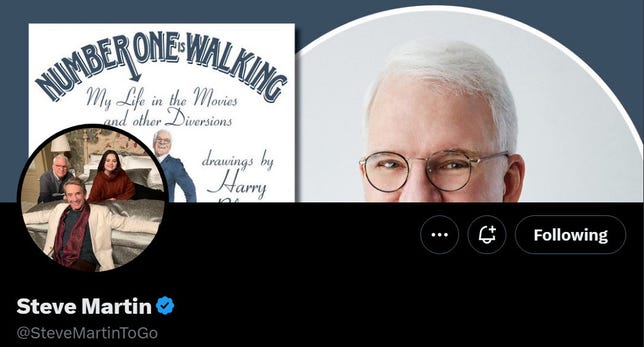
Actor, comedian and musician Steve Martin has a blue check mark to indicate he has a legacy verified Twitter account or that he’s perhaps also subscribed to Twitter Blue.
Screenshot by Amanda Kooser/CNETThe blue mark now comes with this message: «This account is verified because it’s subscribed to Twitter Blue or is a legacy verified account.»
Let’s tackle the first part of that. Twitter Blue subscribers pay $8 per month on the web or $11 on iOS and Android to get a check mark along with access to additional features like the ability to edit tweets within a 30-minute window and share longer tweets up to 4,000 characters. The higher in-app price offsets the app store commissions, so you can save money by subscribing directly through the Twitter site. Anyone who pays the fee and meets the eligibility requirements (including a confirmed phone number and active status) can have a Twitter Blue check mark.
Many well-known Twitter users spoke up against the new system, including basketball star LeBron James, who declared last week, «I ain’t paying.»
But James still has his blue check mark. Turns out Twitter decided not to take the legacy check marks away from most accounts, even if they don’t pay. To add to the turmoil of introducing the new system, Twitter removed the verified check mark from the main New York Times account as Musk referred to the news outlet as «propaganda» and «unreadable.»
Legacy verified users were once considered «active, notable, and authentic accounts of public interest.» Now it isn’t necessarily easy to determine if an account is a legacy or a Twitter Blue subscriber. That confusion may detract from the value of the blue check mark that was once a badge of authenticity.
Twitter no longer has a media relations team that could help us sort through these issues.
Gold check mark

Coca-Cola features a gold check mark and square avatar on Twitter.
Screenshot by Amanda Kooser/CNETYes, it looks yellow, but Twitter calls the color «gold.» These marks are reserved for official business accounts that are signed up with the Twitter Verified Organizations program. Think of this as Twitter Blue on steroids for businesses and nonprofits.
Twitter Verified Organizations pay a $1,000-per-month subscription fee and are rewarded with a check mark, a square avatar, Twitter Blue features and the ability to add affiliate accounts, among other perks.
Gray check mark

The United Nations and other government and official organizations may sport a gray check mark on Twitter.
Screenshot by Amanda Kooser/CNETIt might look drab in comparison to the more colorful blue and gold marks, but the gray check mark is an important one to know. It primarily designates a government organization or official. US President Joe Biden’s account, for example, sports a gray check mark. The mark can also apply to multilateral organizations like the United Nations and the World Health Organization that encompass multiple countries.
At least gold and gray are easy to understand. Will the blue confusion continue or clear up? For Twitter users, this calls for extra scrutiny of where the information is coming from. Is that tweet from a previously verified account or some random Twitter Blue subscriber? As with most things on the internet, it pays to stay on your toes and check your sources.
Technologies
Verum Messenger Introduces Built-In Verum Chess
Verum Messenger Introduces Built-In Verum Chess

Verum Messenger has released a new update for iOS, iPadOS, and macOS, adding another feature to its growing ecosystem — Verum Chess. Users can now play chess directly inside the messenger without switching between different applications.
The new feature allows users to start a game in just a few taps while reinforcing Verum’s vision of a unified digital environment where communication and everyday services come together in a single platform.
Verum Messenger continues to evolve into a multifunctional ecosystem that combines secure chats and calls, AI tools, a built-in VPN, anonymous email, eSIM, financial services, cryptocurrency features, and offline communication. With the introduction of Verum Chess, the platform now also offers a new way for users to interact and spend time together without leaving the app.
The update is now available for iPhone, iPad, and Mac on the App Store.
Technologies
Episode 3 of the VERUM AI Mini-Series Is Now Available
Episode 3 of the VERUM AI Mini-Series Is Now Available

Verum Messenger has released the third episode of its AI mini-series, SHADOWS, created using Verum AI.
The new episode, titled «Ghost Money,» continues the story of the conflict between a team of heroes and the Omega corporation, which seeks to take control of digital communications. This time, the focus shifts to anonymous payments and financial freedom, revealing how privacy can extend beyond messaging.
Like the previous episodes, the new release not only advances the storyline but also showcases the capabilities of the Verum ecosystem, highlighting technologies designed for secure communication and digital privacy.
The mini-series consists of seven episodes, released gradually across Verum Messenger’s social media channels.
Episode 3 is now available. Stay tuned for the next chapter.
Technologies
Verum Finance Now Available for Mac, Expanding the Verum Ecosystem on Desktop
Verum Finance Now Available for Mac, Expanding the Verum Ecosystem on Desktop

Verum has officially released Verum Finance for macOS, bringing its financial platform to the Mac and expanding access to the Verum ecosystem across Apple’s devices. The launch allows users to manage their finances from desktop while enjoying the same secure and seamless experience available on iPhone and iPad.
The new Mac version includes the full range of Verum Finance features, including balance management, instant transfers to other Verum users, debit card management, Apple Pay support, asset exchange, and transaction history — all optimized for the macOS experience.
Verum Finance can be used as a standalone application or alongside Verum Messenger. Users who sign in with their Verum Messenger account automatically synchronize their balances, settings, and account data across devices, ensuring a consistent experience throughout the Verum ecosystem.
The macOS release further strengthens Verum’s vision of creating an integrated digital platform where communication and financial services work together. Verum Messenger, which is also available for Mac, complements the ecosystem with encrypted messaging, voice and video calls, VPN, eSIM, anonymous email, AI-powered tools, offline communication capabilities, and cryptocurrency features.
With both Verum Messenger and Verum Finance now available across iPhone, iPad, and Mac, users can access secure communication and financial services wherever they work.
Verum Finance for Mac is available now through the Mac App Store.
Verum Finance for macOS: https://apps.apple.com/us/app/verum-finance/id6774245148
Verum Finance: https://finance.verum.im
Verum Messenger: https://verum.im
-
 Technologies4 года ago
Tech Companies Need to Be Held Accountable for Security, Experts Say
-
 Technologies3 года ago
Best Handheld Game Console in 2023
-
 Technologies5 лет ago
Black Friday 2021: The best deals on TVs, headphones, kitchenware, and more
-
 Technologies3 года ago
Tighten Up Your VR Game With the Best Head Straps for Quest 2
-
 Technologies5 лет ago
Google to require vaccinations as Silicon Valley rethinks return-to-office policies
-
 Technologies5 лет ago
Verum, Wickr and Threema: next generation secured messengers
-
 Technologies4 года ago
The number of Сrypto Bank customers increased by 10% in five days
-
 Technologies5 лет ago
Olivia Harlan Dekker for Verum Messenger