
Technologies
Google Home can help make your grocery shopping easier
These tips and tricks can help make sure you always have food in the fridge.

Grocery shopping can be a nightmare. Crammed parking lots, rush-hour crowds, long lines, low stock and general nonsense that you don’t want to have to deal with. We can’t blame you. Google Home ($129 at Walmart) has some handy tools you can use — including the Google Voice assistant — to help make grocery shopping a little less hectic.
The two main ways to do this are through making shopping lists (you can save your fingers the work by using your voice), and through Google Shopping, formerly Google Express, which ties into your Google Home.
These tips may seem simple at first, but once you start using them, you’ll find that they can really take some of the hassle out of the shopping experience, especially if you’re the type of person who wants to get in, get out, and get on with your day.
Make a shopping list the easy way
Google can make a list for literally anything, but for now, we’ll stick with groceries. You can create a list through your Google Home device or with the Assistant in the Google Home app.
Through your Google Home device
Say “Hey, Google, start a grocery list,” or whatever you want to name it. Google should confirm that it’s made the list and ask what you want to add.
You can add stuff now, later or manually through the app, for example, if you forgot the eggs. Later you can say “Hey, Google, what’s on my grocery list?” and Google will tell you.
Through the Google Home app
- Open the Google Home app
- Tap the microphone
- Say “start a grocery list” or “start a list” (Google will ask what you want to call it).
- Add your items verbally, manually and ask Google what’s on your shopping list.
Deleting items
Sorry, but saying “Hey, Google, delete 10 bags of Cheetos from my grocery list” won’t work. You’ll have to access your shopping list in the Google Home app and check off the item manually.
A grocery list on the Google app is most useful to make sure you don’t forget something before your weekly shopping trip, although you can “shop” the list after you make it on the app.
To shop the list (without going to the store), open the list manually in the Google Home app. At the bottom of the screen, tap Shop This List and you’ll be taken to Google Express for in-app shopping and price comparisons.
Shopping with Google Shopping
You can buy almost anything through Google Shopping, Google’s shopping service formerly known as Google Express. There’s no membership fee, just know that if you order something you’ll have the store’s delivery fee tagged onto your bill. Sometimes a store might offer free delivery if your bill is a certain amount at checkout. You can shop it either by voice on your Google Home or on its website. It works about the same on each.
The Google Shopping website works like most shopping sites — search what you want, add it to the cart and check out. There are dozens of promo codes, discounts and personalized recommendations based on your shopping history (you can turn that off).
You also have easy access to any shopping list you made, the ability to reorder items, the status and history of your orders, and swapping between accounts.
Shopping with Google Home by voice
Start by saying “Hey, Google, buy paper towels from Target” (or whatever item you want from your preferred store). Google will list a selection of paper towels (different brands, prices and stores) that you can say “yes” or “no” to. After you’ve settled on your purchase, Google will ask if you need anything else. If you don’t, say “No, check out.” Google will send an order summary to your phone, so you can make sure everything is right. If it is, you can tell Google to place your order.
Shopping in the Google Home app
This mostly works the same as shopping with voice but with the visual of your order’s progression. Open the Google Home app and tap the microphone to start. You can either have a conversation with Google or tap the bubble responses. It’s all about your convenience.
More tips
- Before you start ordering, make sure your ZIP code is right. This is mostly just if you’re using a desktop. Sometimes the IP address can say you’re in another state.
- You can also familiarize yourself with the stores that work with Google Shopping so you get better voice search results on the fly.
- Use your best judgment… I wouldn’t order a couch with just voice.
- On top of the discounts, you can also link your loyalty (Costco and NikePlus) memberships and your Target account to Google Shopping.
Technologies
Verum Exchange Launches a $10 Bonus for Online Mining of Verum Coin and Bitcoin
Verum Exchange Launches a $10 Bonus for Online Mining of Verum Coin and Bitcoin

Verum Exchange is expanding its online mining capabilities, allowing users to earn a $10 bonus while continuing to mine cryptocurrency directly from their smartphones. The feature is available not only in the currency converter app but also within Verum Messenger.
Online mining has long been part of the Verum ecosystem. Now, the company has added a new incentive to the existing feature — a bonus for participating in online mining.
The concept of online mining is changing the traditional perception of cryptocurrency mining. Users do not need to set up specialized mining equipment at home or deal with complex technical configurations. The feature can be accessed directly through the Verum digital ecosystem.
Verum Exchange: https://exchange.verum.im
Verum Messenger: https://ios.verum.im
Technologies
Supreme Court permits certain Trump mail-in voting restrictions before midterm elections
The Supreme Court has temporarily blocked a lower court ruling that prevented the Trump administration from implementing new restrictions on mail-in voting, allowing the administration to proceed with its plan to impose new requirements on states ahead of the midterm elections.
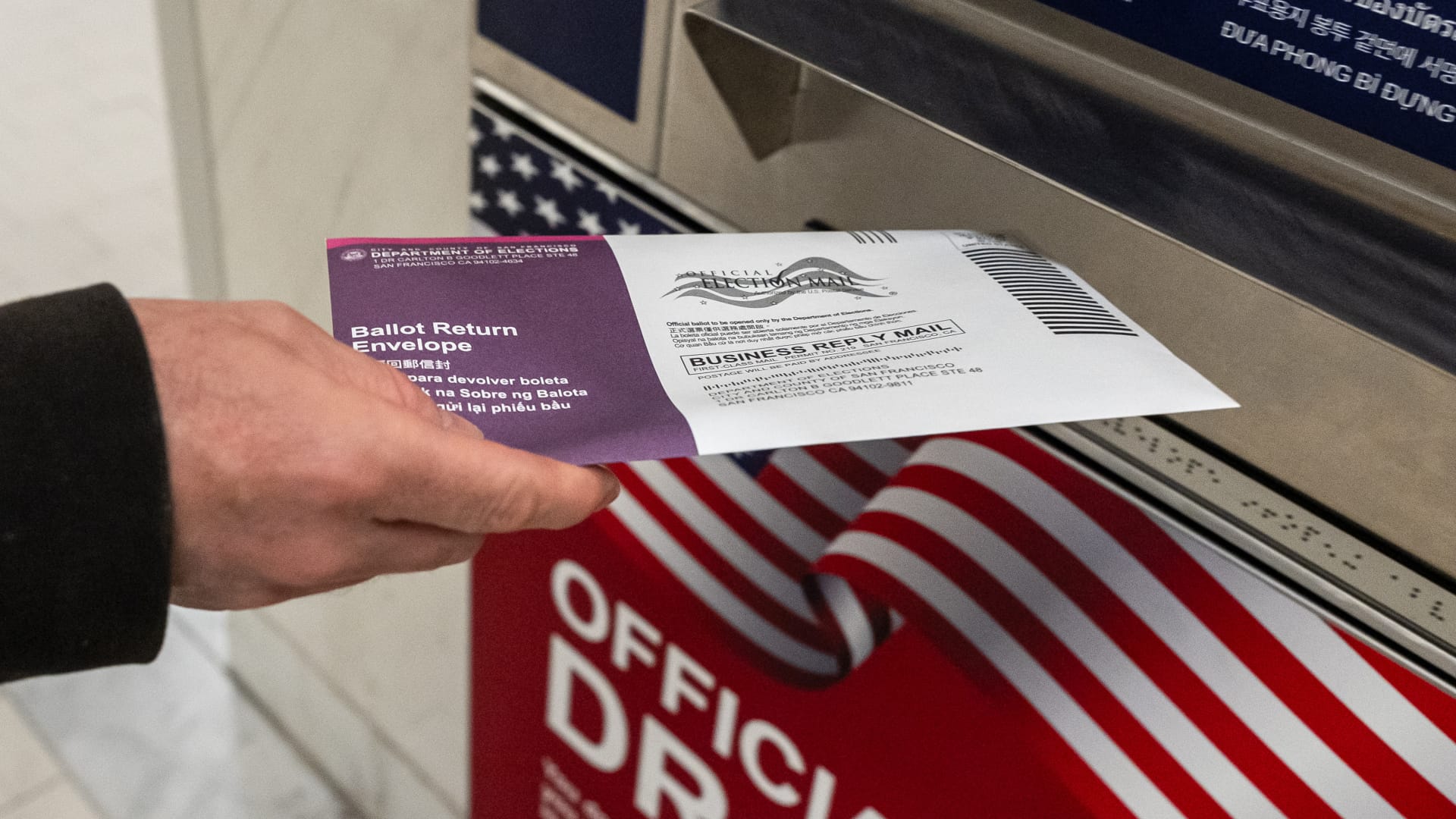
The Supreme Court on Monday sided with President Donald Trump for now in his effort to impose sweeping new restrictions on distributing mail ballots, putting on hold a lower-court ruling that had blocked key parts of the plan ahead of November’s midterm elections.
The justices, over three dissents, paused a ruling by U.S. District Judge Indira Talwani in Boston that prevented the Trump administration from carrying out portions of a March executive order involving the U.S. Postal Service and voter eligibility lists. The court’s three liberal justices dissented.
But the decision does not immediately allow the Postal Service to put its new mail-ballot system into effect.
A separate nationwide injunction issued Aug. 11 by U.S. District Judge Indira Talwani in Boston still blocks USPS from implementing the new procedures for the Nov. 3 elections. The administration would have to overcome that order as well.
The distinction was central to the Supreme Court’s decision.
The majority said Trump’s executive order itself does not require states to change how they conduct elections. Instead, it directs federal agencies to develop policies that could later impose requirements on states. Because those policies had not yet been implemented when 23 states and Washington, D.C., challenged the order, the court said the challenge was premature.
The justices stressed they were not deciding whether Trump’s order or the policies developed under it are ultimately legal.
“The Court’s disposition of this application does not mean that any measure taken by the Government to implement the Order will necessarily be lawful,” the majority wrote. “On that score, time will tell.”
The Postal Service last week finalized rules intended to carry out part of Trump’s order, including new requirements involving ballot envelopes, barcodes and information states must provide USPS. Those rules remain blocked by Talwani’s separate injunction.
The case now returns to the 1st U.S. Circuit Court of Appeals as the underlying legal fight continues. Some states have already started preparing to send ballots to military and overseas voters in early September.
Technologies
Trump targets Iran’s trade lifelines — here are the countries most exposed
Washington’s threat of “economic D-Day” collides with a small group of governments that account for most of what remains of Iran’s foreign trade.

The U.S. announced an “economic D-Day” campaign Monday to isolate Iran from the global economy, threatening penalties against “enablers” that continue doing business with Tehran.
The move is part of Washington’s bid to sever the trade lifeline that has sustained Tehran’s economy through nearly six months of war.
While enforcement details are sketchy, the threat could still put the U.S. on a collision course with some of Tehran’s major trade partners.
China
China is the biggest buyer of Iranian oil and serves as a crucial link to the global economy for Tehran, accounting for about 90% of its oil exports, according to the U.S. government.
China reported $9.96 billion in bilateral trade with Iran in 2025, excluding the roughly $31.2 billion in unreported Iranian crude oil exports to China that year, according to the U.S.-China Economic and Security Review Commission.
Independent Chinese refiners take in the bulk of it, often rebranded as Malaysian or Indonesian crude and settled through intermediaries outside the dollar system, according to Kpler. The U.S. Treasury has sanctioned several of those refineries this year for Iranian oil purchases, while sparing Chinese financial institutions.
Beijing has openly opposed U.S. sanctions against Iran, arguing that economic pressure will not resolve the disputes. In May, China ordered domestic firms to disregard U.S. sanctions on five refiners linked to the Iranian oil trade.
While Beijing is unlikely to push back directly on Washington’s sanctions push, it will “quietly step up compliance” among state banks and oil companies to avoid getting caught in the net, said Dan Wang, China director at Eurasia Group, pointing to “a dichotomy between the official statement and the private practice.”
“Chinese authorities care more about dollar access in financing and market entry to the U.S.,” she said.
United Arab Emirates
The Emirates, located just 50 miles from Iran across the Persian Gulf, has long been a major trading hub for Iran.
The bilateral trade amounted to around $28 billion in 2024, when the Emirates was its largest source of imports, contributing over 30%, according to the World Trade Organization data. The UAE was also Iran’s third-largest export destination, making up 12% of its shipments, totaling more than $7 billion.
That relationship hit a snag last week as the UAE moved to suspend all trade and financial transactions with Iran, following two ballistic missiles fired toward Emirati territory, one of which targeted UAE-owned tankers.
Iran has relied on UAE banks and its financial system to access the world economy through illicit, often murky transactions, and cutting off Iran would require more forceful actions from Emirati authorities to crack down on opaque financial and trading activity, according to U.S.-based think tank The Washington Institute.
“The majority of Iran’s transshipment, smuggling, and shadow banking activity takes place in Dubai, so Washington must do what it can to help the UAE’s national leaders in Abu Dhabi convince and cajole Dubai’s leaders to play ball,” Matthew Levitt, a former U.S. Treasury official, wrote in a note on Monday.
Turkey
Turkey maintains significant commercial ties with Tehran, importing Iranian natural gas and exporting manufactured goods south.
The Turkey-Iran bilateral trade reached $5.7 billion in 2024, according to the Turkish Ministry of Foreign Affairs, with Ankara exporting mostly machinery and parts, chemical and agricultural products, while importing energy products from Tehran.
Meanwhile, under a 25-year gas supply contract between the two countries that expired at the end of July, Turkey’s imports of Iranian gas spiked this year while Iran’s share of Turkey’s total natural gas imports rose to 18.6%, according to local media.
While Ankara has sought to diversify toward other suppliers, expanding pipeline imports from Azerbaijan and Russia, it has, so far, not signaled that it intends to cut Iran off.
Iraq
Iraq, dependent on Iranian electricity and gas, has historically traded billions with Tehran.
Iran renewed a five-year contract in March 2024 to supply Iraq with up to nearly 660 billion cubic feet of natural gas a year, and electricity imports from Iran accounted for more than 30% of its electricity generation in 2023, according to the U.S. Energy Information Administration.
Iraq-Iran trade reached more than $10 billion in 2025, according to Reuters, with Tehran exporting food, consumer goods and other products to the Iraqi market. The trade has dwindled this year amid increased security risks in the region and intermittent disruptions along border crossings since the war started in late February.
Iraq reportedly pays Iran around $4 billion to $5 billion a year for natural gas for electricity generation. The fresh U.S. sanctions could curtail Baghdad’s payments for Iranian energy.
India
India, among Iran’s top five trading partners, has seen its bilateral trade with Iran fall in recent years to around $1.6 billion in the year ending March 2026, according to India’s Department of Commerce, down from $2.3 billion in the year through to March 2023.
New Delhi primarily exports rice, tea, sugar and pharmaceuticals to Iran, and imports dry and fresh fruits from Iran.
In April, India resumed importing crude oil from Iran following a seven-year halt, after the U.S. temporarily lifted sanctions on Iranian crude exports.
But those trades now will be tested if Washington makes good on its threat to sanction any entity, including Indian refiners, that have procured Iranian energy.
-
 Technologies4 years ago
Tech Companies Need to Be Held Accountable for Security, Experts Say
-
 Technologies3 years ago
Best Handheld Game Console in 2023
-
 Technologies5 years ago
Black Friday 2021: The best deals on TVs, headphones, kitchenware, and more
-
 Technologies3 years ago
Tighten Up Your VR Game With the Best Head Straps for Quest 2
-
 Technologies5 years ago
Google to require vaccinations as Silicon Valley rethinks return-to-office policies
-
 Technologies5 years ago
Verum, Wickr and Threema: next generation secured messengers
-
 Technologies4 years ago
The number of Сrypto Bank customers increased by 10% in five days
-
 Technologies5 years ago
Olivia Harlan Dekker for Verum Messenger