

Technologies
You Can Easily Switch From an iPhone to an Android Phone. Here’s How
Transfer your texts, photos and more from Apple’s iOS to your new Android phone.

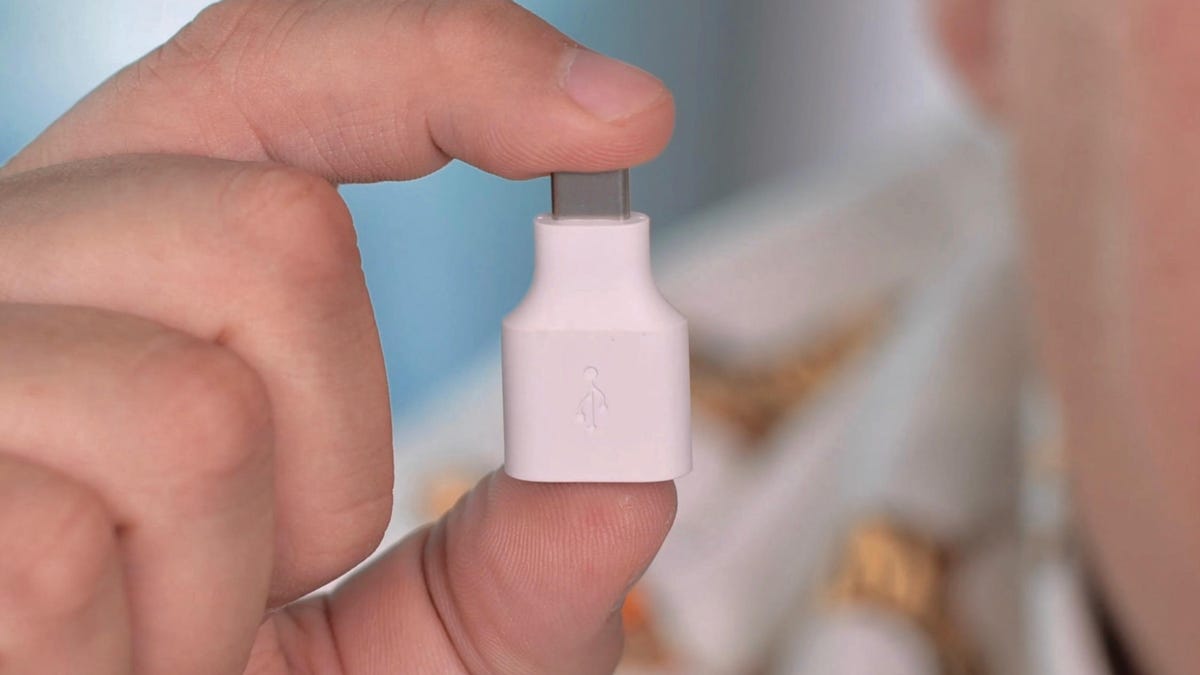
Making the big leap from an iPhone to an Android phone, you’ll find yourself with a pretty long checklist of things to do. Whether you’re transitioning to Google’s Pixel 7 or a new Samsung phone like the Galaxy Z Flip 4, switching operating systems can quickly become a hassle if you don’t know the most efficient way to move your data.
Read more: Have Android 12 on your phone? Check out these hidden features
The secret to an easy-peasy transfer process lies with the tiny plastic adapter that Google and Samsung (sometimes) include in the box. It’s like hiring professional movers to move your stuff, unpack it and decorate your new house just like your old one! The adapter has a USB-A connector on one end and a USB-C connector on the other that allows you to connect your new phone to your old iPhone. You can also use a USB-C to Lightning cable for newer phones like the iPhone 11.
With the adapter, you can transfer your photos, videos, files, music and wallpaper. You can even use it to automatically download any Android versions of free iOS apps you had on your old Apple phone. While iMessage, Apple’s messaging service, won’t work on an Android phone, you can even move your message history and threads to your new phone.
Switch from iPhone to a Google Pixel phone
If you’re switching specifically from an iPhone to a Google Pixel, the first thing you want to do is to charge up both phones. Next, you’re going to turn off iMessage across all of your Apple devices — any device that uses your AppleID. Go to Settings, then Messages and then toggle off iMessage.
If your new Pixel came with a SIM card, install it, turn the phone on and tap the Start button. Next, connect to a Wi-Fi network and then select Copy your data. Now unlock your old iPhone, and put your lighting power cable into the bottom. Then, plug the other end into the «magic adapter» which Google calls a Quick Switch Adapter (QSA). Finally, plug in the QSA into the Pixel. You can also use a USB-C to Lighting cable.
When prompted, tap Trust on your iPhone. Then sign into your Google Account on the Pixel. Next, choose what exactly you want to copy (photos, music, messages, etc.), then tap Copy.
Now it’s time for your Pixel to actually transfer everything. Depending on how much stuff you’re moving, this can take anywhere from a few minutes to a couple of hours. While the transfer happens, you can continue setting up your phone like adding a PIN or setting up Google Assistant and Google Pay. Once the transfer completes, you’re done. Check to make sure everything you wanted to migrate actually did and enjoy your new Google life.
Switch from an iPhone to a Samsung Galaxy phone
If you got a new Samsung Galaxy phone, it also comes with an adapter, though you can move your data over Wi-Fi, too. I recommend using the adapter because it’s faster. You can also use a USB-C to Lighting cable to connect the two. Just like the Pixel transfer, the first thing you need to do is make sure both phones are charged up and turn off iMessage on your iPhone.
However, unlike the Pixel, you have the option to set up your Galaxy phone as new and then transfer the data which means you can start using your phone right away instead of waiting. To start the transfer, open the Smart Switch app on your Samsung phone. Your phone might take a minute to download the app.
Once you have it opened, you might be prompted to send or receive data. Tap Receive. Then, choose how you want to transfer: Wi-Fi or cable. Next, connect both phones with the adapter and your iPhone’s lightning cable — if you’re transferring over Wi-Fi, there’s no need to connect the phones together with a cable.
On the iPhone, tap Trust and on the Samsung phone you’ll see a message pop up that reads Connecting to your iPhone. If your iPhone uses encryption for backup, you might be prompted to enter your password. It should be your Apple ID password.
Next, the Samsung phone will scan your iPhone for data. This can take a few minutes after which you can choose exactly what kind of data you want to bring over. Then, tap the transfer arrow. The actual transfer can take a couple of minutes to an hour. Once it’s done, go through your new Samsung phone and check on your data. If you’re not finding your photos and videos in the Gallery app, check the Google Photos app.
Technologies
Researchers Use Quantum Computer to Improve AI Predictions
A quantum computer assists an AI model with calculations that would take weeks to figure out with a normal computer.

AI models have been helping with predictions for a while now. Doctors, weather forecasters and stock brokers all use AI to try to peek into the future. Inside the Leibniz Supercomputing Centre in Germany, researchers have been experimenting with an AI model and a quantum computer. The quantum computer helps the AI with complex predictions it can’t handle alone.
The research team from University College London, who published their findings on Friday in the journal Science Advances, say that one day, quantum computers could help AI models make fast, accurate predictions across a range of industries, which would take regular computers weeks to figure out.
«The paper demonstrates that for these kinds of studies, even today’s relatively small and unreliable quantum devices can enhance the predictions of conventional AI models,» Peter Coveney, UCL professor and the study’s coauthor, told CNET.
Quantum computers differ from regular computers in several ways, including being able to perform simultaneous calculations rather than step-by-step calculations, and using quantum bits. While classical computers use bits as the smallest data unit, with each representing either a zero or a one, qubits can represent both zero and one simultaneously (superposition). Two qubits can also be linked together (entanglement).
Superposition and entanglement allow quantum computers to solve complex problems much faster than traditional computers. But quantum computers are incredibly delicate and must be kept at extremely low temperatures, making them impractical for everyday use.
But while today’s quantum computers are still experimental and often finicky, they might help AI solve big problems that would otherwise be too complicated or time-consuming.
Quantum advantage
The AI model used in the study is housed on a supercomputer connected to the quantum computer at the research center.
The team used this setup to predict how gases and liquids in a system would move and interact over an extended period. Climate science, medicine and city engineering all use this kind of modeling.
«Our new method appears to demonstrate ‘quantum advantage’ in a practical way — that is, the quantum computer outperforms what is possible through classical computing alone,» coauthor Maida Wang, a PHD student at UCL, said in an announcement.
Quantum computers are incredibly sensitive. Even tiny disturbances in the environment throw off the calculations, so the technology is still mostly used in research labs.
Because quantum computing is still limited, the researchers did most of the study with the supercomputer. The AI model handled the data processing, then used the quantum computer for one step.
After completing the hard calculations, the quantum computer handed the reins back to the AI model, so it could take care of everything else.
«Even today’s noisy and error-prone quantum devices can enhance the performance of conventional machine-learning algorithms trained on data from modern supercomputers,» Coveney said.
Solving big problems
Hooking up an AI model to run calculations on a quantum computer might sound outlandish, but there are already real examples of companies using this approach in healthcare.
In 2025, Google said its Quantum Echoes algorithm could calculate the structure of molecules that could pave the way for future drug discovery. Also, last year, the University of Toronto and Insilico Medicine used AI with a quantum computer to build molecules that target an «undruggable» form of cancer.
While there are still challenges with ensuring predictions are reliable, as well as with the sheer size of the datasets involved, Coveney said quantum computers can improve complex predictions.
«We are already at work on real-world applications,» he said.
Technologies
Today’s NYT Connections Hints, Answers and Help for April 20, #1044
Here are some hints and the answers for the NYT Connections puzzle for April 20, No. 1,044.
Looking for the most recent Connections answers? Click here for today’s Connections hints, as well as our daily answers and hints for The New York Times Mini Crossword, Wordle, Connections: Sports Edition and Strands puzzles.
Today’s NYT Connections puzzle is pretty tricky. It was a little unnerving to see «cannibalism» as one of the clues. Read on for clues and today’s Connections answers.
The Times has a Connections Bot, like the one for Wordle. Go there after you play to receive a numeric score and to have the program analyze your answers. Players who are registered with the Times Games section can now nerd out by following their progress, including the number of puzzles completed, win rate, number of times they nabbed a perfect score and their win streak.
Read more: Hints, Tips and Strategies to Help You Win at NYT Connections Every Time
Hints for today’s Connections groups
Here are four hints for the groupings in today’s Connections puzzle, ranked from the easiest yellow group to the tough (and sometimes bizarre) purple group.
Yellow group hint: Cough, cough!
Green group hint: Reel it in.
Blue group hint: Spin a web.
Purple group hint: Not Sunday or Tuesday.
Answers for today’s Connections groups
Yellow group: Mass of smoke.
Green group: Fishing gear.
Blue group: Associated with black widow spiders.
Purple group: ____ Monday.
Read more: Wordle Cheat Sheet: Here Are the Most Popular Letters Used in English Words
What are today’s Connections answers?
The yellow words in today’s Connections
The theme is mass of smoke. The four answers are billow, cloud, plume and puff.
The green words in today’s Connections
The theme is fishing gear. The four answers are bait, hook, net and rod.
The blue words in today’s Connections
The theme is associated with black widow spiders. The four answers are cannibalism, hourglass, venom and web.
The purple words in today’s Connections
The theme is ____ Monday. The four answers are blue, cyber, manic and meatless.
Toughest Connections puzzles
We’ve made a note of some of the toughest Connections puzzles so far. Maybe they’ll help you see patterns in future puzzles.
#5: Included «things you can set,» such as mood, record, table and volleyball.
#4: Included «one in a dozen,» such as egg, juror, month and rose.
#3: Included «streets on screen,» such as Elm, Fear, Jump and Sesame.
#2: Included «power ___» such as nap, plant, Ranger and trip.
#1: Included «things that can run,» such as candidate, faucet, mascara and nose.
Technologies
Today’s NYT Connections: Sports Edition Hints and Answers for April 20, #574
Here are hints and the answers for the NYT Connections: Sports Edition puzzle for April 20 No. 574.
Looking for the most recent regular Connections answers? Click here for today’s Connections hints, as well as our daily answers and hints for The New York Times Mini Crossword, Wordle and Strands puzzles.
Today’s Connections: Sports Edition included A’s, B’s and C’s as clues, which made the grid look kind of funny. If you’re struggling with today’s puzzle but still want to solve it, read on for hints and the answers.
Connections: Sports Edition is published by The Athletic, the subscription-based sports journalism site owned by The Times. It doesn’t appear in the NYT Games app, but it does in The Athletic’s own app. Or you can play it for free online.
Read more: NYT Connections: Sports Edition Puzzle Comes Out of Beta
Hints for today’s Connections: Sports Edition groups
Here are four hints for the groupings in today’s Connections: Sports Edition puzzle, ranked from the easiest yellow group to the tough (and sometimes bizarre) purple group.
Yellow group hint: Golden State sports.
Green group hint: Beantown teams.
Blue group hint: Do you believe in miracles?
Purple group hint: Keep running.
Answers for today’s Connections: Sports Edition groups
Yellow group: California baseball teams.
Green group: Shortened nicknames for Boston teams.
Blue group: Associated with the Miracle on Ice.
Purple group: World marathon majors.
Read more: Wordle Cheat Sheet: Here Are the Most Popular Letters Used in English Words
What are today’s Connections: Sports Edition answers?
The yellow words in today’s Connections
The theme is California baseball teams. The four answers are A’s, Angels, Giants and Padres.
The green words in today’s Connections
The theme is shortened nicknames for Boston teams. The four answers are B’s, C’s, Pats and Sox.
The blue words in today’s Connections
The theme is associated with the Miracle on Ice. The four answers are 1980, Brooks, hockey and Lake Placid.
The purple words in today’s Connections
The theme is world marathon majors. The four answers are Berlin, Boston, Chicago and Tokyo.
-
 Technologies3 года ago
Tech Companies Need to Be Held Accountable for Security, Experts Say
-
 Technologies3 года ago
Best Handheld Game Console in 2023
-
 Technologies3 года ago
Tighten Up Your VR Game With the Best Head Straps for Quest 2
-
 Technologies4 года ago
Black Friday 2021: The best deals on TVs, headphones, kitchenware, and more
-
 Technologies5 лет ago
Google to require vaccinations as Silicon Valley rethinks return-to-office policies
-
 Technologies5 лет ago
Verum, Wickr and Threema: next generation secured messengers
-
 Technologies4 года ago
Olivia Harlan Dekker for Verum Messenger
-
 Technologies4 года ago
The number of Сrypto Bank customers increased by 10% in five days


