

Technologies
Do Not Disturb vs. Silent Mode on iPhone: Here’s the Difference
Here’s how — and when — to turn on each setting.

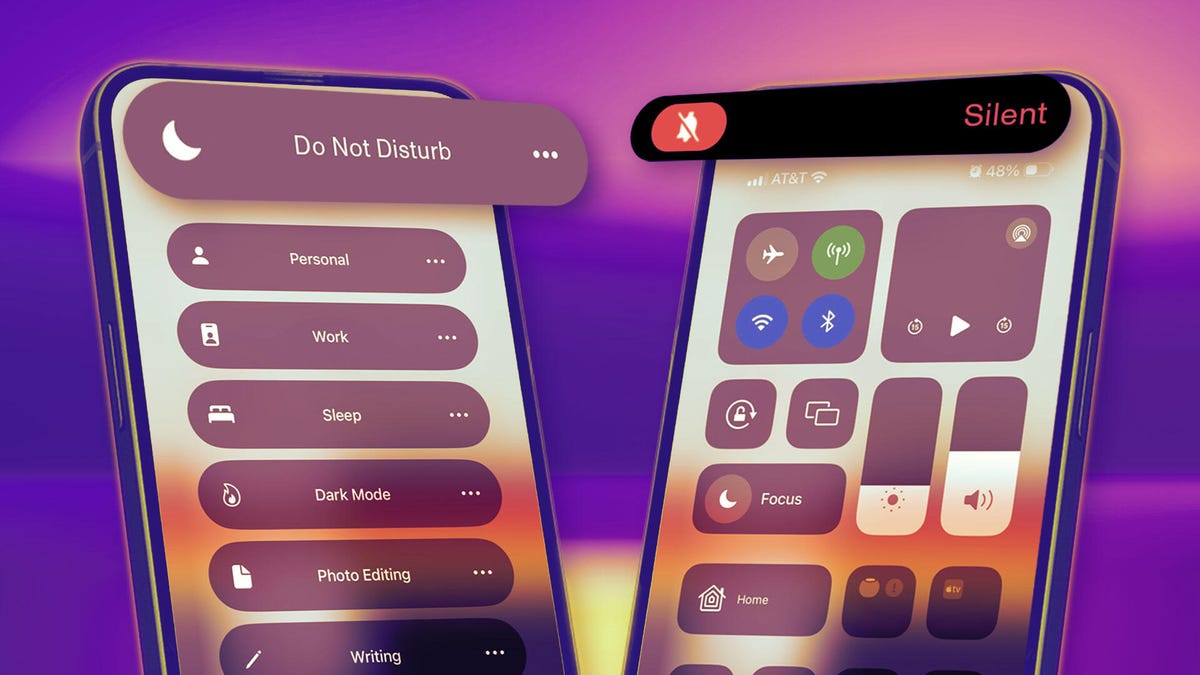
There are plenty of reasons you may want to temporarily mute notifications on your iPhone, like if you’re in an important meeting or just need a screen time break. You have two easy ways to go about this on iOS: Silent mode and Do Not Disturb.
Here’s the difference between each setting and when it may be best to choose one over the other.
Silent mode
The go-to method for silencing your phone is typically the switch above the volume buttons on the left side of your device.
Depending on your iPhone model, you can either hold down the Action button (on the iPhone 15 or later) or switch the toggle (iPhone 14 or older) to silence any pings or incoming phone calls. If you have a phone with Dynamic Island, you’ll see text at the top of your phone indicating you’ve turned on Silent mode. Otherwise, a confirmation pop-up will appear on your screen.
If you have an Action button, hold it down until you feel haptic feedback. (You can also customize the Action button for other commands, like launching your camera or recording audio.)
While the ring/silent switch mutes all alerts and notifications (along with sound effects and game audio), your iPhone may still vibrate when you receive a call. And your screen will light up with the arrival of a phone call or text. You can stop your iPhone from buzzing when in silent mode by going to Settings > Accessibility > Touch, then hitting the toggle next to Vibration to turn it off. (Note that this also disables vibrations for earthquake, tsunami and other emergency alerts.) But you can’t stop the screen from lighting up, which brings us to our next section.
Do Not Disturb
When Do Not Disturb is enabled, your iPhone will stay silent and with its screen off, though there are some exceptions and customizations you should know about.
But first, let’s go over the two ways to enable Do Not Disturb. The easiest way is to pull up your phone’s Control Center — swipe down from the upper-right corner of the screen if you have an iPhone X or newer, or up from the bottom edge of the screen on an iPhone SE and iPhone 8 or earlier. Then tap the crescent moon button to turn on Focus mode. You can also go to Settings > Focus > Do Not Disturb.
The great thing about Focus modes is that you can customize them for different purposes and times of day. Want to block TikTok and Instagram notifications while you’re at work to avoid distractions? You can set that up in a Work focus mode so you’re getting only critical notifications from work-related apps. Want to make sure you’re receiving only calls from family members when your Personal Focus mode is on? You can customize that, too. The Sleep focus mode is great for automatically silencing all notifications to prep for bedtime so you’re not tempted to look at your screen.
Within the Do Not Disturb settings, you can also click on People to customize who you allow calls from: Everybody, Allowed People Only (which you select), Favorites or Contacts Only. You can also hit the toggle next to Allow Repeated Calls. This will ring your device if the same person calls again within 3 minutes, so you don’t miss any potential emergencies.
When to choose Silent mode vs. Do Not Disturb
The key distinguishing factor between Silent mode and Do Not Disturb is just how silent you want your phone to be. If you want to mute notifications, calls and texts, but still see them rolling in, turning on Silent mode is probably your best bet. But if you want to fully block all pings and stop your phone’s screen from lighting up for a while, then you’ll want to opt for Do Not Disturb.
If you generally keep your iPhone out and about — in your hand, on your lap, on a table or desk — then Do Not Disturb is the better option so that your screen suddenly lighting up doesn’t distract other moviegoers, your classmates (or more to the point, your teacher or professor) or those around you at a religious service, for instance. It’s also just a great way to avoid the temptation of picking up your phone each time a notification comes in.
Technologies
Roblox Will Pay $12 Million to Settle Nevada Child Safety Lawsuit
The deal with the Nevada attorney general will require Roblox to have stricter safeguards to protect children online.

Popular gaming platform Roblox agreed to pay more than $12 million and implement new safety features as part of a settlement with the state of Nevada. This settlement comes amid several lawsuits accusing the company of an alleged lack of protection of children on the platform.
The agreement resolves potential litigation over allegations that Roblox failed to adequately safeguard children while they played the online game, Nevada Attorney General Aaron Ford said in a press release on Wednesday.
As part of the deal, Roblox will spend $10 million over three years to encourage children to engage in non-digital activities, as well as institute age verification for all users. This will include «facial age estimation technology and government-issued ID for age assurance, and will use behavioral monitoring to identify users who may have been aged incorrectly,» according to the press release.
«The injunctive relief that Roblox has agreed to will give parents the tools they need to protect their children on the platform; institute default protections to block predators from engaging with children; and ensure that messages involving minors are not encrypted,» Ford said in the press release.
Roblox also committed to spending $1 million over two years on a campaign to educate minors and adults about online safety and another $1.5 million to develop a law enforcement liaison position to work with state law enforcement agencies over concerns about the platform.
Roblox Chief Safety Officer Matt Kaufman said it’s part of the company’s «work to establish a new standard for digital safety.»
«This resolution creates a blueprint for how industry and regulators can work together to protect the next generation of digital citizens,» Kaufman said Thursday. «We have no finish line when it comes to safety.»
Roblox is under significant legal pressure amid more than 140 lawsuits, according to Reuters. The suits, filed in 2025, allege the company knowingly created a gaming platform that allowed child predators to target minors.
The company also faces lawsuits from state attorneys general in Texas, Kentucky, Louisiana, Iowa, Nebraska, Tennessee and Florida over similar accusations.
Age-based accounts coming soon
Two days before the settlement announcement, Roblox CEO and founder David Baszucki revealed new accounts for younger Roblox users.
Roblox Kids will be available for children between the ages of 5 and 8, and Roblox Select is for those ages 9 to 15. Roblox is reportedly used by nearly half of US children under 16. Children who are older than 16 will be in their own age group, simply called «Roblox.»
Kids and Select accounts would be available in those age groups as determined by Roblox’s age-check technology or by a verified parent.
Unmonitored chat in the game has been a point of criticism for the platform, as it allows predators to chat with children. Kids’ accounts will have chat turned off by default, with limited access to Minimal or Mild games as determined by the platform. Select accounts will have chat with safeguards and access to games with Moderate content, which is described by the platforms as having «moderate violence, light realistic blood, moderate crude humor, unplayable gambling content, and/or moderate fear.»
These new age-based accounts will roll out sometime in early June.
Technologies
Opera Adds Browser Connector Feature to Integrate AI Chatbots Into Browsers
New feature will allow users to include the AI tools of their choice.
Opera announced Thursday the launch of a new tool that allows users of its browsers to include more AI chatbots in their browsing experience.
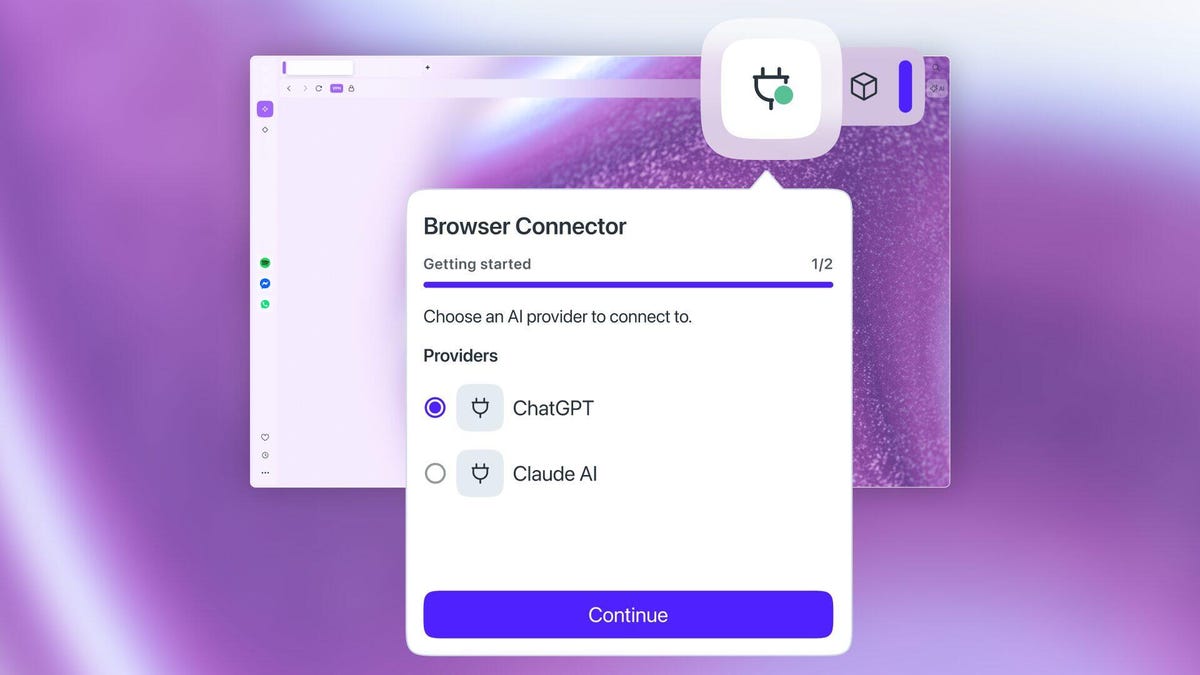
Browser Connector is a free feature for Opera One and Opera GX browsers that allows users to integrate AI tools such as OpenAI’s ChatGPT and Anthropic’s Claude into their live browsing sessions via Model Context Protocol. MCP is an open standard developed by Anthropic that allows for a secure two-way connection between AI models, external data sources and tools such as search engines.
(Disclosure: Ziff Davis, CNET’s parent company, in 2025 filed a lawsuit against OpenAI, alleging it infringed Ziff Davis copyrights in training and operating its AI systems.)
Last month, Opera introduced MCP compatibility to Opera Neon, its subscription-based agentic AI browser. Opera says the new feature willallow a user’s AI of choice to provide real-time context of open tabs and active content.
«With Browser Connector, Opera ensures users aren’t bound to a single company’s ecosystem, but are instead free to combine the best tools for their specific needs,» Mohamed Salah, senior director of product at Opera, said in a statement.
To enable the feature, which is now available in Early Bird mode, users need to go to Settings in the browser, search for «AI Services» and install the Browser Connector feature. They then have to connect ChatGPT or Claude to the feature.
Technologies
Today’s NYT Connections: Sports Edition Hints and Answers for April 17, #571
Here are hints and the answers for the NYT Connections: Sports Edition puzzle for April 17 No. 571.
Looking for the most recent regular Connections answers? Click here for today’s Connections hints, as well as our daily answers and hints for The New York Times Mini Crossword, Wordle and Strands puzzles.
Today’s Connections: Sports Edition is a tricky one, especially the purple category. If you’re struggling with today’s puzzle but still want to solve it, read on for hints and the answers.
Connections: Sports Edition is published by The Athletic, the subscription-based sports journalism site owned by The Times. It doesn’t appear in the NYT Games app, but it does in The Athletic’s own app. Or you can play it for free online.
Read more: NYT Connections: Sports Edition Puzzle Comes Out of Beta
Hints for today’s Connections: Sports Edition groups
Here are four hints for the groupings in today’s Connections: Sports Edition puzzle, ranked from the easiest yellow group to the tough (and sometimes bizarre) purple group.
Yellow group hint: «Yer out!»
Green group hint: They score goals.
Blue group hint: Daddy dearest.
Purple group hint: Home, home on the…
Answers for today’s Connections: Sports Edition groups
Yellow group: Things an umpire calls.
Green group: An attacking player in soccer.
Blue group: MLB father-son duos.
Purple group: ____ range.
Read more: Wordle Cheat Sheet: Here Are the Most Popular Letters Used in English Words
What are today’s Connections: Sports Edition answers?
The yellow words in today’s Connections
The theme is things an umpire calls. The four answers are ball, out, safe and strike.
The green words in today’s Connections
The theme is an attacking player in soccer. The four answers are forward, No. 9, striker and target man.
The blue words in today’s Connections
The theme is MLB father-son duos. The four answers are Alou, Bonds, Fielder and Griffey.
The purple words in today’s Connections
The theme is ____ range. The four answers are 3-point, driving, long and mid.
-
 Technologies3 года ago
Tech Companies Need to Be Held Accountable for Security, Experts Say
-
 Technologies3 года ago
Best Handheld Game Console in 2023
-
 Technologies3 года ago
Tighten Up Your VR Game With the Best Head Straps for Quest 2
-
 Technologies4 года ago
Black Friday 2021: The best deals on TVs, headphones, kitchenware, and more
-
 Technologies5 лет ago
Google to require vaccinations as Silicon Valley rethinks return-to-office policies
-
 Technologies5 лет ago
Verum, Wickr and Threema: next generation secured messengers
-
 Technologies4 года ago
Olivia Harlan Dekker for Verum Messenger
-
 Technologies4 года ago
The number of Сrypto Bank customers increased by 10% in five days


