

Technologies
GameStop Designates Xbox 360, PlayStation 3 and Wii U as Retro Consoles
The retailer also announced a limited-time trade-in bonus on the consoles and other older gaming equipment.


The consoles you grew up with are now officially retro. GameStop, the world’s largest brick-and-mortar video game retailer, announced Monday that it’s labelling multiple seventh- and eighth-generation home gaming consoles as «retro consoles.»
The Xbox 360, released in 2005; the PlayStation 3, released in 2006; and the Wii U, released in 2012, are now «historical artifacts» of the games industry, according to the retailer.
It’s hard to define the «retro» label in gaming circles. There’s a fierce debate over whether the transition from 2D to 3D graphics, the rise of online gaming or the adoption of digital audiovisual outputs should qualify consoles for the designation.
What matters most is that the definition of retro gaming is fluid, and GameStop has set forth its own criteria for redesignating these three home consoles.
«The ruling was reached following careful analysis of multiple indicators, including: the presence of component cables, the lack of Fortnite and the realization that [these consoles] launched when George W. Bush was still president,» the statement reads.
While that may feel like GameStop is reclassifying consoles based on vibes — the Wii U wasn’t even released during the Bush administration — there is at least some merit to these claims. The lack of component cables in newer consoles is proof enough that hardware has significantly evolved since the release of the reclassified consoles, and it has been a long time since they’ve been able to run any modern games (even something as ubiquitous as Fortnite). The Xbox 360 and PlayStation 3 are 20 years old. That’s about as «retro» as retro gets.
According to GameStop’s statement, it reclassified these consoles under its «Retro Classification Standard,» with the hardware joining the Sega Saturn and the Nintendo DS in the retro category.
A representative for GameStop did not immediately respond to a request for comment.
GameStop began a limited-time trade-in campaign for retro gaming equipment in accordance with the reclassification of these consoles.
Anyone who brings in an Xbox 360, PlayStation 3, Wii U or any console, game or gaming accessory that is older than the redesignated consoles will receive an additional 10% in trade-in credit. This offer ends on March 21.
The company also revised its retro console trade-in policy. Starting immediately, GameStop will accept defective retro consoles even if they are «non-operable, missing accessories or aesthetically unfortunate» as long as they can be powered on. This policy also applies to the Xbox 360, PlayStation 3 and Wii U home consoles.
Technologies
TSA Staffing Shortages Are Causing a Mess at Airport Security Lines. How to Mitigate the Wait
Airport security professionals just missed their first paychecks due to the ongoing partial US government shutdown.
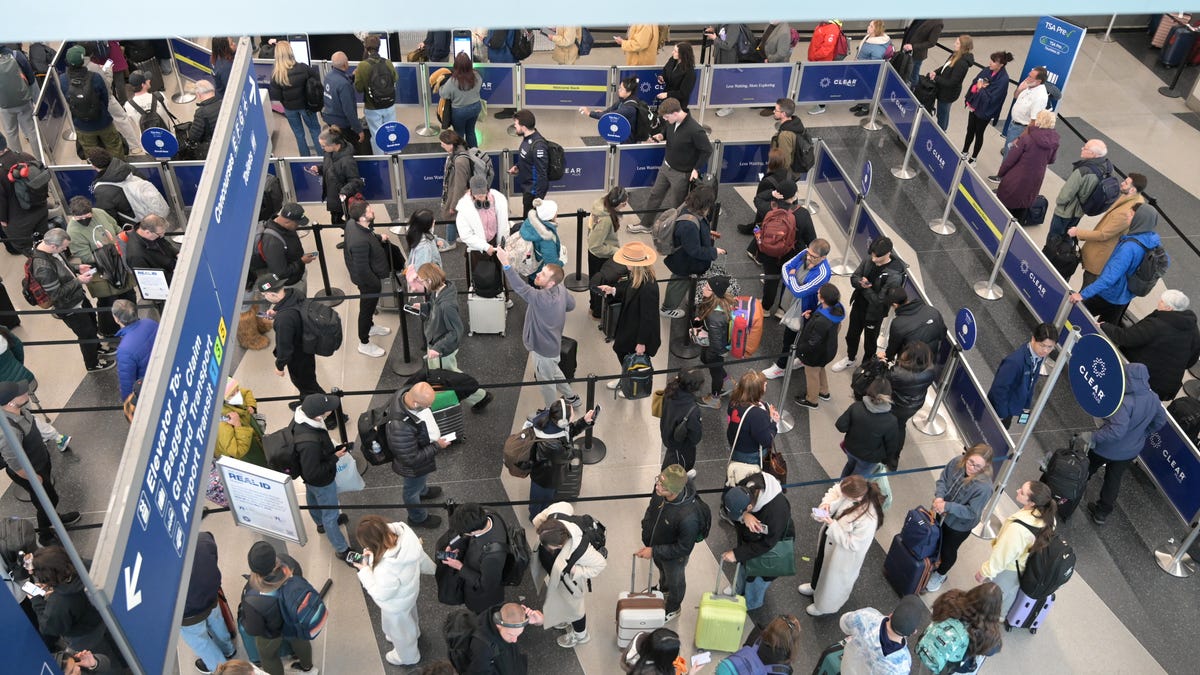
This past weekend, employees of the Transportation Security Administration missed their first full paycheck due to the partial government shutdown. Not surprisingly, many of those security officers have quit or stopped showing up for work, leading to airport staffing shortages.
The loss of TSA officers and a new batch of extreme weather in the Midwest and East Coast are creating havoc at airports across the US. Some travelers at Atlanta’s Hartfield-Jackson airport on Tuesday waited more than two hours in the security area before being allowed to travel to their gates, and Acting Deputy TSA Administrator Adam Stahl said that the government may need to shut down some airports completely.
Don’t be surprised when you get to the airport and see the security line trailing out into the parking lot. It’s easy to check security wait lines before you leave for the airport, so you know how long it will take you to get from check-in to your gate.
If you have spring break or other planned air travel coming soon, learn how you can check security line wait times so you can better plan your trip to the airport.
Check the official TSA app
The TSA maintains an app for mobile devices called MyTSA (iOS and Android) that lists security line wait times for airports around the US. The app is fairly basic and now includes a warning that «this website is not actively managed» due to the pause in federal funding, but it does include plenty of official TSA information about airline travel.
To check the wait times for specific US airports, tap the My Airports tab at the bottom of the app, then tap «Search Airports.» You can scroll through the alphabetical list of airports or type in an airport name or code in the search bar at the top.
Tap through to the airport of your choice, and you’ll see the current estimated security wait time at the top of the screen.
When I checked some of the major airports Tuesday afternoon — Los Angeles (LAX), Chicago O’Hare (ORD), Hartsfield-Jackson in Atlanta (ATL), JFK in New York (JFK) and Ronald Reagan in DC (DCA) — most had estimated relatively low wait times of 0 to 15 or 15 to 30 minutes (only JFK was 30-45 minutes).
Those estimates are a far cry from the two to four hours that airports are advising travelers to allow, but the times on the MyTSA app mostly matched the times listed on airport websites (see below). The only exception was Hartsfield-Jackson in Atlanta, which showed an estimate of 0-15 minutes on the MyTSA app, but slightly longer times on the airport website.
The MyTSA app also includes historical averages for each airport’s security line wait times by time of day.
Check your airport’s website
When I tested the TSA app, it didn’t list specific terminals at any of the airports. It only listed a time range for «All Terminals.»
If you want that sort of detailed information, your best bet is to use the official airport websites — most of the major ones now offer estimated security wait times. Some airports put those estimated times front and center on their websites; others require a little more exploration.
Most airport websites will break out the times for specific terminals. At some of the bigger airports, there’s often quite a disparity between the terminals.
Here are the web pages for estimated security wait lines for some of the most frequently traveled airports in the US:
- Hartsfield-Jackson Atlanta International Airport (ATL)
- Dallas Fort Worth International Airport (DFW)
- Denver International Airport (DEN)
- Los Angeles International Airport (LAX)
- John F. Kennedy International Airport (JFK) in New York
- Orlando International Airport (MCO)
- Charlotte Douglas International Airport (CLT)
- Miami International Airport (MIA)
I wasn’t able to find security line wait times on the websites for two of the busiest airports — O’Hare in Chicago and Harry Reid International Airport (LAS) in Las Vegas. For those, you’ll need to use the TSA app.
Save your spot in the security line
Numerous airports now allow travelers to reserve a specific time in the security line. At Seattle’s SeaTac Airport, you make a Spot Saver reservation and go to a specially marked entrance to the security checkpoint listed on your reservation. An employee scans the barcode you were emailed, and you’re ushered to the front. At SeaTac, you can be up to 15 minutes before or after your Spot Saver reservation, since airport timing is tough to estimate.
Here’s a list of some of those reservation sites. You can search for your airport name and «reserve security line spot» or something similar to see if your airport also has a program.
- Seattle-Tacoma International Airport (SEA): Spot Saver
- Minneapolis-St. Paul International Airport (MSP): MSP Reserve
- Denver International Airport (DEN): DEN Reserve
- Orlando International Airport (MCO): MCO Reserve
- Phoenix Sky Harbor International Airport (PHX): PHX Reserve
Technologies
Today’s NYT Strands Hints, Answers and Help for March 18 #745
Here are hints and answers for the NYT Strands puzzle for March 18, No. 745.
Looking for the most recent Strands answer? Click here for our daily Strands hints, as well as our daily answers and hints for The New York Times Mini Crossword, Wordle, Connections and Connections: Sports Edition puzzles.
Today’s NYT Strands puzzle is kind of bizarre. Even after I had found some of the answers, the theme didn’t click in my brain until I was almost done with the puzzle. And some of the answers are difficult to unscramble, so if you need hints and answers, read on.
I go into depth about the rules for Strands in this story.
If you’re looking for today’s Wordle, Connections and Mini Crossword answers, you can visit CNET’s NYT puzzle hints page.
Read more: NYT Connections Turns 1: These Are the 5 Toughest Puzzles So Far
Hint for today’s Strands puzzle
Today’s Strands theme is: It follows.
If that doesn’t help you, here’s a clue: Not death…
Clue words to unlock in-game hints
Your goal is to find hidden words that fit the puzzle’s theme. If you’re stuck, find any words you can. Every time you find three words of four letters or more, Strands will reveal one of the theme words. These are the words I used to get those hints but any words of four or more letters that you find will work:
- LEFT, COLE, HOLE, LACK, BILE, LEACH, SOLE, LOSE, LIFE, SEER, STEEL, STERN, FAIL
Answers for today’s Strands puzzle
These are the answers that tie into the theme. The goal of the puzzle is to find them all, including the spangram, a theme word that reaches from one side of the puzzle to the other. When you have all of them (I originally thought there were always eight but learned that the number can vary), every letter on the board will be used. Here are the nonspangram answers:
- COACH, HACK, BLOOD, CYCLE, STYLE, LESSON, PRESERVER. (All words that can follow the word «LIFE.»)
Today’s Strands spangram
Today’s Strands spangram is AFTERLIFE. To find it, start with the A that is the furthest-left letter on the top row, and wind down.
Technologies
Today’s NYT Connections: Sports Edition Hints and Answers for March 18, #541
Here are hints and the answers for the NYT Connections: Sports Edition puzzle for March 18, No. 541.
Looking for the most recent regular Connections answers? Click here for today’s Connections hints, as well as our daily answers and hints for The New York Times Mini Crossword, Wordle and Strands puzzles.
Today’s Connections: Sports Edition is fairly diverse. The topics are kind of all over the place — hope you know your movies, for one thing. If you’re struggling with today’s puzzle but still want to solve it, read on for hints and the answers.
Connections: Sports Edition is published by The Athletic, the subscription-based sports journalism site owned by The Times. It doesn’t appear in the NYT Games app, but it does in The Athletic’s own app. Or you can play it for free online.
Read more: NYT Connections: Sports Edition Puzzle Comes Out of Beta
Hints for today’s Connections: Sports Edition groups
Here are four hints for the groupings in today’s Connections: Sports Edition puzzle, ranked from the easiest yellow group to the tough (and sometimes bizarre) purple group.
Yellow group hint: Snowy season.
Green group hint: Fire it in there.
Blue group hint: Sports equipment.
Purple group hint: Cinema titles.
Answers for today’s Connections: Sports Edition groups
Yellow group: Winter sports.
Green group: Stat for a pitcher.
Blue group: Sports balls.
Purple group: Last words of boxing movies.
Read more: Wordle Cheat Sheet: Here Are the Most Popular Letters Used in English Words
What are today’s Connections: Sports Edition answers?
The yellow words in today’s Connections
The theme is winter sports. The four answers are curling, hockey, luge and skeleton.
The green words in today’s Connections
The theme is stat for a pitcher. The four answers are hold, quality start, save and win.
The blue words in today’s Connections
The theme is sports balls. The four answers are cue, golf, medicine and ping pong.
The purple words in today’s Connections
The theme is last words of boxing movies. The four answers are Baby (Million Dollar Baby), Balboa (Rocky Balboa), Bull (Raging Bull) and Fighter (The Fighter).
-
 Technologies3 года ago
Tech Companies Need to Be Held Accountable for Security, Experts Say
-
 Technologies3 года ago
Best Handheld Game Console in 2023
-
 Technologies3 года ago
Tighten Up Your VR Game With the Best Head Straps for Quest 2
-
 Technologies4 года ago
Black Friday 2021: The best deals on TVs, headphones, kitchenware, and more
-
 Technologies5 лет ago
Google to require vaccinations as Silicon Valley rethinks return-to-office policies
-
 Technologies5 лет ago
Verum, Wickr and Threema: next generation secured messengers
-
 Technologies4 года ago
Olivia Harlan Dekker for Verum Messenger
-
 Technologies5 лет ago
iPhone 13 event: How to watch Apple’s big announcement tomorrow


