

Technologies
Today’s NYT Connections Hints, Answers and Help for Feb. 28, #993
Here are some hints and the answers for the NYT Connections puzzle for Feb. 28 #993

Looking for the most recent Connections answers? Click here for today’s Connections hints, as well as our daily answers and hints for The New York Times Mini Crossword, Wordle, Connections: Sports Edition and Strands puzzles.
Today’s NYT Connections puzzle is pretty tricky. Both the blue and the purple categories really require you to look for hidden connections. Read on for clues and today’s Connections answers.
The Times has a Connections Bot, like the one for Wordle. Go there after you play to receive a numeric score and to have the program analyze your answers. Players who are registered with the Times Games section can now nerd out by following their progress, including the number of puzzles completed, win rate, number of times they nabbed a perfect score and their win streak.
Read more: Hints, Tips and Strategies to Help You Win at NYT Connections Every Time
Hints for today’s Connections groups
Here are four hints for the groupings in today’s Connections puzzle, ranked from the easiest yellow group to the tough (and sometimes bizarre) purple group.
Yellow group hint: When you really want something.
Green group hint: Flight attendants also.
Blue group hint: What’s your name?
Purple group hint: Stars and space.
Answers for today’s Connections groups
Yellow group: Craving.
Green group: Jobs that involve traveling.
Blue group: Name homophones.
Purple group: Astronomical terms plus a letter.
Read more: Wordle Cheat Sheet: Here Are the Most Popular Letters Used in English Words
What are today’s Connections answers?
The yellow words in today’s Connections
The theme is craving. The four answers are desire, itch, thirst and urge.
The green words in today’s Connections
The theme is jobs that involve traveling. The four answers are cruise director, pilot, roadie and salesman.
The blue words in today’s Connections
The theme is name homophones. The four answers are earnest, kneel, rustle and tailor.
The purple words in today’s Connections
The theme is astronomical terms plus a letter. The four answers are cometh (comet), Novak (nova), start (star) and sung (sun).
Toughest Connections puzzles
We’ve made a note of some of the toughest Connections puzzles so far. Maybe they’ll help you see patterns in future puzzles.
#5: Included «things you can set,» such as mood, record, table and volleyball.
#4: Included «one in a dozen,» such as egg, juror, month and rose.
#3: Included «streets on screen,» such as Elm, Fear, Jump and Sesame.
#2: Included «power ___» such as nap, plant, Ranger and trip.
#1: Included «things that can run,» such as candidate, faucet, mascara and nose.
Technologies
Little Caesars Wants ChatGPT to Order Your Pizza for You
You can personalize your pie and place your order without leaving the chatbot.
When it comes to building the perfect pizza, you need perfectly structured crust, quality cheese, well-seasoned sauce and fresh, delicious toppings. Oh, and artificial intelligence, naturally.
Or at least that’s what Little Caesars is saying.
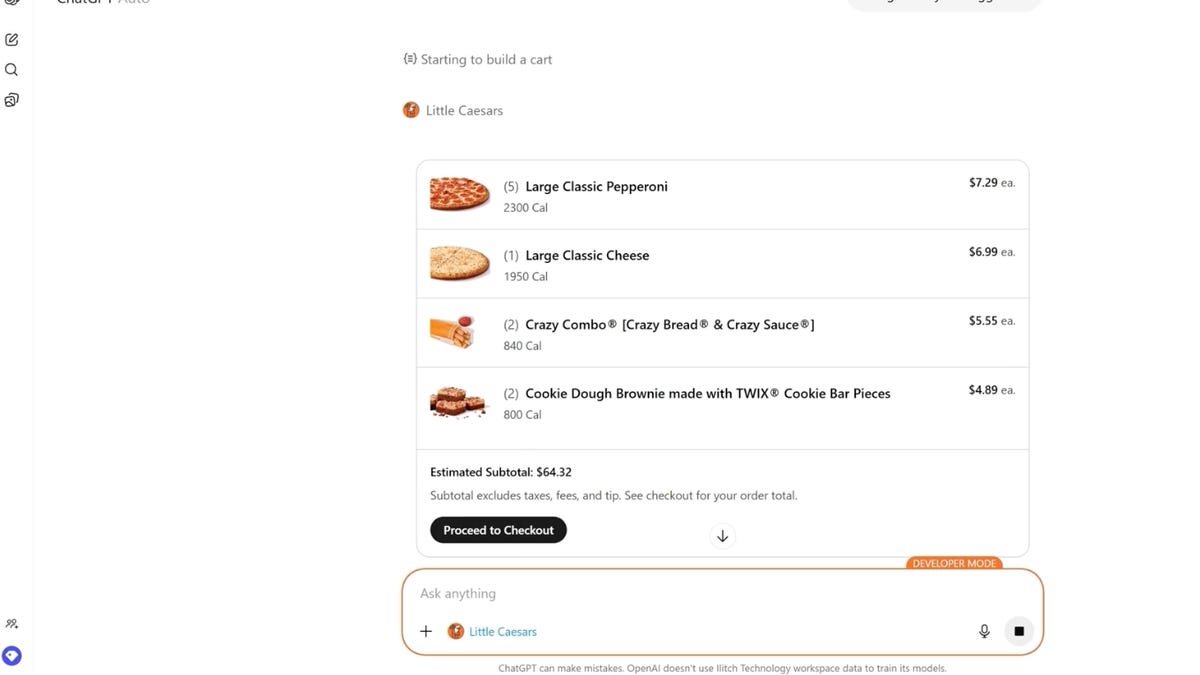
Starting today, you can order Little Caesars through a new app inside ChatGPT. OpenAI’s chatbot can customize and order pizzas, or you can use ChatGPT to receive recommendations based on your budget, preferences, dietary restrictions or the number of people you need to serve.
«Today’s consumers are turning to Gen AI as part of how they search for everything, including where to get their next meal,» Greg Hamilton, chief marketing officer at Little Caesars, said in a statement. «We recognize this shift and want to meet our customers where they already are and be the go-to for their pizza occasions. The process is as natural and intuitive as having a conversation. It’s not just about technology for technology’s sake — it’s about making life a little easier for people who love great pizza.»
Read also: I Had ChatGPT Order Me a Pizza. This Could Change Everything
How ordering a pizza with ChatGPT works
To get started, you’ll need to launch ChatGPT on your desktop or mobile device. On the ChatGPT interface, go to the Apps menu and select Little Caesars. You will need to connect your accounts by signing into your Little Caesars account or creating one. From there, you can get started with ordering.
You can simply type in something like, «Pizzas for five people with no meat,» and you’ll get personalized recommendations for pizzas and sides that match your preferences. From there, you can tailor your order further by swapping toppings, adjusting amounts or adding an order of cookie dough brownies.
Once you review your order, you can checkout through the Little Caesars app and then your order will go to the nearest location for you to pick up when ready. You can also schedule an order ahead of time and track your order in real-time through the app.
The new ordering function is now available across all Little Caesars locations in the US, and many locations in Mexico and Canada.
Not interested in using AI? The Little Caesars app and website are still available, or you can always pick up the phone and call.
Technologies
Don’t Lose Your Texts: How to Move Away From Samsung Messages Before It Shuts Down
Samsung is deactivating its long-standing Messages app in July. Here’s what to do next.

Samsung is closing the book on its proprietary texting platform this summer. After years of slowly phasing out the software in favor of a more unified experience, the company is finally pulling the plug on its Messages app this July. While many Galaxy owners have already been using Google’s version for years, those holding onto the legacy interface now have a firm deadline to migrate their conversations before the service goes dark.
On a page with information about the switch, Samsung points to instructions on how to swap over to Google’s Messages app, including for phones that are still on Android 12 and Android 13. Samsung has historically preinstalled its own Messages app on Galaxy phones, but began transitioning toward Google Messages as early as 2021.
To encourage people to switch to Google Messages, Samsung’s instructions list new features offered by Google Messages, like RCS-enabled texting for features like typing indicators, easier group chats and sending higher-quality images. Google’s Messages app also has AI-powered spam detection and spam filters, multi-device access to messages and some built-in Gemini AI features. It’s also the app that most Android phones use as their default texting app, including Samsung’s more recent Galaxy S26. There are other SMS texting app alternatives in the Google Play Store if you don’t want to use the one made by Google.
Samsung has not said when exactly in July messaging will no longer work in the app. A Samsung representative didn’t immediately respond to a request for comment. Once the app is deactivated, only messaging to emergency services will work on Samsung Messages.
While Samsung did stop including it as the default texting app in 2021, it wasn’t until 2024 that Samsung stopped preinstalling the texting app alongside Google Messages. The Galaxy S26 can’t download the Samsung Messages app, and other phones won’t be able to download it after the app’s July sunset.
Samsung said users of Android 11 or lower aren’t affected by the end of service, but would also likely benefit from switching to a supported texting app like Google Messages. To switch to Google Messages, the company asks users to download the app if it’s not already installed and to set it as the default SMS app when prompted after launching it.
The post also notes that anyone using an older Galaxy Watch that runs on Samsung’s Tizen operating system will no longer have access to their full conversation history since these watches cannot use Google Messages. Samsung said that they will still be able to read and send text messages, but the company’s newer watches (Galaxy Watch 4 and later) that run WearOS will still have access to full conversations.
Technologies
New AT&T Elite 2.0 Phone Plan Boosts Wireless Hotspot and Data Performance
For customers willing to pay for it, the new top plan offers more high-speed data and performance than the former one.
Only a few weeks after overhauling its unlimited phone plans, AT&T has added a new plan to the top of the lineup that offers more data and performance — for a higher price. The AT&T Elite 2.0 plan is available now.
For a single line, Elite 2.0 costs $110 (plus taxes and fees). As more lines are added, the per-line price goes down. AT&T customers can mix and match plans on an account, but if we assume everyone is signing up for the Elite 2.0 plan, the costs break down like this:
• One line: $110
• Two lines: $100 per line, $200 total
• Three lines: $85 per line, $255 total
• Four lines: $75 per line, $300 total
• Five lines: $75 per line, $375 total
To compare it with AT&T’s next-priciest option, the Premium 2.0 plan costs $90 for a single line, or $55 per line on an account with four lines.
What’s included in the AT&T Elite 2.0 plan
For those amounts, the plan includes unlimited high-speed 5G data, prioritized even during network congestion, just like the Premium 2.0 plan, and 250GB of hotspot data (up from 100GB for the other plan). It also includes cellular access for one smartwatch and one tablet per line.
For travelers, Elite 2.0 has unlimited international talk, text and 20GB of high-speed data per month in 210 countries. The Premium 2.0 plan has unlimited talk, text and high-speed data, but only for 20 Latin American countries.
Aside from the data amounts, the Elite 2.0 plan includes AT&T Turbo, a feature normally offered as an add-on that increases data performance for video calling, gaming and streaming on 5G-capable devices. For other plans, AT&T Turbo costs $7 per line per month.
(AT&T Turbo is a separate feature from AT&T Turbo Live, which is designed to boost performance in certain crowded venues such as concerts or sporting events.)
AT&T Elite 2.0 vs Premium 2.0
| Price for 1 line, per month | Price for 4 lines, per month | High-speed data | Mobile hotspot | International Call/Data | AT&T Turbo | |
| AT&T Premium 2.0 | $90 | $220 ($55 per line) | Unlimited | 100GB | Unlimited talk, text and high-speed data in 20 Latin American countries; unlimited texting from US to 200+ countries | Not included |
| AT&T Elite 2.0 | $110 | $300 ($75 per line) | Unlimited | 250GB | Unlimited talk, text and 20GB high-speed data in 210 countries | Included |
-
 Technologies3 года ago
Tech Companies Need to Be Held Accountable for Security, Experts Say
-
 Technologies3 года ago
Best Handheld Game Console in 2023
-
 Technologies3 года ago
Tighten Up Your VR Game With the Best Head Straps for Quest 2
-
 Technologies4 года ago
Black Friday 2021: The best deals on TVs, headphones, kitchenware, and more
-
 Technologies5 лет ago
Google to require vaccinations as Silicon Valley rethinks return-to-office policies
-
 Technologies5 лет ago
Verum, Wickr and Threema: next generation secured messengers
-
 Technologies4 года ago
Olivia Harlan Dekker for Verum Messenger
-
 Technologies4 года ago
The number of Сrypto Bank customers increased by 10% in five days


