

Technologies
This New Skittering Robotic Hand Could Reach Things You Can’t
The proposed robotic hand is designed for dexterity and has versatile functions for grasping, crawling and locomotion.

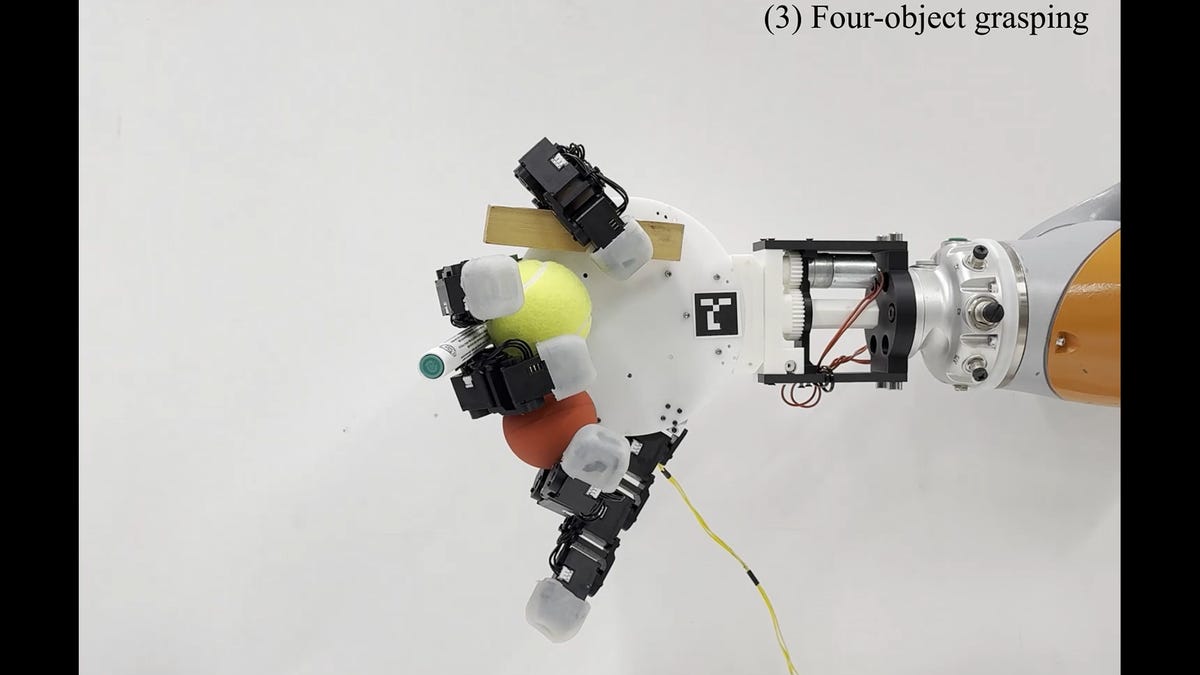
The latest robot creation is rooted in human anatomy. Researchers at the Swiss Federal Institute of Technology in Lausanne have developed a robotic hand with a broader range of motion than anything made of flesh and blood: It can detach from an arm and skitter around, bend its fingers backward and even pick up and maneuver multiple objects at a time.
The detachable robotic hand, described in an article published Tuesday in Nature Communications, was developed in two phases. The first version of the robot had five fingers and exhibited dexterity and agility comparable to the human hand while still navigating confined spaces.
Don’t miss any of our unbiased tech content and lab-based reviews. Add CNET as a preferred Google source.
The second version of the robot utilized a sixth finger to further manipulate grasped objects. The six-fingered robot was able to pinch and lift a small ball and use its fingers to simultaneously hold objects against both sides of its palm. When attached to an arm, the hand can pick up larger objects the same way a human would.
The most impressive display of dexterity came from a simple test with a mustard bottle. The robotic hand unscrewed the cap while holding the bottle in place, demonstrating a high level of fine motor control.
The research team commented on this extensive control in their article, explaining how the robot hand can surpass typical human constraints.
«While our robotic hand can perform common grasping modes like human hands, our design exceeds human capabilities by allowing any combination of fingers to form opposing finger pairs, enabling simultaneous multi-object grasping with fewer fingers and non-anthropomorphic grasping,» the team noted in the article.
A representative for the research project did not immediately respond to a request for comment.
Researchers hope that the hand may one day aid in tight disaster relief situations or support warehouse and factory workers.
«The ability to crawl directly to a target object and grasp it also enables efficient handling in environments such as warehouses, where objects may be located within dense shelving,» the team wrote. «Or in service robotics, where the system can autonomously retrieve dropped items.»
In their article, the research team wrote that they hope their «non-traditional configuration could effectively serve in specialized environments requiring augmented manipulation abilities.» While the proposed robotic hand is not anthropomorphic, it doesn’t rule out its potential for prosthetic applications.
Technologies
ChatGPT Will Now Guess Whether You’re Under 18 to Restrict What You See
OpenAI is setting up new guardrails intended to reduce exposure to sensitive or potentially harmful content.

OpenAI has started pushing out its age-prediction technology across ChatGPT consumer accounts. In a post on Monday, the company said that for those under 18 who haven’t already told ChatGPT their age, its software will look at a person’s behavior and other signals, such as how long the account has existed and when they’re active, to estimate an age.
If you’re incorrectly identified as being underage, you can turn to technology from identity verification service Persona, OpenAI said. That requires a live selfie and a government-issued ID. A ChatGPT page that takes you directly to age verification is available.
Don’t miss any of our unbiased tech content and lab-based reviews. Add CNET as a preferred Google source.
The new ChatGPT system, announced last September as part of broader changes for younger users, adds more guardrails to the AI chatbot, providing what OpenAI calls «safeguards to reduce exposure to sensitive or potentially harmful content.»
In a separate support page, the company describes in more detail how age prediction works in ChatGPT and what it filters out. That includes graphic violence or gore; depictions of self-harm; viral challenges «that could push risky or harmful behavior»; roleplaying that’s sexual, romantic or violent; or content that promotes extreme beauty standards, unhealthy dieting or body shaming.
(Disclosure: Ziff Davis, CNET’s parent company, in April filed a lawsuit against ChatGPT maker OpenAI, alleging it infringed Ziff Davis copyrights in training and operating its AI systems.)
OpenAI and other companies with AI technology have come under fire and are the subject of multiple lawsuits and investigations related to the deaths of teenagers who were engaging with chatbots, including ChatGPT. In the last year, OpenAI also announced it was adding additional parental controls to the platform.
Age verification and access restrictions based on age have become a theme more widely across online experiences, driven in part by laws proposed or enacted in various countries and US states. Earlier this month, the gaming platform Roblox instituted mandatory age checks. A new law in Australia imposes a sweeping ban on social media for children under 16.
Technologies
Bye Bye, Booms: Jabra’s New Evolve3 Headsets Drop the Mic
In an effort to make its professional-grade Evolve3 85 and Evolve3 75 more consumer-friendly, Jabra has designed them to look like standard headphones.
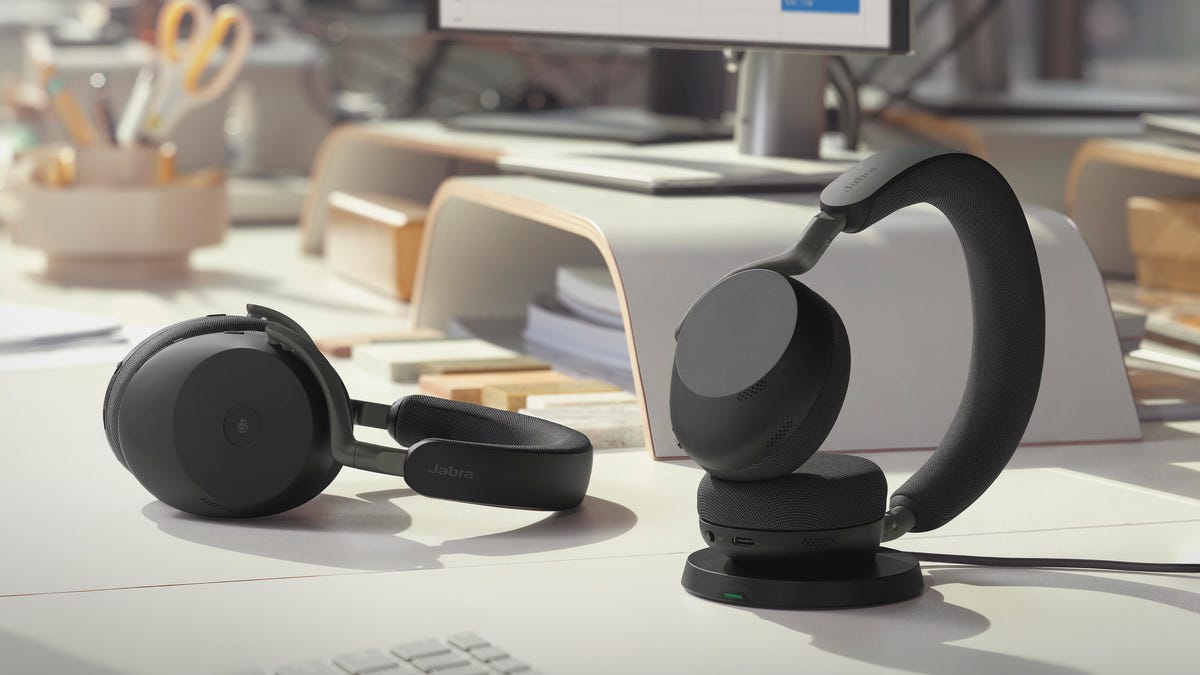
In the past, Jabra marketed its Evolve headsets more toward businesses rather than consumers. But as more people have shifted to hybrid or work-from-home environments, the professional-grade headset market’s dynamics have shifted to the point where the Danish brand made a major design decision for its new Evolve3 85 ($649) and Evolve3 75 ($463) headsets: it left off the boom microphone and designed the new models to look like your typical premium over-ear and on-ear headphones.
Scheduled to ship on March 1, the two models offer nearly identical specs and performance, but the Evolve3 85 has larger ear cups and is an over-ear model, while the Evolve 3 75 is an on-ear model (the Evolve3 85 also has slightly better battery life).
Read more: Best Headsets for Working From Home
While there’s no flexible boom microphone to bring the mic close to your mouth, according to Jabra, the new models are able to pick up your voice clearly while dramatically reducing background noise thanks to its ClearVoice system that combines «deep neural network technology and Jabra’s multi-mic algorithms.»
Along with streamlined designs and comfortable fits, Jabra promises that the headsets are good for everyday use as headphones that sound good for music listening and movie watching. They feature active noise canceling and come with either a USB-C or USB-A Bluetooth dongle for computer use.
Battery life seems impressively strong, and Jabra is touting the ability to replace the headsets’ batteries and ear pads to extend the headsets’ lifespans. That’s a plus considering both headsets are rather expensive, exceeding the price points of such premium noise-canceling headphones as the Sony WH-1000XM6 and second-gen Bose QuietComfort Ultra Headphones.
I’ll have full hands-on reviews of the headsets closer to their March 1 availability date. For now, here’s a quick look at some of their key specs.
Jabra Evolve3 85 and Evolve3 75 key features:
- Boomless design with Jabra ClearVoice, powered by DNN technology for professional-grade voice clarity
- Adaptive active noise cancellation that adjusts in real-time to the environment
- Spatial Sound for more natural and less fatiguing call experiences
- Fast-charge support that delivers up to 10 hours of power in just 10 minutes by cable
- Wireless charging
- Voice input for accurate access to AI workflows and tools
- Tuned for high-fidelity music with the LC3 audio codec (SBC and AAC codecs are also supported)
- Certified for leading virtual meeting platforms (UC-certified variants)
- Secure Bluetooth Low Energy connectivity with prepaired adapter included
- Centralized device management through Jabra Plus Management (for enterprises)
- Customization and control via the Jabra Plus mobile and desktop app (later in 2026)
- Replaceable batteries to extend product life
- Jabra Evolve3 85 battery life: Up to 25 hours of call time or 120 hours of listening to entertainment (with ANC/busylight off) and 10-minute fast charge for 10 hours of use
- Jabra Evolve3 75 battery life: Up to 22 hours of call time or 110 hours of listening to entertainment (with ANC/busylight off) and a 10-minute fast charge for 10 hours of use
- Price: Evolve3 85 $649; Evolve3 75 $463
- Availability: Black versions of both headsets will be available from March 1, while the warm gray color will be available from April
Technologies
How You Can Print PDFs, Websites or Any Document Using Your iPhone
Your iPhone can connect to most printers, just like a computer, and with a few taps, it can print out the documents you need.
Even though we live in a digital world where you can view and even sign off on important documents using your iPhone, there are still times when it’s best to use a printer. Be it shipping labels, luggage tags or a hard copy of an important document, sometimes it’s necessary to get these onto paper.
Fortunately, it’s pretty easy to print a PDF from your iPhone, as long as you have access to a wireless or AirPrint-compatible printer. Most popular printer models are already AirPrint-capable, but if you want to make sure your printer is compatible, you can look it up on Apple’s support page. And even if you have an older printer that doesn’t support AirPrint, you might still be able to use your iPhone to print just like you would with a computer.
Here, we’ll guide you through how to print from a web page or email. If you just want to save a document as a PDF to share or print later, we’ll walk you through that step as well.
Printing from a web page or the Files app
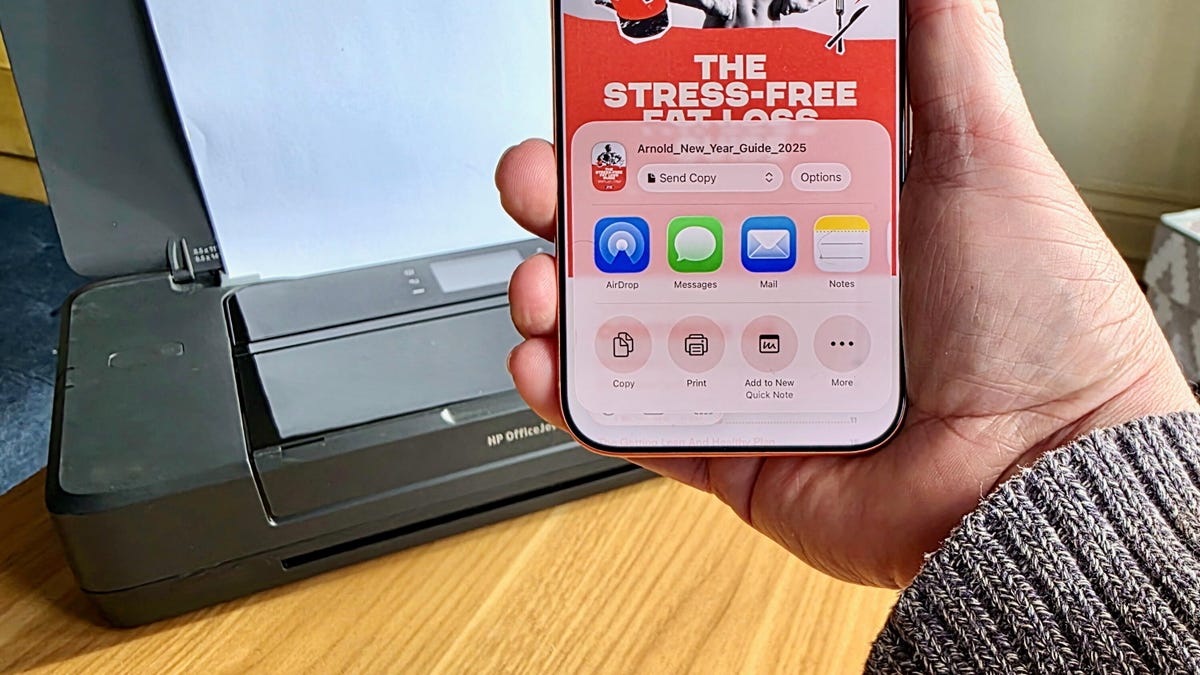
When printing a document viewed inside your Files app or from a web page, the steps are largely the same. First, open the PDF or web page you would like to print. On Safari, tap the triple-dot icon on the right, next to the URL bar, then tap Share. On Google Chrome, you’d tap the Share icon — it looks like a square with an arrow pointing up — to the right of the URL bar instead. And in the Files app, tap the Share icon after opening the document. The Share menu will pop up. Scroll down, and you’ll see the Print option.
Select Print to open the Printer Options menu. You should then be able to select your printer, choose your printer settings and then print the page out by hitting the printer icon on the top right.
Printing from email
Open up the email you’d like to print. If you’re using Apple Mail, you would then select the Reply button (the curved arrow icon) and scroll all the way down to select Print. If you’re using Gmail instead, you’d tap the three dots icon on the upper right corner and then select the Print all option.
Saving a web page or email as a PDF
Be it a web page or email, you can choose to save the document as a PDF instead of printing it. When you’re on the Printer Options page, instead of hitting the printer icon, you would select the Share icon next to it. After that, simply select Save to Files to save the web page or email as a PDF. If you want to retrieve that saved PDF, just launch the Files app, and you should see it there.
In the event your printer doesn’t include AirPrint, you might still be able to print a PDF from your iPhone. HP, Canon and other printer companies offer their own iOS apps that can assist in sending documents to printers that do not support AirPrint. While many of the above steps will be similar, you’ll want to follow the instructions provided by the manufacturer where they diverge. For instance, for printers set up with the HP app, you’ll tap the Share icon and then tap Print with the HP app in order to send a document to the printer.
-
 Technologies3 года ago
Tech Companies Need to Be Held Accountable for Security, Experts Say
-
 Technologies3 года ago
Best Handheld Game Console in 2023
-
 Technologies3 года ago
Tighten Up Your VR Game With the Best Head Straps for Quest 2
-
 Technologies4 года ago
Black Friday 2021: The best deals on TVs, headphones, kitchenware, and more
-
 Technologies4 года ago
Google to require vaccinations as Silicon Valley rethinks return-to-office policies
-
 Technologies5 лет ago
Verum, Wickr and Threema: next generation secured messengers
-
 Technologies4 года ago
Olivia Harlan Dekker for Verum Messenger
-
 Technologies4 года ago
iPhone 13 event: How to watch Apple’s big announcement tomorrow


