

Technologies
My Clicks Communicator Hands-On: Boldly Going Where Phones Have Been Before
The new Android handset is meant to be a secondary phone optimized for messaging, with a BlackBerry-like physical keyboard, headphone jack and other features lost to time.

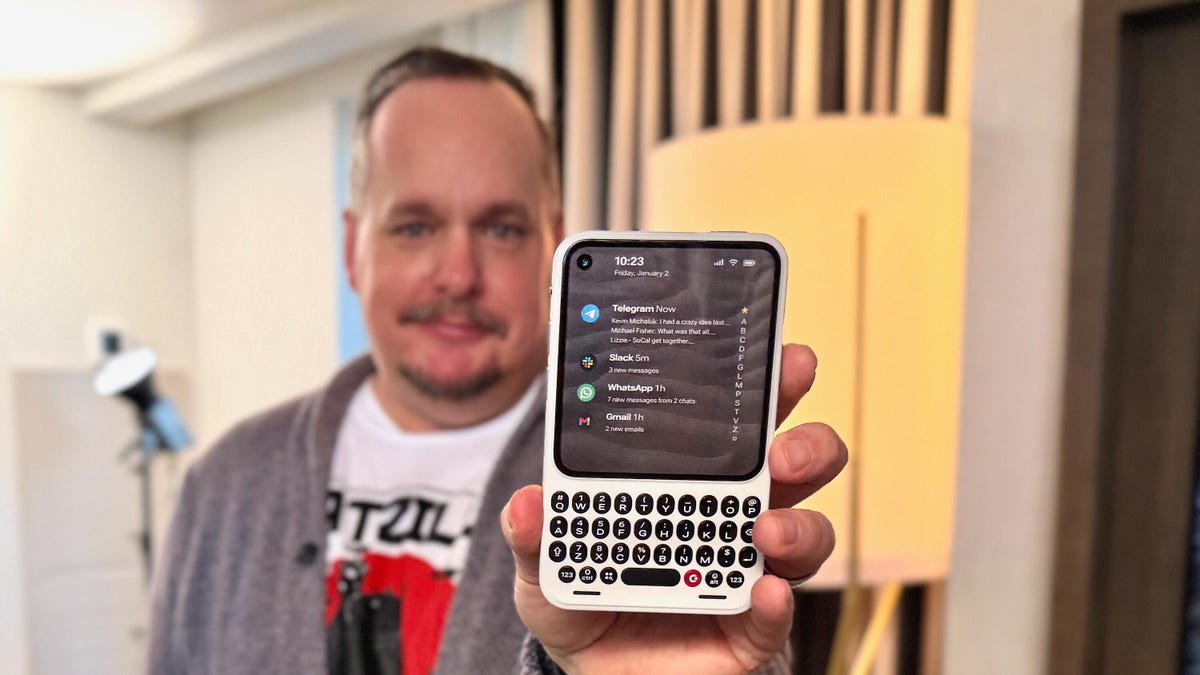
It’s one thing to have a great idea and another to actually make it a reality. The newly announced Clicks Communicator phone, from the keyboard phone case company of the same name, is a refreshing breath of fresh air that is also oh-so-familiar. You might easily mistake it for a BlackBerry phone from circa 2007, and that’s because it was designed by a former BlackBerry designer. However, it runs Android 16 and has a nifty, minimalist app launcher that looks sleek and contemporary. In the hour I spent learning about it and using a non-working prototype, the Clicks Communicator quickly became my favorite CES gadget in years.
The Communicator is a surprisingly smart take that combines old and new phone features in a way that, aside from Motorola, very few phone makers have successfully done before. It’s a straightforward-to-use Android smartphone with seemingly every popular feature that companies have removed over the past decade.
In its small design, there is a physical keyboard, a notification alert light, a headphone jack, a physical SIM card tray, support for a microSD card and buttons, oh so many buttons. Jony Ive’s soul must be hurting right now.
At a time when phones have become overly complicated, AI-centric attention stealers, the Clicks Communicator aims to provide an experience optimized for typing and voice-to-text recording, all while minimizing distractions. It’s designed to be a secondary device that complements your regular smartphone. The idea is similar to what Palm tried almost a decade ago, when it sold a small Android phone meant to complement larger ones. However, Palm’s phone didn’t offer amenities like a physical keyboard.
«Communicator is to a smartphone what a Kindle is to an iPad,» said Jeff Gadway, chief marketing officer at Clicks, in a press release. «It’s a complementary product that stands on its own, optimized for a specific purpose. In the case of Clicks Communicator, that means communicating with confidence in a noisy world.»
We expect our smartphones to do anything we want, but that often means compromising on how features are implemented. On an iPhone 17 Pro, for example, I can definitely type and respond to texts, emails and jot down the occasional random thought in the Notes app. But for me, and I expect many others, I have a much more enjoyable experience typing on a physical keyboard. I prefer to use a laptop to respond to a long or complex email versus writing it on a phone.
But the Communicator’s singular focus on input, along with the fact that it can be your only phone, unlocks a much wider appeal (at least on paper). I could see the Communicator being the ideal «work» phone for those jobs where you want a separate device from your personal smartphone. You could quickly respond to a Slack thread without being tempted to check out TikTok or Instagram.
It might be an attractive option to a growing number of people who crave a phone that doesn’t need all their attention every damn minute. This could be someone burnt out from being obsessively online or someone who misses having a physical keyboard and features like a headphone jack. It could appeal to a person who wants a minimal-feeling smartphone like the Light Phone and Punkt, which each have their own take on what a less distracting phone might look like.
The Communicator costs $499 and launches later this year. However, you can preorder the phone for $399 or reserve one for $199 right now. It joins the Clicks Keyboard Pro and Keyboard Case.
«We’re really trying to help have people see us as a company that’s building purpose-built tech for people who want to do shit and not doom scroll,» Gadway told me.
Clicks Communicator’s stand-out features
Name: The phone is named in part for the iconic handheld voice device from Star Trek. Clicks co-founder Michael Fisher also explained that calling the device a «communicator» really captures what the phone was designed for: to provide the best typing and voice-to-text experience (in terms of both hardware and software) that you’ll find on a phone.
Design: The phone is compact. Its aluminum frame and polycarbonate body felt solid in my hand. Small phone lovers, this one seems aimed at you. It weighs only 170 grams. Compare that to the iPhone 17 Pro, which is 206 grams. It’s roughly the size of a small SSD or magnetic battery pack. It has a 4-inch screen and a keyboard similar to the one found on the Clicks keyboard case — with keys that are 43% larger on the Communicator.
Android 16 and Niagara launcher: The Communicator runs on Android 16 and has a custom version of the Niagara app launcher. Messages from apps like WhatsApp, Telegram and Slack are curated directly on the home screen, allowing people to review and respond quickly without having to open and jump between apps.
Prompt Key and Signal light: On the right side of the phone is a button called the Prompt Key. You press and hold it to record voice-to-text. Surrounding the button is the Signal light (think Android notification light from years ago) that makes it easy to distinguish messages and notifications at a glance. It can be customized with different colors and light patterns to glow when getting messages from specific people, groups, or apps.
Removable backplate: The back has a sloped, ergonomic, and interchangeable plate — think Moto X. During my briefing, there were half a dozen different plates made of polycarbonate and leather. The backplate also supports Qi2.2 wireless charging.
Other features:
- 50-megapixel rear camera with optical image stabilization
- 24-megapixel front camera
- 4,000 mAh silicon-carbon battery
- 256GB onboard storage plus expandable microSD
- Physical SIM card tray and eSIM
- A 3.5mm headphone jack
- Android 16 with 5 years of security updates
- Global 5G, 4G LTE, and 3G/2G support, unlocked
- NFC with Google Pay, Bluetooth 5.4, Wi-Fi 6
- USB-C and wireless charging
- 4,000mAh battery
- A 3.5mm headphone jack
- A configurable mute switch
Technologies
Today’s NYT Connections Hints, Answers and Help for Jan. 7, #941
Here are some hints and the answers for the NYT Connections puzzle for Jan. 7, #941
Looking for the most recent Connections answers? Click here for today’s Connections hints, as well as our daily answers and hints for The New York Times Mini Crossword, Wordle, Connections: Sports Edition and Strands puzzles.
Today’s NYT Connections puzzle is rather tricky. The purple category is especially mystifying. Read on for clues and today’s Connections answers.
The Times has a Connections Bot, like the one for Wordle. Go there after you play to receive a numeric score and to have the program analyze your answers. Players who are registered with the Times Games section can now nerd out by following their progress, including the number of puzzles completed, win rate, number of times they nabbed a perfect score and their win streak.
Read more: Hints, Tips and Strategies to Help You Win at NYT Connections Every Time
Hints for today’s Connections groups
Here are four hints for the groupings in today’s Connections puzzle, ranked from the easiest yellow group to the tough (and sometimes bizarre) purple group.
Yellow group hint: Lookalikes.
Green group hint: Part of something.
Blue group hint: National symbol.
Purple group hint: Squish down.
Answers for today’s Connections groups
Yellow group: Doppelgänger.
Green group: Portion.
Blue group: Common flag symbols.
Purple group: Pressed using a press.
Read more: Wordle Cheat Sheet: Here Are the Most Popular Letters Used in English Words
What are today’s Connections answers?
The yellow words in today’s Connections
The theme is doppelgänger. The four answers are clone, double, mirror and ringer.
The green words in today’s Connections
The theme is portion. The four answers are concern, interest, share and stake.
The blue words in today’s Connections
The theme is common flag symbols. The four answers are crescent, cross, star and stripe.
The purple words in today’s Connections
The theme is pressed using a press. The four answers are cider, garlic, trousers and wine.
Don’t miss any of our unbiased tech content and lab-based reviews. Add CNET as a preferred Google source.
Technologies
Today’s NYT Strands Hints, Answers and Help for Jan. 7 #675
Here are hints and answers for the NYT Strands puzzle for Jan. 7, No. 675.
Looking for the most recent Strands answer? Click here for our daily Strands hints, as well as our daily answers and hints for The New York Times Mini Crossword, Wordle, Connections and Connections: Sports Edition puzzles.
Today’s NYT Strands puzzle is easier than some have been. Once you learn the topic, the words come pretty easily. But if you need hints and answers, read on.
I go into depth about the rules for Strands in this story.
If you’re looking for today’s Wordle, Connections and Mini Crossword answers, you can visit CNET’s NYT puzzle hints page.
Read more: NYT Connections Turns 1: These Are the 5 Toughest Puzzles So Far
Hint for today’s Strands puzzle
Today’s Strands theme is: Open wide.
If that doesn’t help you, here’s a clue: Brace face.
Clue words to unlock in-game hints
Your goal is to find hidden words that fit the puzzle’s theme. If you’re stuck, find any words you can. Every time you find three words of four letters or more, Strands will reveal one of the theme words. These are the words I used to get those hints, but any words of four or more letters that you find will work:
- MIST, SOIL, RICE, LICE, RUDE, LUDE, BRUSH, TOOT, RIDE, RIDER
Answers for today’s Strands puzzle
These are the answers that tie into the theme. The goal of the puzzle is to find them all, including the spangram, a theme word that reaches from one side of the puzzle to the other. When you have all of them (I originally thought there were always eight but learned that the number can vary), every letter on the board will be used. Here are the nonspangram answers:
- DRILL, FLOSS, MIRROR, FLUORIDE, TOOTHBRUSH
Today’s Strands spangram
Today’s Strands spangram is DENTISTSOFFICE. To find it, start with the D that’s five letters down on the far-left row, and wind up and then across.
Don’t miss any of our unbiased tech content and lab-based reviews. Add CNET as a preferred Google source.
Technologies
The Clicks Communicator Phone Is My Favorite Thing at CES
-
 Technologies3 года ago
Tech Companies Need to Be Held Accountable for Security, Experts Say
-
 Technologies3 года ago
Best Handheld Game Console in 2023
-
 Technologies3 года ago
Tighten Up Your VR Game With the Best Head Straps for Quest 2
-
 Technologies4 года ago
Black Friday 2021: The best deals on TVs, headphones, kitchenware, and more
-
 Technologies4 года ago
Verum, Wickr and Threema: next generation secured messengers
-
 Technologies4 года ago
Google to require vaccinations as Silicon Valley rethinks return-to-office policies
-
 Technologies4 года ago
Olivia Harlan Dekker for Verum Messenger
-
 Technologies4 года ago
iPhone 13 event: How to watch Apple’s big announcement tomorrow


