

Technologies
Spotify Says It’s Shutting Down Access to Site That Scraped Its Music Library
After a shadow library site claimed to have created a metadata archive of 99.6 percent of Spotify’s music, the streaming service said it’s shutting down accounts and creating safeguards to protect its data.

Spotify says it’s cutting off access to some user accounts and adding safeguards after a shadow library website claimed to have scraped 99.6% of Spotify’s metadata and audio files from the streaming service’s music library.
On Dec. 20, the website Anna’s Archive said in a blog post that it was distributing 300 terabytes worth of data for 256 million music tracks it scraped from Spotify. It has released 99.6 of the service’s music library, or 86 million music files of the most popular tracks. The blog post called it a preservation effort and said it was considering allowing the downloading of individual files in the future. The post also called for donations to Anna’s Archive.
Don’t miss any of our unbiased tech content and lab-based reviews. Add CNET as a preferred Google source.
Spotify responded, saying it’s been investigating the scraping and is taking action against Anna’s Archive. «Spotify has identified and disabled the nefarious user accounts that engaged in unlawful scraping,» a spokesperson told CNET in an email.
«We’ve implemented new safeguards for these types of anti-copyright attacks and are actively monitoring for suspicious behavior. Since day one, we have stood with the artist community against piracy, and we are actively working with our industry partners to protect creators and defend their rights,» the spokesperson said.
In its blog post, Anna’s Archive said the torrent release of metadata was just the first step of its plans for the Spotify data it collected. It said the release of music files, in order of popularity on Spotify, was next, to be followed by additional file metadata, album art and patching files to reconstruct Spotify’s original files. «This is by far the largest music metadata database that is publicly available,» the blog post said.
Technologies
I Grew Up on Atari. Now I’m Reliving My Childhood on the Gamestation Go
Commentary: Wander down Gen X gamer memory lane with 200 games, including Pac-Man, Asteroids, Berserk and Centipede.
On Christmas Day, 1982, I unwrapped my very first video game console, an Atari 2600. Although it was released in 1977, it was new to me, and I’m pretty sure the reason my parents got it for me was because of a 2600 game released around that time: E.T.: The Extra-Terrestrial. My parents knew I was obsessed with the movie, a transformative film that I almost missed because I was so scared to watch it.
Don’t miss any of our unbiased tech content and lab-based reviews. Add CNET as a preferred Google source.
Seven-year-old me was ecstatic. With my gigantic brown glasses atop my nose, wearing a red E.T. shirt, I had one of the best Christmases ever. Despite my love for the movie, I didn’t get far in the game, which left me frustrated and confused. I had no idea it wasn’t because I was unskilled, but because it was bad. Even today, people find the game overly complex and impenetrable to play.
(How bad? Copies of the game were literally buried for decades because it sold so poorly.)
The Atari 2600 came bundled with Combat and two controllers. I played it for years, starting down the road of becoming a dedicated gamer like millions of other kids of the era. If you had asked me a few months ago how many games I remembered from the 2600 or its subsequent successors, the Atari 5200 and 7800, I would have had a hard time answering. I could have named maybe a dozen titles at most.
So, when Atari lent me a Gamestation Go handheld gaming console to try out, I was shocked that dozens of titles came rushing back to me. The moment I saw their cover art, animated screenshots, or just their titles, memories flooded back quickly. I played so many of these.
And the ones I didn’t get to own or try, I pined over, pointing at them at the store or poring over whatever game magazines I could get my hands on.
Asteroids and Berserk and Centipede and Night Driver and Yar’s Revenge — so, so many games.
Old games, new console
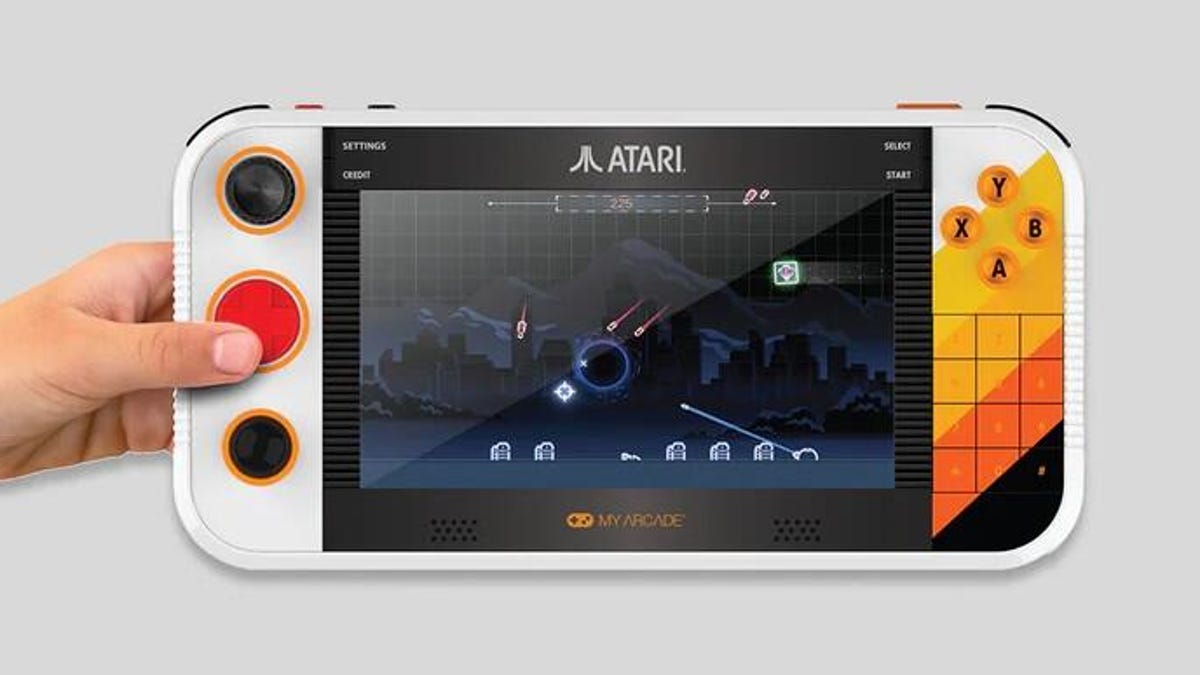
The Gamestation Go, which sells for $179, collects about 200 of those Atari home console games. But it also includes versions of arcade games, including Crystal Castles, Food Fight and Tempest, plus seven Balls of Steel pinball tables, Classic and 2600 versions of Pac-Man, and games from Jaleco and Piko Interactive such as Bases Loaded and Bad Street Brawler. Many of the games can be enjoyed in multiplayer mode by connecting a game controller.
It’s a wide-ranging set of games, and Atari packages it in a nice hardware setup with a larger screen than the original Nintendo Switch.
There are no detachable controllers like on the Switch, but the crazy array of controller options makes up for it: the usual D-pad and shoulder buttons, but also a dial you can rotate (good for games like Breakout), a trackball wheel (for games like Centipede and Crystal Castles) and even a physical number pad, handy for some Atari 5200 games and if Mattel’s Intellivision titles ever get added.
It features an HDMI port, three USB-C ports, a headphone jack, and a micro-SD slot for side-loading additional games. A solid, but flimsy-looking kickstand can prop up the system. An extra set of small buttons gets you Settings, Credit, Select and Start. Instructions for using the game system, such as navigating in and out of titles, are clear and available from the main menu.
You can perform system updates via built-in Wi-Fi, but there’s no app store to buy or download additional games.
Retro vs. modern
The biggest challenge I faced during my time with the Gamestation Go was devoting time to games from eras past, and ignoring the siren call of modern games on modern consoles and computers.
Did I really want to blast an endless downward cascade of Centipedes or play very slow-paced stick-figure Tennis when I could be finishing Act II of Clair Obscur: Expedition 33 or hopping onto a Marvel Rivals match with my friends?
Some of the gameplay of the old Atari games, and a few of their Recharged revamps, still hold up incredibly well. Missile Command still raises your pulse no matter which version you try, and it’s fun to control with the included trackball, even if its marble size makes it a challenge to use with as much precision as the larger one you might remember from the arcade.
The Balls of Steel pinball tables look and play great, even if viewing them on a horizontal screen presents a challenge to gameplay. Tempest with the dial or trackball controls is still a twisted joy. I found myself particularly drawn to arcade games I either missed entirely, such as Cisco Heat All American, or that I remember dropping many, many quarters into, like Asteroids.
Missing in action? E.T., the game that started it all for me. But there’s Steeplechase, with its sorta-horse animations, and Ninja Golf, which is as weird as it sounds.
Getting bogged down with E.T.
I’m not a big emulation player, though I’ve been curious about the possibilities of home arcade cabinets that allow you to add many more games than those that come standard.
The Gamestation Go makes it easy to access retro games, provided you have access to ROM files and a microSD card to store them on. The process involves creating a set of folders to store the files in and then booting from the microSD card when the Gamestation starts up.
In my testing, the Gamestation handled Sega Genesis and Atari 2600 titles like a champ. However, online reports vary about how well it reproduces games from more advanced consoles, such as the original Sony PlayStation or the Sega Dreamcast.
There’s some controversy over ROMs, digital copies of game software. Most ROMs are copies of games that are still under copyright, meaning the original creators, such as Nintendo or Sega, legally own them. Downloading or distributing ROMs without permission is illegal in many countries, even if you own the original game. That said, some ROMS have been available on the Internet Archive, and there’s no shortage of sites that collect files and descriptions for games across many game consoles.
Atari offers this capability to play ROMs in the hopes that you will find legal means to purchase ROMs or only use ROMs from games where you already own a cartridge of a digitally purchased version.
For the sole purpose of seeing whether E.T. was what I remembered as a young boy, I found a copy of the game after trying unsuccessfully to find a way to purchase it as a digital file or even a physical copy with a ROM included.
E.T.’s visage shows up on the title screen as a chiptune version of the John Williams theme plays. When I started it up, I got goosebumps.
But that tingly feeling was gone almost instantly when the game started. I instantly fell into a bog. I tried to chase down tiny dots meant to represent Reese’s Pieces candies, but got repeatedly accosted by FBI agents and scientists. Down the bog I went. Again and again. Soon, I was dead, my alien body turned white to indicate loss of life. The frustration I felt back then was now combined with an adult’s annoyance at how poorly the game was designed. How dare they rush this game out to entice parents of kids like 1980s me? Who thought this might be fun?
After a few more annoyed minutes, I shut the game off. There’s probably an online walkthrough on how to easily beat E.T., but I didn’t even bother. I was done for another few decades, at least.
E.T. for Atari 2600, like so many other things, belongs in the past.
Should you buy a Gamestation Go?
As E.T. proves, not all the early games were good. Many of them were and continue to be garbage. (Sorry, Swordquest.)
But there are lots of gems bundled into the Gamestation Go that draw you in, even if it’s only for short bursts of time before you get tired of the repetition and want to play something from this century.
But what a warm wave of feelings the Gamestation Go will give you the first time you boot up and look at that long list of titles, games you once may have wished and wished for and spent weeks trying to master!
Is it worth buying? It really depends on how much nostalgia is worth to you these days, or whether kids in your family are curious about retro gaming and emulation.
My inner 7-year-old, the one who would have been in 8-bit heaven with so many games to play, says you’d be a fool not to. But grown-up me has some reservations.
Technologies
Flying for Christmas? Stay Up to Date With Your iPhone’s Secret Flight Tracker
Here’s how to get up-to-date flight information using your iPhone built-in flight tracker.
If you’re traveling or plan to be soon for Thanksgiving, you might be concerned about flight delays and cancellations. This is normal for typical high-traffic flight dates, but the government shutdown has increased the risk even more, so staying on top of your flight status is imperative.
Getting up-to-date flight information has never been easier. You can check your flight status through your airline’s app or its website easily enough — or you can just use your iPhone’s secret flight tracker.
You read that right. Your iPhone has a built-in flight tracker, but it’s tucked away and you might not realize you even have it. Below, we’ll show you how to access it so you have some peace of mind while traveling this season.
Don’t miss any of our unbiased tech content and lab-based reviews. Add CNET as a preferred Google source on Chrome.
How to track your flight via iMessage
Before we start, there are a few prerequisites you must meet:
- Make sure iMessage is enabled (it doesn’t work with SMS/MMS).
- You’ll need your flight number somewhere in your text messages, whether you’ve sent that information to someone (even yourself) or it’s been sent to you.
- The flight number must be sent in this format: [Airline] [Flight number], for example, American Airlines 9707.
Launch the native Messages app on your iPhone and open the text message thread that contains your flight information. You’ll know the flight tracker feature works when the text with the flight information appears underlined, which means it’s actionable and you can tap on it.
If your flight is still several months away or it’s already passed, you might see a message that says, «Flight information unavailable.» You might also see another flight that’s not yours because airlines recycle flight numbers.
You can check your flight status from Spotlight Search, too
If getting your flight information from Messages wasn’t easy enough, you can also grab the details right from your iPhone’s home screen by swiping down and adding your flight number into Spotlight Search. This works with Spotlight Search on your Mac computer, too.
How to access the hidden flight tracker
Although the airline name/flight number format highlighted above is the best way to go, there are other texting options that will lead you to the same result. So let’s say we stick with American Airlines 9707, other options that may bring up the flight tracker include:
- AmericanAirlines9707 (no spaces)
- AmericanAirlines 9707 (only one space)
- AA9707 (airline name is abbreviated and no space)
- AA 9707 (abbreviated and space)
I would suggest you keep the airline name spelled out completely and add a space between the two pieces of information — like in the previous section — because for some airlines, these alternative options may not work.
Real-time flight tracking
Once everything is set, tap on the flight information in your text messages. If the feature works correctly, you should see the following two options appear in a quick-action menu:
- Preview Flight: View the flight’s details. Tap this to view more information about the flight.
- Copy Flight Code: Copy the flight code to your clipboard (in case you want to send your flight details to someone else via text or email).
If you select Preview Flight, at the top of the window, you’ll see the best part of this feature: a real-time flight tracker map. A line will connect the two destinations, and a tiny airplane will move between them, indicating where the flight is at that exact moment.
Underneath the map, you’ll see important flight information:
- Airline name and flight number
- Flight status (arriving on time, delayed, canceled, etc.)
- Terminal and gate numbers (for arrival and departure)
- Arrival and departure time
- Flight duration
- Baggage claim (the number of the baggage carousel)
If you swipe left on the bottom half of the flight tracker, you can switch between flights, but only if there’s a return flight.
For more travel tips, don’t miss our test on whether AI can help you fly more sustainably.
Technologies
25+ Last-Minute Gift Ideas to Save the Day
-
 Technologies3 года ago
Tech Companies Need to Be Held Accountable for Security, Experts Say
-
 Technologies3 года ago
Best Handheld Game Console in 2023
-
 Technologies3 года ago
Tighten Up Your VR Game With the Best Head Straps for Quest 2
-
 Technologies4 года ago
Black Friday 2021: The best deals on TVs, headphones, kitchenware, and more
-
 Technologies4 года ago
Verum, Wickr and Threema: next generation secured messengers
-
 Technologies4 года ago
Google to require vaccinations as Silicon Valley rethinks return-to-office policies
-
 Technologies4 года ago
Olivia Harlan Dekker for Verum Messenger
-
 Technologies4 года ago
iPhone 13 event: How to watch Apple’s big announcement tomorrow


