

Technologies
Headphone Conversation Awareness Mode: How It Works and Why You Need It
Taking off your headphones for a quick chat is practically Stone Age. Try conversation awareness mode to make things more seamless and truly hands-free.


Listening to your tunes, but your neighbor is feeling chatty? Ordering a latte but your hands are full so you can’t pause your podcast? Conversation detection, a feature on some headphones and earphones, can be a game-changer. Instead of removing your active noise-canceling earbuds or using your hands to pause the audio, this handy feature detects voices, pauses the audio and turns off the noise canceling.
That seamlessness between the cozy comfort of noise cancellation and the bustling real world is extremely helpful and easy to set up. There are, however, a few important things to note for the best experience with automatic conversation detection.
Most noise-canceling earbuds, including those from Bose and many other manufacturers, have a mode called Aware, Awareness or Transparency. This boosts ambient sound, often in the vocal frequency ranges. What I’m talking about here is a detection feature that makes switching to this mode automatic instead of having to manually select it.
You’ll generally see this feature on flagship headphones from Apple, Sony, Google and Samsung. Each one calls it something slightly different: Apple has Conversation Awareness, Samsung has Voice Detect, Google has Conversation Detection and Sony’s got Speak-to-Chat.
Don’t miss any of our unbiased tech content and lab-based reviews. Add CNET as a preferred Google source.
How it works
Enable
Conversation modes are generally accessible in the settings for your headphone’s companion app. If your phone and headphones are both Apple or both Google, go into the phone’s settings and access this feature by tapping on your headphones. Always be sure to update all of your devices’ firmware. Apple iOS also provides access to Conversation Awareness via the Control Center that appears when you swipe down from the top of the screen.
Detect
The array of tiny microphones built into your earbuds or headphones for calls and noise canceling will detect your voice for an awareness mode. Many headphones have built-in accelerometers for features like head tracking and on-ear/head detection; these might also be used to pick up jaw movement to verify that it’s you speaking and not someone nearby.
Samsung has a separate but related Siren Detect feature that automatically turns on Transparency mode when a siren is detected, so you can hear what’s going on in an emergency. (Some brands do the opposite and crank up the ANC when a loud sound is detected.)
Auto-adjust audio
Once activated, awareness modes also either pause or lower the volume of whatever audio is currently playing. This behavior differs by brand. For example, Apple devices lower music audio but pause podcasts. Samsung, instead, lowers all audio, while Sony and Google devices both pause all audio. Ideally, you’d be able to choose the behavior, but currently that’s still rare. Apple adds Conversation Boost, which uses the mics and accelerometers to amplify the voice of the person you’re talking to via head tracking.
End chat and resume
Then, either through some technological wizardry or simply by sensing when you stop talking (adjustable on some brands, including Sony), the headphones detect that the conversation has ended and revert to the previous audio, at the same volume and in the same noise-cancellation mode. Many models are better than people at detecting the end of a conversation.
Any model with this feature will also let you toggle the conversation mode on/off manually with a long button press or similar action.
The fine print
Conversation detection is triggered by your voice, not someone else’s, so you may wind up asking people to repeat themselves when you notice they’re talking to you. This asking will trigger conversation mode. Depending on how a specific model’s detection works, it might require both earbuds to be in your ears for it to work.
Sometimes, conversation detection can be triggered inadvertently by coughing, singing along to music, or other random ambient sounds. It may also not work well in extremely noisy environments, such as construction sites and airplanes. Some models do let you adjust the sensitivity, which is something we’d like to see more of in firmware updates and future releases.
Frequent podcast or audiobook listeners should choose headphones that pause all audio for conversations, or at least handle it intelligently by distinguishing between audio types and pausing podcasts or audiobooks so you don’t miss anything. However, Apple and Samsung won’t pause videos from services like Netflix or YouTube; they just lower the audio.
As with all features that use sensors and mics, conversation detection will affect battery life to some degree, though it’s not a major drain.
The final verdict
Conversation detection modes aren’t for everyone, especially exuberant souls who talk to themselves at full volume, yell at the news or sing along with their tunes. If you reflexively take your earbuds out to talk to others, you also don’t need this feature — unless you want to change that habit.
In the future, I’d like to see more adjustability, but even how this feature is implemented in the current crop of headphones and earbuds, it’s an excellent upgrade to the seamlessness of digital life.
Technologies
We Had a Poke Around ChatGPT’s New App Store. Here’s What We Found
After a call for app submissions from developers, ChatGPT’s beta app feature has arrived.
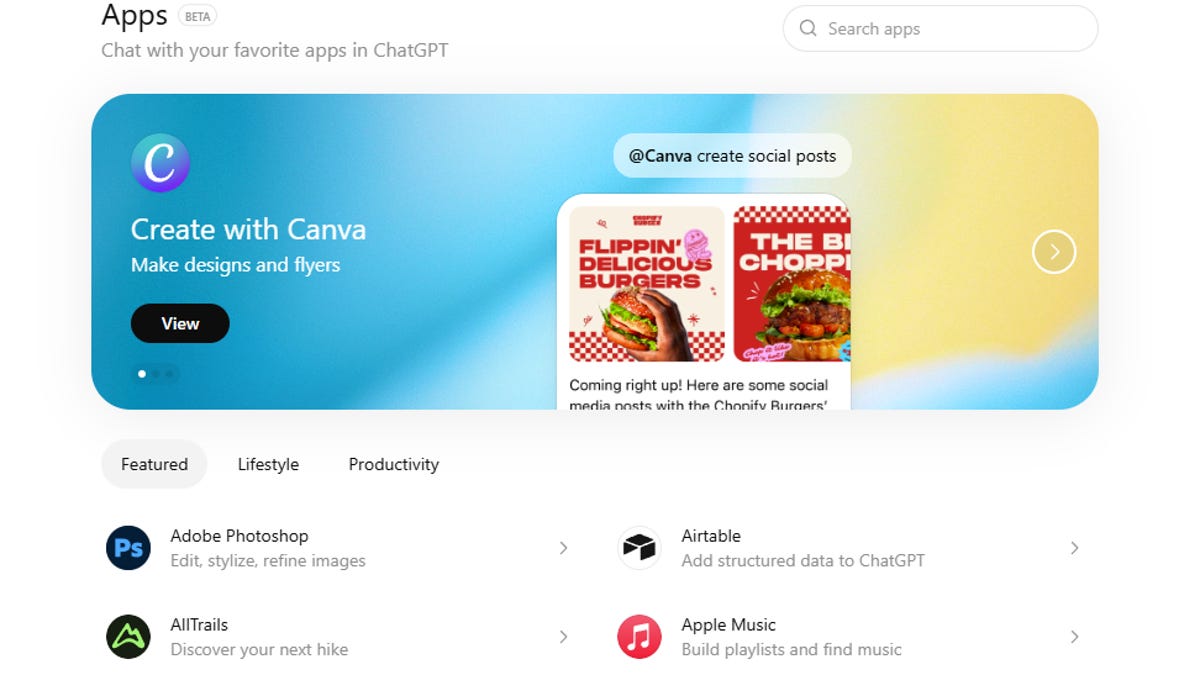
Adobe Photoshop, Spotify, Canva, Zillow and other well-known digital tools are now apps within ChatGPT. OpenAI has launched an app platform two months after announcing the beta feature and rolling out a development kit.
Don’t miss any of our unbiased tech content and lab-based reviews. Add CNET as a preferred Google source.
On Dec. 17, OpenAI announced that developers could submit their apps and a day later, apps began to appear in the desktop version of ChatGPT, the wildly popular chatbot with more than 800 million active users. It’s unclear how soon it will show up in the mobile ChatGPT app. In CNET’s testing, it wasn’t yet available on iOS.
(Disclosure: Ziff Davis, CNET’s parent company, in April filed a lawsuit against OpenAI, alleging it infringed Ziff Davis copyrights in training and operating its AI systems.)
How to use apps in ChatGPT
The apps, at least at launch, are categorized as «Featured,» «Lifestyle» and «Productivity,» with descriptions that will look familiar to anyone who’s used the Apple App Store or the Google Play store.
You can also use search to find a specific app that may not be listed under those categories.
Many of the apps include screenshots with prompt examples that suggest how to use the app within the chatbot. Canva, for instance, includes the prompt example, «@canva create a 2025 wrap presentation for my class.»
Instead of downloading an app, you’ll click a «Connect» button to give ChatGPT access to it. From there, you can use an @ prompt to access that app’s features.
Interestingly, you can’t just ask ChatGPT what apps are connected if you forget — instead, you need to go to Settings, Connected Apps or to Settings, then Data Controls, then Connected Apps depending on which version of ChatGPT you’re using.
Technologies
AI Health Coaches: The Next Frontier in Wearables or Privacy Nightmare?
We should probably brace for both.
I’ve been tracking biometric data about my body since what feels like the dawn of time (or at least the dawn of wearables). I ran a half-marathon with the first Fitbit tracker, reviewed the very first Apple Watch and used the first smartphone-connected thermometer for ovulation tracking back when it was a pen-and-paper operation for most.
Collecting data about my body isn’t just second nature; it’s practically part of my job description. And for years, it’s been entirely on me to overanalyze that mountain of metrics and figure out how to turn it into something useful.
So when AI health coaches started surfacing from Google, Samsung, Apple, Oura and others, promising to shoulder that mental load, I was all in. You mean to tell me I don’t have to decode every tiny fluctuation in my data on my own anymore?
Most of us can’t afford a real-life wellness coach to meal-prep for us, hype us up midworkout or pry the dumbbells from our fever-wrought hands when we’re at the gym looking like a walking Flonase commercial. An AI coach felt like the next best thing: a nerdy, data-obsessed friend living in my phone, armed with years of my biometrics and the patience to explain them without judgment.
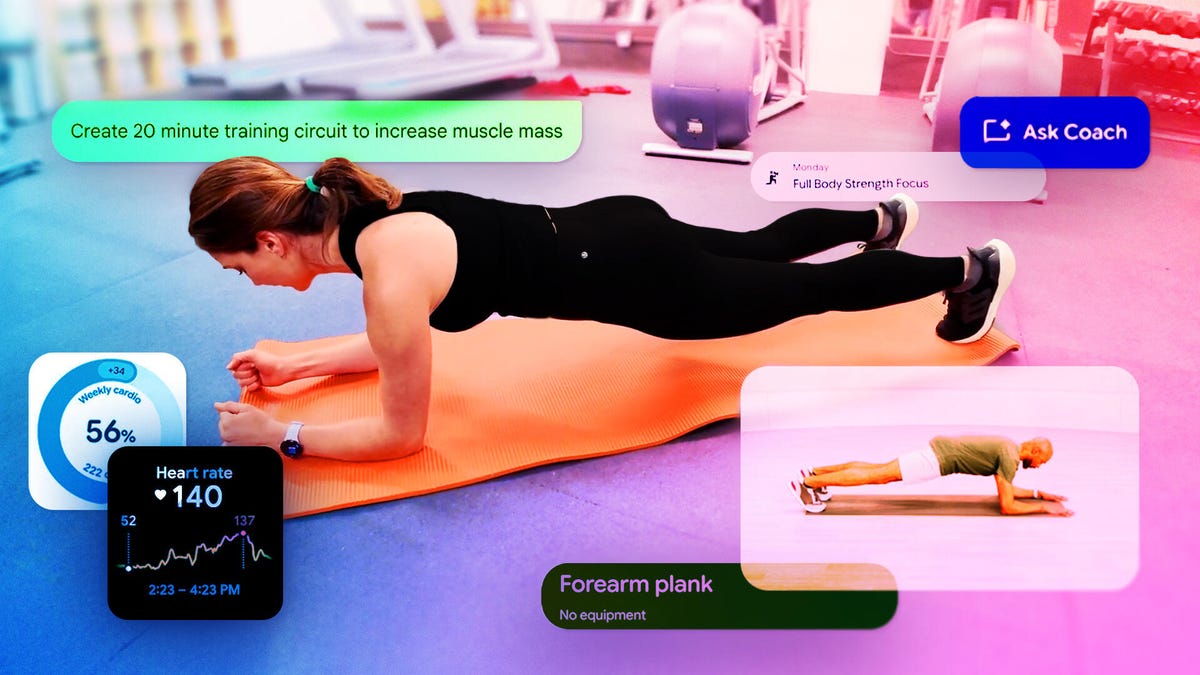
Over the last year, I tried them all, or at least the early versions of what they’ll eventually become. Personal trainers built into fitness apps. Chatbots tucked behind wearable dashboards. Coaches that whisper advice into your earbuds or nudge you from your smartwatch. Some free, some paid.
But so far, none has been game-changing in the way I’d hoped, and the trade-offs of handing over my health data often felt like a high price to pay. The dream in my head doesn’t quite match the reality taking shape.
Like with any new tech, it takes a while to weigh the long-term cost versus the short-term reward. But one thing is clear: This isn’t a passing trend. AI-driven health tech is poised to reshape personal health care in a way that smartwatches and smart rings haven’t yet.
In the best-case scenario, AI health apps and programs could help fill gaps in care and serve as a lifeline in communities with limited access to wellness information. In the worst-case scenario, they could open the floodgates to a privacy nightmare and mishandle medical data. Where this all lands depends on how we choose to use AI coaches and what guardrails are built around them.
Don’t miss any of our unbiased tech content and lab-based reviews. Add CNET as a preferred Google source.
AI in wearables isn’t new, but now it’s going rogue
The use of AI in health care, wellness and fitness has exploded in the last year, but the technology has been baked into the wearable experience for much longer. High heart-rate alerts, fall detection, even sleep scores… that’s all AI working behind the scenes.
According to Karin Verspoor, dean of the School of Computing Technologies at RMIT University in Melbourne, Australia, this type of AI is referred to as predictive modeling. «It’s a targeted tool that’s been trained to identify a particular type of event.»
In the case of these wearables, the «task» is looking for patterns outside the normal baseline and surfacing them as an alert. They’re precise and predictable.
But now we’re veering into something different and much harder to control: generative AI. With these full-on concierge-style chatbot models, not much different from ChatGPT or Gemini, any topic is fair game: heart rate patterns, premenstrual mood swings, diet tips or even medical recommendations (the latter, thankfully, usually prompts you to check with a human physician). The caveat is that these «health coaches» have an all-access pass to your most sensitive health data in real time.
«Large language AI models are essentially much more dynamic and much more responsive to whatever somebody puts into the prompt, and whatever the ongoing interaction with the system is,» says Verspoor. The problem, she notes, is that they’re also «subject to all of the problems that we have with large language models like confabulations or hallucinations.»
Over the past 18 months, it seems like nearly every major tech and fitness brand has launched its own version of an AI coach or chatbot-style concierge, and if they haven’t, they’re very likely considering it.
Google is testing an AI coach inside the Fitbit app, built on Gemini. Apple has released a Workout Buddy for the Apple Watch that offers real-time motivation via headphones based on live metrics during workouts, and is rumored to be exploring some kind of ChatGPT integration in its Health app. Samsung, Garmin, Oura and iFit have all rolled out AI features across their apps and wearable devices, while Meta has partnered with Garmin and Oakley to embed its Meta AI voice assistant into smart workout glasses.
That’s just a snapshot of the AI health coaches I’ve personally tested, and a fraction of what’s likely in development. Only Google’s is explicitly labeled a «coach,» but for the purposes of this article, they all fall under the same umbrella of AI health coaches.
Some of these features feel promising. Meta AI, for example, can read your Garmin heart-rate data into your ear through the glasses’ speakers so you don’t have to take your eyes off the trail. Or you might get training and rest-day recommendations based on how you slept and other physical data.
Other features, however, still feel half-baked. Samsung’s running coach, for example, offered a one-size-fits-all training plan that didn’t match my goals or experience.
In theory, these models should improve over time as they learn individual patterns and as people like me find better ways to leverage them. For now, though, most remain in their infancy, far from the full potential they’re meant to be: an always-available adviser, designed to make sense of the ever-growing pile of health data collected through wearables.
Best-case scenario: AI to the rescue
The current health care model in the US is overdue for a transformation. The system is overburdened, prohibitively expensive and facing demand that outpaces supply, especially in rural areas with limited access to doctors and medical equipment.
Dr. Jonathan Chen, professor of medicine and the director for medical education in artificial intelligence at Stanford, is optimistic that AI could play a constructive role in easing some of that pressure, especially when it comes to making sense of all the health information and clinical data in patient records.
«We already have ways to collect data for people all the time, but even your doctor doesn’t know what to do with all that data in the ICU, let alone all the wearable data,» says Chen.
AI, he argues, can help bridge that gap by synthesizing information in ways that actually matter, such as flagging warning signs of potentially life-threatening conditions like hypertension before they become fatal. Having a personal health concierge at your fingertips could help you focus more intimately on wellness and encourage behavioral changes that reduce the risk of chronic illness over time.
«Even though the actionable insight might not be that different,» said Chen, «when it feels personalized, that might be a way some people will engage deeper.» Chen emphasizes that AI works best when it drives better conversations, not when it replaces them. He points to glucose monitoring as an example: Instead of walking into an appointment with a month of raw data, AI could review that information ahead of time and surface patterns and actionable insights to guide the discussion.
I’ve seen that best-case scenario play out firsthand. A close family member began receiving irregular heart rhythm notifications from an Apple Watch. The alerts had never appeared during a routine doctor visit, nor after wearing a clinical heart monitor at home for weeks. When the watch flagged an episode in real time, he got in front of a doctor, confirmed the diagnosis with an ECG and took action. A few months later, he underwent a heart procedure that significantly reduced his risk of a potentially life-threatening event. In that case, the wearable didn’t replace medical care, but did exactly what it was meant to do: surface a signal, start a conversation and help close a dangerous gap in care.
But that same dynamic can just as easily tip in the other direction. False positives and over-indexing on minor deviations could lead to unnecessary tests and screenings, adding strain to an already overwhelmed health care system.
«Is there going to be a storm of patients banging on the doctor’s door? ‘My Apple Watch, my Fitbit told me I have some heart condition,'» says Chen. «‘You have to give me 100 scans right now and start me on medication.’ Like, whoa, whoa, whoa, buddy… Let’s take a look first. Let’s see what’s really there.»
It’s a familiar tension; an upgraded version of the Dr. Google era when even the most innocent search about a rash could spiral into a late-night panic over flesh-eating bacteria.
Pay to play: The price of privacy
My biggest concern when I started using these AI coaches was data sharing and privacy. Asking ChatGPT about a rash is one thing, but giving a chatbot access to my entire medical history is a completely different beast. Many of these health platforms contain years of my biometric data, along with my medical ID, which includes blood type and allergies.
The alternative is not to use them at all. In many cases, these AI coaches rely on a pay-to-play model, with some requiring an actual subscription. But the real payment is your data. «We can’t have reliable predictive models or generative models without having access to data of some variety,» says Verspoor.
The amount you give up and how it’s used varies by platform, but signing up involves wading through dense disclosures: permission to use your historical and real-time biometric data, location info and chat history to train other models. We’ve become so desensitized to these agreements that most people (myself included) aren’t even sure what we’re giving up anymore.
That confusion isn’t accidental. The language is often intentionally vague and nearly impossible to understand without a law degree. In my case, for example, using Oakley’s smart glasses required agreeing to let my data be used to train Meta’s AI.
A recent privacy analysis by the Electronic Privacy Information Center found that the health-related data people assumed was private (including searches, browsing behavior and information entered into health platforms) is often collected and shared far beyond its original context. In one case, data entered on a state health insurance marketplace was tracked and sent to third parties, such as LinkedIn, for advertising purposes. Much of this information falls outside HIPAA protections, meaning it can be legally repurposed or sold in ways consumers never intended.
Even when anonymized, health data can often be traced back to a real person and even used by insurance agencies to raise premiums.
«You can deidentify and can make it harder to tell, but if someone tried really hard, it’s actually not that hard to use statistical methods to reconstruct who’s actually who,» says Chen.
Data breaches and hacks are just the tip of the iceberg. We often have little visibility into how long data will be stored, who it might be shared with or where it could end up years down the line. Chen points to 23andMe as a cautionary tale. The company had promised privacy and security, until financial trouble put massive amounts of genetic data in jeopardy.
«They’ll keep it secure and private, but then they go bankrupt. And so now they’re just going to sell all their assets to whoever wants to buy it.»
AI health coach: friend or foe?
The reality, at least in the short term, is likely less extreme than either of those scenarios. We’re probably not on the verge of AI saving health care, or of selling our most sensitive health data to the highest bidder.
As Verspoor points out, the pay-to-play model isn’t exclusive to AI health coaches. Tech companies have been using personal data to power products long before generative AI entered the chat. Your search history may not look like an ECG, but it can be just as revealing about life stages, health anxieties or illness history.
With AI health coaches having a direct line to real-time biometric data, it’s more important than ever for people to pay close attention to what data they’re signing off on and who they’re handing it to. Is that information staying on-device? Is it being shared with third parties? And what happens to it down the line? This requires people to be in the driver’s seat when signing up and to read the fine print, even if it means having to copy and paste it into yet another AI chatbot to translate the legal jargon. Then weigh whether the exchange is worth it to you.
Chen believes the potential upside still outweighs the risks, especially if these tools succeed at getting people to care more about their health and engage with it more often. That engagement, he argues, is where the real value lies so long as AI remains a supplement to care, not a substitute for it. Both experts agree AI health coaches should function as ancillary tools to help you understand your data, ask better questions and jump-start conversations with your doctor.
AI coaches may know your day-to-day vitals, but they still have blind spots when it comes to real-world context and medical-grade testing. Their advice, no matter how innocuous and obvious it may sound, like «hydrate after a bad night of sleep,» should be taken with a healthy dose of skepticism. Unlike tools such as ChatGPT or Google’s Gemini, some AI health coaches, including Google’s Fitbit Coach and Oura’s Advisor, don’t clearly cite sources or explain where their recommendations come from, at least not yet.
The tipping point
The reality, at the moment, is less dramatic than either of these extremes. We’re probably not on the brink of AI saving health care, or of plummeting into a full-blown medical data dystopia. Instead, we’re in this awkward in-between phase.
I was initially excited about the idea of an AI health coach taking some of the mental load off interpreting my health data. That quickly turned to skepticism as the privacy trade-offs became apparent. Now, after months of testing, I’ve landed somewhere else entirely: Most days, I forget the tool is there in the first place.
That gap between insight and action is something human coaches have long understood. Jonathan Goodman, a fitness coach and author of Unhinged Habits, says AI excels at processing data, but behavior change rarely hinges on perfect metrics or the perfect training plan.
«For a general-population human who just needs to move a little bit more, eat a little bit better, and play with their kids, it’s probably closer to 10% technical and 90% psychological,» he says. Metrics can surface patterns, but coaching is about asking the right questions, fitting movement into real life and recognizing those moments when someone is ready to push themselves into real transformation.
To me, it’s that in-the-moment guidance, pushing me past my limit or telling me when to scale back, that’s missing from these AI coaches. The experience is largely passive, often requiring you to check the app to see that day’s training plan. Apple’s Workout Buddy might be the closest to that, with real-time motivation based on your stats, but even that stops short of actual coaching. And none has proven indispensable enough to make me seek it out consistently.
To reach that tipping point, these companies will need to give us stronger reasons to engage and clearer safeguards to justify handing over our deeply personal health data.
Technologies
Newest Apple Watch Models Compared: Apple Watch Series 11 vs. Ultra 3 and SE 3
Apple made changes to its entire Apple Watch lineup this year. Which one fits you best?
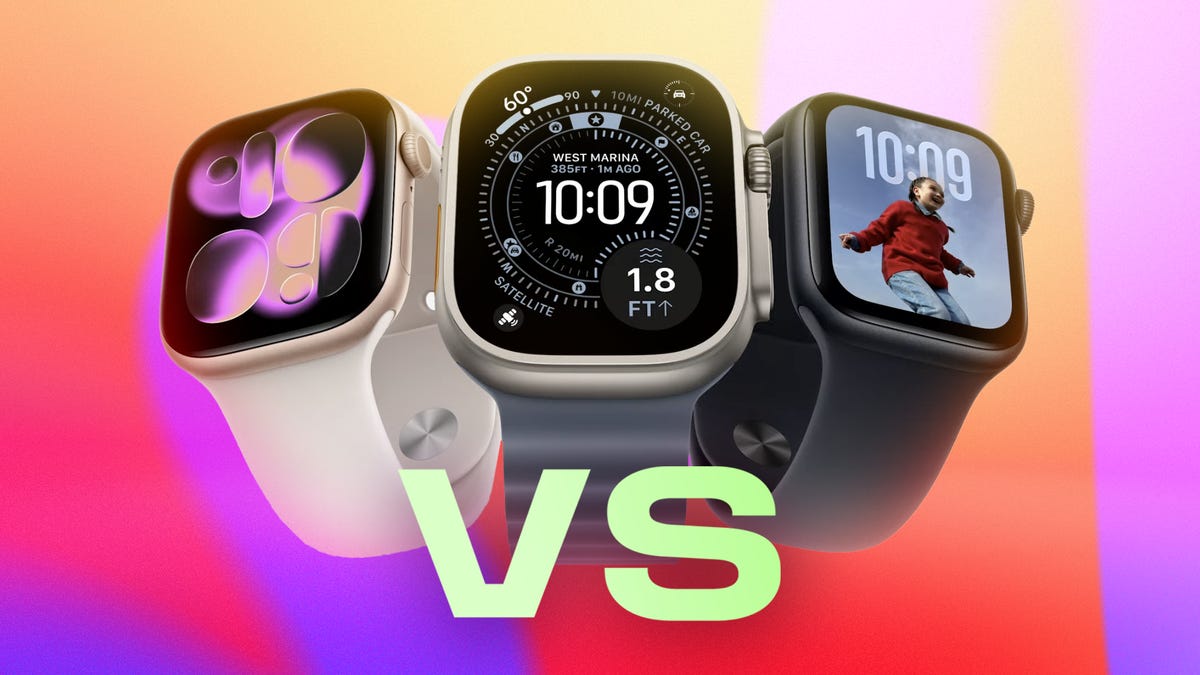
It’s the most watch-ful time of year, and if you’re thinking of giving or receiving a new Apple Watch as a gift, Apple has made the choices extra challenging this season. The flagship Apple Watch Series 11, rugged Apple Watch Ultra 3 and economical Apple Watch SE 3 models are a lot closer in features and specs than they’ve ever been. Let’s compare them to see which deserves a place in a gift box — or on your wrist.
Don’t miss any of our unbiased tech content and lab-based reviews. Add CNET as a preferred Google source.
Pricing the Apple Watch Series 11, Ultra 3 and SE 3
The 2025 Apple Watch line spans a wide price range, starting as low as $249 for the Apple Watch SE 3 and going as high as $1,299 for a titanium Apple Watch Series 11 with an Hermès band. Like most fashion accessories, you can choose from different case sizes, materials, cellular connectivity options and bands to find the right fit — and price — for your watch.
The Apple Watch Series 11 offers the widest price range, with two case sizes, two body materials, optional cellular connectivity and premium Hermès models. The Apple Watch SE 3 is only available in aluminum and has the earlier, slightly smaller case sizes. The Apple Watch Ultra 3 comes only in titanium, with a single 49mm size and cellular included by default.
Read more: Find the best deals on the Series 11 and Ultra 3.
Here’s how they break down:
| Apple Watch Series 11 | GPS | GPS plus cellular |
|---|---|---|
| 42mm aluminum | $399 | $499 |
| 46mm aluminum | $429 | $529 |
| 42mm titanium | $699 | |
| 46mm titanium | $749 | |
| Hermès 42mm titanium | $1,249 | |
| Hermès 46mm titanium | $1,299 | |
| Apple Watch SE 3 | ||
| 42mm aluminum | $249 | $299 |
| 46mm aluminum | $279 | $329 |
| Apple Watch Ultra 3 | ||
| 49mm titanium | $799 | |
| Hermès 49mm titanium | $1,399 |
Series 11 vs. Ultra 3, SE 3 physical designs
The core rounded-rectangle design of the Apple Watch has seen incremental changes since its first iterations. The Series 11 shares the slimmer 9.7mm height profile of the Series 10, with 42mm and 46mm diagonal sizes. Weight is light across the board, from 29.7 to 43.1 grams depending on size and case material. Aluminum models come in space gray, jet black, rose gold or silver, while titanium versions are offered in natural, slate or gold finishes.
The Apple Watch SE 3 is slightly thicker (10.7mm) and slightly smaller, with 40mm and 44mm sizes. Its design most closely harkens back to earlier Apple Watch models. It weighs 26.4 grams or 33 grams, depending on the case size. And as the no-frills option, the SE 3 comes in either midnight (black) or starlight (silver).
The Ultra 3 is the most significant departure from the original design, with 14.4mm thickness, 49mm diagonal size and a more solid weight of 61.6 grams. Its titanium body comes in either natural or black — unless you opt for the Hermès edition, which is only offered in natural.
CNET lead writer Vanessa Hand Orellana described the Ultra 3 in her review as being «like the luxury Land Rover you see in safari brochures: It’s adventure-ready on the outside, with all the modern conveniences on the inside.» The body is also 3D-printed using 100% recycled titanium, but you’d never know it; there are none of the telltale layering indications found on most 3D-printed items.
Each watch has Apple’s Digital Crown and a side button. The Ultra 3 also includes a programmable Action button, which can, for example, start a workout with a single press.
Looks aside, all three Apple Watch models are built for durability. The SE 3 is water resistant to 50 meters, so you don’t need to baby it — whether you’re showering, swimming or just living through a rainy Pacific Northwest day.
The Series 11 is also rated for water resistance to 50 meters, while the Ultra 3 doubles that with a 100-meter rating. They’re both also certified as IP6X dust resistant, which is better than the SE.
Series 11 vs. Ultra 3, SE 3 displays
The Series 11 and Ultra 3 both use an LPTO 3 OLED display, which has the advantages of staying always on, giving you a wide viewing angle, so you don’t need to look at it head-on to see the time. It can also get very bright: 2,000 nits of peak brightness for the Series 11 and 3,000 nits (the same as the iPhone 17 Pro) for the Ultra 3.
The energy-efficient screen can refresh its display at just one nit of brightness once every second when in its passive state, so you can always see the second hand or indicator (depending on the watch face).
The display is protected by sapphire crystal on the titanium Series 11 and the Ultra 3. According to Apple, the aluminum Series 11 uses Ion-X glass, which is twice as scratch-resistant as the Series 10.
In past generations, the SE was stuck with the lowest-quality screen, but not this time. The SE 3 gets an always-on LTPO OLED display that reaches up to 2,000 nits of brightness and dims to just 2 nits when inactive. But it doesn’t refresh as often as the Series 11 and Ultra 3, so the seconds indicator only appears when the screen is active. It’s still a big «quality of life» bump from prior SE watches, which don’t have an always-on display mode.
Series 11 vs. Ultra 3, SE 3 battery life
One surprise with the new Apple Watch lineup is improved battery life in the Series 11 and Ultra 3, plus a fast-charge option on the SE 3 that makes it easy to top up for a night’s sleep after a full day.
Apple claims up to 24 hours of use on a battery charge for the Series 11, up from the Series 10’s 18 hours. It also claims up to 38 hours in Low Power mode, a notch above the 36 hours of the Series 10. That fast-charging option can bring the battery level up to 80% in 30 minutes, but putting the watch on its charger for just 15 minutes can boost it for up to eight hours.
Hand Orellana writes in her Series 11 review, «The six-hour battery bump on the Series 11 may not sound like much on paper, but it’s given me some welcome breathing room to figure out a better charging strategy.»
The SE 3 still delivers up to 18 hours of use, or 32 hours in Low Power mode. It also supports fast charging — up to 80% in 45 minutes, or about eight hours of use from a quick 15-minute top-up.
If you want the most time between charges, the Ultra 3 remains the Apple Watch to get. It can last for up to 42 hours, per Apple, or up to 72 hours in Low Power mode. Fast charging its larger battery takes it to 80% in about 45 minutes, and 15 minutes on the cable will give you roughly 12 hours of power.
Some of these gains come from Apple factoring in a night’s sleep, but credit also goes to the more power-efficient LTPO 3 screen in the Series 11 and Ultra 3.
It’s one thing to reference Apple’s claims, but what about battery life in practice? In Hand Orellana’s review of each model, she recorded even better battery life than Apple’s estimates. Keep in mind your daily usage will affect results, but here’s what she found:
| Apple Watch | Apple’s estimate | CNET review |
|---|---|---|
| Series 11 | 24 hours | 27-32 hours |
| Ultra 3 | 42 hours | 45-49 hours |
| SE 3 | 18 hours | 20-25 hours |
Series 11 vs. Ultra 3, SE 3 health features
The Apple Watch SE line has always sacrificed some hardware and features to remain the least expensive option, and the SE 3 continues that tradition — but not to the same extent. It lacks an electrical heart sensor found in the Series 11 and Ultra 3, so it can’t take heart readings using the ECG app to look for signs of atrial fibrillation (Afib).
According to Apple, the SE 3 uses a second-generation optical heart sensor that tracks heart rate during exercise, sleep and potential emergencies — though, like all Apple Watches, it can’t detect heart attacks or measure blood oxygen. The Series 11 and Ultra 3 upgrade to third-generation optical heart sensors.
The SE 3 is also missing a water temperature sensor and depth gauge, making the Series 11 and Ultra 3 better options if you spend a lot of time in water and want to track swim workouts or shallow dives more reliably.
This year’s standout health feature is the ability to analyze data and check for signs of possible hypertension, or high blood pressure. «It’s not the full on-the-spot blood pressure monitoring Apple fans have long hoped for,» wrote Hand Orellana, «but it’s a major step forward — one that Apple says could help 1 million people get diagnosed with hypertension in the first year alone.»
Like the sleep-apnea tracking introduced last year, hypertension notifications are not a screening tool; think of it as a warning system that prompts you to get checked out by your doctor. The Series 11 and Ultra 3 include this ability (sorry, SE 3), and require 30 days of data collection before triggering notifications. The Series 9, Series 10 and Ultra 2 also get hypertension notifications in WatchOS 26.
Series 11 vs. Ultra 3, SE 3 connectivity
Each of the Apple Watch models supports cellular communications, allowing you to stay connected even when your iPhone is at home. You can order the aluminum Series 11 models and the SE 3 with the cellular option; the titanium Series 11 and the Ultra 3 include it by default.
What’s unique about these watches is their support for both 5G and LTE networks, offering faster speeds and broader compatibility. Plus, they use 5G Reduced Capacity technology, which is more power efficient than the 5G networking in your iPhone.
They also support Wi-Fi 4 (802.11n, at 2.4GHz and 5GHz frequencies), Bluetooth 5.3 and L1 GPS location chips. The Ultra 3 includes dual GPS radios (L1 and L5) for more precise location tracking, especially in challenging environments like dense downtown corridors.
Plus, the Ultra 3 offers satellite connectivity directly from the watch. With a direct view of the sky, it can communicate with overhead satellites for sending and receiving texts, sharing your location and accessing emergency services.
Series 11 vs. Ultra 3, SE 3 processors
One of the biggest surprises in the lineup? The Apple Watch Series 11, Ultra 3 and SE 3 all include the same S10 chip. It’s worth noting that the S10, introduced in last year’s Series 10, isn’t a new processor generation for 2025. But each watch now includes 64 gigabytes of storage, a four-core Neural Engine and a 64-bit dual-core processor.
The only significant difference is that the Apple Watch SE 3 is the only model not to get Apple’s second-generation Ultra Wideband chip, which is used for precise location tracking. You can still use Find My from an iPhone (equipped with UWB) to tell if the SE 3 is with you or if you left it at home. But with the Series 11 and Ultra 3, Find My will point you in the right direction as you get closer to your mislaid watch.
WatchOS 26 on the Series 11, Ultra 3 and SE 3
Each model is preloaded with WatchOS 26, which has the new Liquid Glass interface (though in most cases, it’s quite subtle). And all models add features like the new Wrist Flick gesture, nightly sleep scores, Workout Buddy, the Notes app and live translation in Messages. The Series 11 and Ultra 3, with their upgraded sensors, also gain hypertension notifications.
Apple Watch Series 11, Ultra 3 and SE 3 specs
| Apple Watch Series 11 | Apple Watch Ultra 3 | Apple Watch SE (3rd Gen) | |
| Design & sizes | Rectangular, 42mm, 46mm | Rectangular, 49mm | Rectangular, 40mm, 44mm |
| Display | 42mm: 446 × 374 pixels; LTPO3 OLED Retina display (wide-angle) 46mm: 496 × 416 pixels; LTPO3 OLED Retina display (wide-angle) | 49mm: 514 × 422 pixels; LTPO3 OLED Retina display (wide-angle, Always-On) | 44mm: 368 × 448 pixels (Always-On Retina LTPO OLED)Apple 40mm: 324 × 394 pixels (Always-On Retina LTPO OLED) |
| Brightness | Between 1 and 2000 nits | Between 1 and 3000 nits | Up to 1000 nits |
| Thickness & weight | 46mm: 9.7mm; 37.8g (aluminum GPS), 36.9g (aluminum GPS+Cellular), 43.1g (titanium) 42mm: 9.7mm; 30.3g (aluminum GPS), 29.7g (aluminum GPS+Cellular), 34.6g (titanium) | 49mm: 14.4mm; 61.6g (titanium) | 44mm: 10.7mm; 33.0g (aluminum GPS+Cellular) 40mm: 10.7mm; 26.4g (aluminum GPS+Cellular) |
| Material & finish | Aluminum: Jet black, rose gold or silver finish; Titanium: slate, gold or natural finish with sapphire crystal display (titanium) | Titanium, natural or black finish with sapphire crystal display (titanium) | 100% recycled aluminum, midnight and starlight |
| Durability | 2X more scratch resistant glass (aluminum), 5ATM Water + IP6X (dust) | Water resistance 100m; dust IP6X, scuba to 40m, tested to MIL-STD 810H | Cover glass is 4X times more resistant to cracks than the SE 2; made of Ion-X glass. Water resistant up to 50 meters |
| Battery life | Up to 24 hours, up to 38 hours Low Power (always-on) + Fast charge: 80% in 30 min, 100% in 60 min | Up to 42 hours; up to 72 hours Low Power. Fast charge to 80% in 45 min, 100% charge 75 min | All-day, 18-hour battery life. Fast charging with 8 hours of normal use in just 15 minutes on the charger |
| Sensors | ECG, 3rd-gen optical heart sensor, skin temp, depth gauge, SpO2, Noise monitoring, water temperature, compass | ECG, 3rd-gen optical heart sensor, skin temp, depth gauge, SpO2, Noise monitoring, water temperature, compass | Wrist temperature, Second-generation optical heart sensor |
| Emergency features | Satellite SOS, Emergency SOS, Fall detection, Crash detection, Check in and Backtrack | Satellite SOS, Emergency SOS, Fall detection, Crash detection, Check in and Backtrack | Fall Detection, Crash Detection, Emergency SOS, and Check In |
| AI & coaching | Siri (voice assistant); Workout Buddy | Siri (voice assistant); Workout Buddy | On-device Siri, Workout Buddy |
| Processor | S10 SiP with 64-bit dual-core processor, W3 Apple wireless chip | S10 SiP with 64-bit dual-core processor, W3 Apple wireless chip | S10 SiP with 64-bit dual-core processor, W3 Apple wireless chip |
| RAM/Storage | 64GB (storage) | 64GB (storage) | 64GB (storage) |
| Payments | Apple Pay | Apple Pay | Apple Pay |
| Price (US) | $399-$750 (titanium) | $799 | $249 (starting) |
-
 Technologies3 года ago
Tech Companies Need to Be Held Accountable for Security, Experts Say
-
 Technologies3 года ago
Best Handheld Game Console in 2023
-
 Technologies3 года ago
Tighten Up Your VR Game With the Best Head Straps for Quest 2
-
 Technologies4 года ago
Black Friday 2021: The best deals on TVs, headphones, kitchenware, and more
-
 Technologies4 года ago
Verum, Wickr and Threema: next generation secured messengers
-
 Technologies4 года ago
Google to require vaccinations as Silicon Valley rethinks return-to-office policies
-
 Technologies4 года ago
Olivia Harlan Dekker for Verum Messenger
-
 Technologies4 года ago
iPhone 13 event: How to watch Apple’s big announcement tomorrow


