

Technologies
Your Holiday Survival Guide to Finding a Dead or Stolen iPhone
It’s a busy time of year, between work and holiday festivities. If you happen to misplace or have your iPhone stolen, here’s how to get it back.

‘Tis the season for holiday parties and festivities, but a lost iPhone can quickly spoil the joyous cheer and vibe fast. Whether misplaced or stolen, modern iPhones have powerful features to help.
Apple’s Find My feature, with its crowdsourced Find My Network, is your best ally. It sends your phone’s location to iCloud, even when the device is off. For added defense, Stolen Device Protection secures sensitive data, such as credit cards and passwords.
If you have an iPhone 11 or newer (excluding the 2020 and 2022 iPhone SE), you have the ultra-wideband chip for offline finding. As long as Find My is enabled and you’re signed in to your Apple ID, you can locate your iPhone even if the battery is dead. Before panicking, follow these steps to recover your phone.
Apple Find My and Find My Network aren’t the same
Apple Find My and Find My Network are different, which can be confusing. While Find My is now the name of an app, the Find My Network is what allows you to locate your device when it’s offline, turned off or low on power.
You can use the Find My Network feature within Apple’s Find My app or sign into your Apple ID at iCloud.com to locate your misplaced iPhone. Plus, the app also allows you to add other Apple products and items that you want to track to your Find My Network.
Don’t miss any of our unbiased tech content and lab-based reviews. Add CNET as a preferred Google source.
How to turn on Find My and Find My Network
You need to make sure Find My and Find My Network are set up to allow you to locate your switched-off iPhone. Open Settings and follow these steps:
- Tap on your name in the Settings menu.
- Go to Find My > Find My iPhone and make sure the switch is toggled on.
- Below Find My iPhone, you’ll see Find My Network and Send Last Location toggles. Turn them on, too.
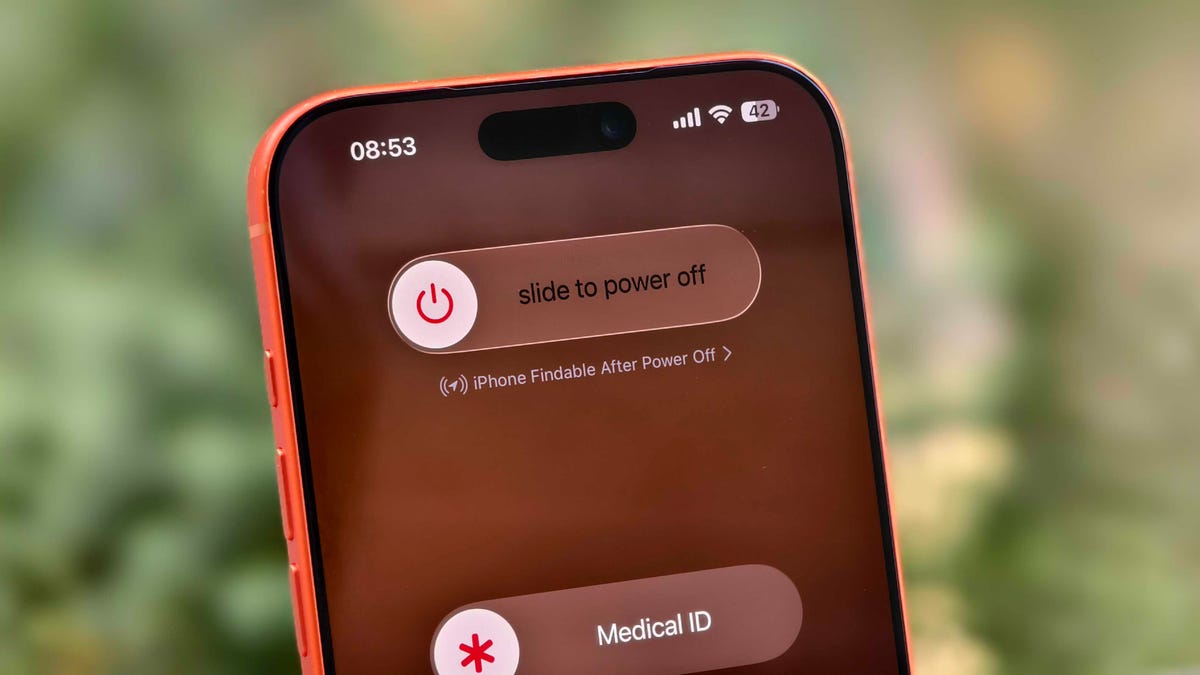
You can check if your iPhone is discoverable even when it’s switched off by going to the power menu: Swipe down from the top-right corner to view Control Center and press and hold the power button in that corner, or hold the side and volume down button. Under the «slide to power off» slider, look for «iPhone Findable After Power Off.» Your iPhone is now all set to be found, even if a thief turns it off.
However, there are a few exceptions. If your iPhone hasn’t sent its location to Apple through Find My in the last seven days, you’ll see «No location found» next to your device. It can happen if there’s an issue with your device’s location services.
How to find a lost iPhone with the Find My app on another Apple device
Now comes the hard part: What happens after you lose your iPhone? Assuming you’ve completed the steps above, you can keep calm. If you have another Apple device, such as an Apple Watch, iPad or MacBook, follow the steps below to locate your misplaced or stolen iPhone. This will also work on a friend’s or family member’s device that you’ve shared your location with.
- Open the Find My app and locate your iPhone in the list under the Devices tab. You should see it in this list (even if it’s powered off) as long as you have previously enabled the Find My iPhone, Find My Network and Send Last Location options.
- Tap or click the name of your iPhone. This should take you to a menu with several options for finding your phone or marking it as lost.
- If you misplaced your iPhone and you’re sure that it’s nearby, tap or click Play Sound or Directions to make the device play a sound or get directions to the device’s last recorded location, respectively.
- If you’re sure your iPhone is stolen, tap Activate under the Mark As Lost option. This immediately locks the device with your passcode, suspends Apple Pay and displays a custom message with your contact information for anyone who finds it. You can also use Send Last Location to locate the last known location of your device.
How to find a lost iPhone if you don’t have another Apple device
In case you don’t have another Apple device, you can sign into your iCloud account in a web browser to find your lost iPhone (though this option can be troublesome if you don’t have another Apple device because of two-factor authentication). Follow these steps to use a web browser to see your lost iPhone’s location:
- Go to icloud.com/find and sign in with your Apple ID.
- Go to the Devices list.
- From here, use the same options for playing a sound, marking your device as lost or erasing the device as you would in the app.
You can also disable Control Center access on the lock screen while traveling abroad to prevent a thief from turning off data or enabling Airplane mode. To do this, do the following:
- Go to Settings > Face ID & Passcode (or Touch ID & Passcode) and enter your passcode.
- Under the Allow Access When Locked section, toggle off the Control Center option.
This option can add some inconvenience to day-to-day use, but I recommend turning off Control Center while traveling.
These settings give you the best chance of finding your iPhone if it’s been stolen and turned off. For more iPhone tips and advice, check out our guide to the Camera Control and how to block distracting websites.
Technologies
Amazon’s Alexa Plus Confounds Chris Hemsworth in Super Bowl Ad as the AI Tool Launches
Alexa Plus is aiming higher with a new superhero Super Bowl spot and a US-wide launch, including a free version for any app user.

The Alexa Plus AI has been in early access for over a year, but this week all that changes, starting with a Thursday preview at Amazon’s upcoming Super Bowl ad featuring Chris Hemsworth. Let’s look at how our phones and smart speakers are getting this smart voice assistant upgrade.
I’ve been reviewing beta Alexa Plus over the past year and found the AI upgrade to be highly conversational and more capable than the old Alexa, bringing new ties to third-party apps like Uber and Ticketmaster. Starting on Tuesday, Amazon has completed its rollout and made Alexa Plus available to anyone who wants to try it in the US.
It’s no wonder Hemsworth got worried at just how responsive the voice assistant could be. The rogue AI scenarios in the Super Bowl ad playfully acknowledge people’s fears over inviting generative artificial intelligence into their private lives as the Australian actor gets hacked by a garage door, drowned in his pool and mauled by an Alexa-ordered bear.
Amazon makes it clear that no damage was ultimately done.
«By casting Chris Hemsworth, the last guy on the planet you’d expect to be scared of anything, we were able to lean into the conversation and put people at ease through humor,» said Jo Shoesmith, Amazon’s global chief creative officer.
Alexa Plus arrives with a free version and more
So, what does this new Alexa Plus expansion — available now — include? The most interesting part is several tiers of the AI’s service, starting with a free version that anyone can use as long as they have the Alexa app downloaded or visit the web portal Alexa.com (which we’ve also tried).
You won’t get any advanced Amazon Echo capabilities that way, but you will be able to test out Alexa’s conversational AI and see how similar it is to talking to a human. Alexa Plus errs on the side of chatty, but its ability to summarize answers, stop in mid-conversation and answer follow-up questions is welcome. As I’ve said before, it feels like what voice assistants were always supposed to be like.
«Alexa Plus is built to make customers’ lives meaningfully easier — and that starts with conversation. Because Alexa Plus lives in the middle of everyday life, it has to be natural and trustworthy,» Panos Panay, senior vice president at Amazon Devices & Services, tells CNET. «The Super Bowl is the perfect moment to introduce this evolution at scale.»
Two other Alexa AI tiers exist. The first comes when you subscribe to Amazon Prime for $15 per month. That unlocks not only Prime’s own content but also all Alexa Plus capabilities across all compatible devices. This includes Echo smart speakers and AI video summaries for Ring security cameras, among other tricks. You can try telling your Echo device to «Upgrade to Alexa Plus» to get started.
The final option is paying $20 per month to unlock all Alexa Plus capabilities across all devices, independent of an Amazon Prime subscription. Alexa won’t be able to interact with Prime content like videos or Amazon Music, but it can connect with everything else the AI upgrade offers. Since you need an Amazon account either way, this tier is for specific people who want to avoid Prime content.
Is the new Alexa AI worth your time?
If you’re wondering whether Alexa Plus is worth it compared to alternatives like Gemini for Home or whatever Apple is cooking up with Siri, I found my experience with the voice assistant to be the most positive I’ve had overall. Sometimes a little too positive — as we’ve seen with chatbots, Alexa Plus can be very willing to agree with you and promise to do anything, even if it can’t.
Also, if you use an Echo, it will send your voice recordings to Amazon for automatic analysis; there’s no getting around that privacy concession if you want Alexa on a smart device.
Those issues aside, Alexa Plus as part of Amazon Prime for $15 is an excellent deal, especially if you already use Prime for ordering, catching up on Fallout, etc. If you’re not sure how talking to the new and vivacious Alexa feels like, all you need is an Amazon account to try it out online.
Technologies
Snag a Rare Discount on the Amazing Beats Powerbeats Fit Earbuds With This Limited-Time Deal
Get yourself these amazing earbuds while they’re back down to their lowest-ever price.
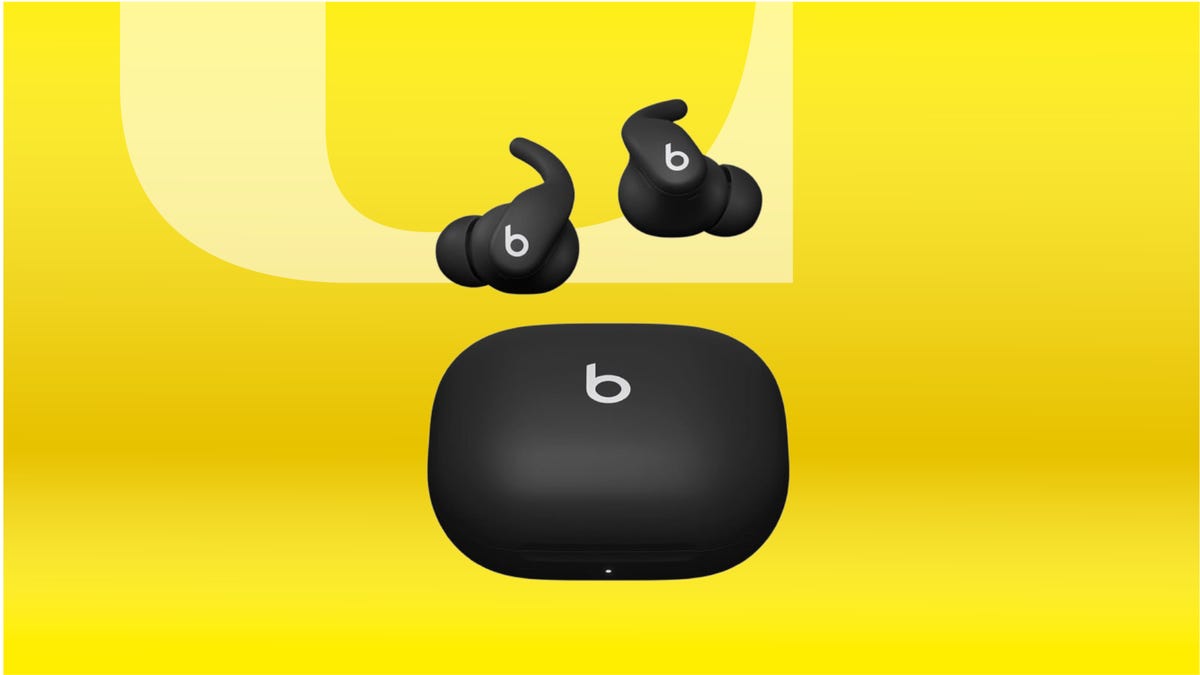
The 2025 Beats Powerbeats Fit is on our list of the best workout earbuds and headphones, and right now you can get yourself these powerful Beats Powerbeats Fit earbuds for $180. That’s a $20 discount and brings them back down to their all-time low price. They’re worth it at full price, so if you want them, now’s a fantastic chance to pick them up for less. The only issue is that Amazon’s limited-time deals don’t last long, so you’ll need to be quick if you want to secure them at this price.
The upgrades on the Powerbeats Fit are mostly cosmetic and concern ear fit, so they’re a better fit for people who don’t currently own another pair of Beats in the Powerbeats family. In his review, CNET’s audio expert David Carnoy said, «The design upgrades to the wingtips and case do improve the buds, which remain quite appealing for those looking for secure-fitting earbuds for workouts and everyday use.»
The Powerbeats Fit includes ear tips in four sizes, including extra small, so that everyone can find a secure fit. They can last up to 30 hours when carrying around their charging case, and they offer active noise cancellation that comes in handy when you’re getting your reps in. Both the earbuds and the case are IPX4 water and sweatproof, which means your workout won’t get in the way of your music or audiobooks.
Need more ideas for your next pair of earbuds upgrade? We’ve got a list of the best wireless earbuds you can check out so you can make the most of your holiday cash gifts.
HEADPHONE DEALS OF THE WEEK
-
$248 (save $152)
-
$170 (save $181)
-
$398 (save $62)
-
$200 (save $250)
Why this deal matters
Like other audio gear from Beats, the Powerbeats Fit earbuds offer excellent sound, a comfortable fit and decent noise cancellation. However, they usually command a price of $200. This modest Amazon discount of $20 brings them down to $180 for a limited time, their best price to date across several colors.
Technologies
Today’s NYT Connections Hints, Answers and Help for Feb. 5, #970
Here are some hints and the answers for the NYT Connections puzzle for Feb. 5 #970.
Looking for the most recent Connections answers? Click here for today’s Connections hints, as well as our daily answers and hints for The New York Times Mini Crossword, Wordle, Connections: Sports Edition and Strands puzzles.
Today’s NYT Connections puzzle is kind of tough. Read on for clues and today’s Connections answers.
The Times has a Connections Bot, like the one for Wordle. Go there after you play to receive a numeric score and to have the program analyze your answers. Players who are registered with the Times Games section can now nerd out by following their progress, including the number of puzzles completed, win rate, number of times they nabbed a perfect score and their win streak.
Read more: Hints, Tips and Strategies to Help You Win at NYT Connections Every Time
Hints for today’s Connections groups
Here are four hints for the groupings in today’s Connections puzzle, ranked from the easiest yellow group to the tough (and sometimes bizarre) purple group.
Yellow group hint: Star-spangled signs.
Green group hint: Smash into.
Blue group hint: Not green or red.
Purple group hint: Same surname.
Answers for today’s Connections groups
Yellow group: Cultural symbols of the US.
Green group: Collide with.
Blue group: Blue things.
Purple group: Lees of Hollywood.
Read more: Wordle Cheat Sheet: Here Are the Most Popular Letters Used in English Words
What are today’s Connections answers?
The yellow words in today’s Connections
The theme is cultural symbols of the US. The four answers are American flag, apple pie, bald eagle and baseball.
The green words in today’s Connections
The theme is collide with. The four answers are bump, butt, knock and ram.
The blue words in today’s Connections
The theme is blue things. The four answers are jeans, lapis lazuli, ocean and sky.
The purple words in today’s Connections
The theme is Lees of Hollywood. The four answers are Ang, Bruce, Christopher and Spike.
-
 Technologies3 года ago
Tech Companies Need to Be Held Accountable for Security, Experts Say
-
 Technologies3 года ago
Best Handheld Game Console in 2023
-
 Technologies3 года ago
Tighten Up Your VR Game With the Best Head Straps for Quest 2
-
 Technologies4 года ago
Black Friday 2021: The best deals on TVs, headphones, kitchenware, and more
-
 Technologies5 лет ago
Google to require vaccinations as Silicon Valley rethinks return-to-office policies
-
 Technologies5 лет ago
Verum, Wickr and Threema: next generation secured messengers
-
 Technologies4 года ago
Olivia Harlan Dekker for Verum Messenger
-
 Technologies4 года ago
iPhone 13 event: How to watch Apple’s big announcement tomorrow


