

Technologies
Backbone One vs. Backbone Pro: Here’s the Mobile Controller You Should Buy
For gaming on a phone, Backbone’s controllers are some of the best. The decision comes down to how much you’re willing to pay.

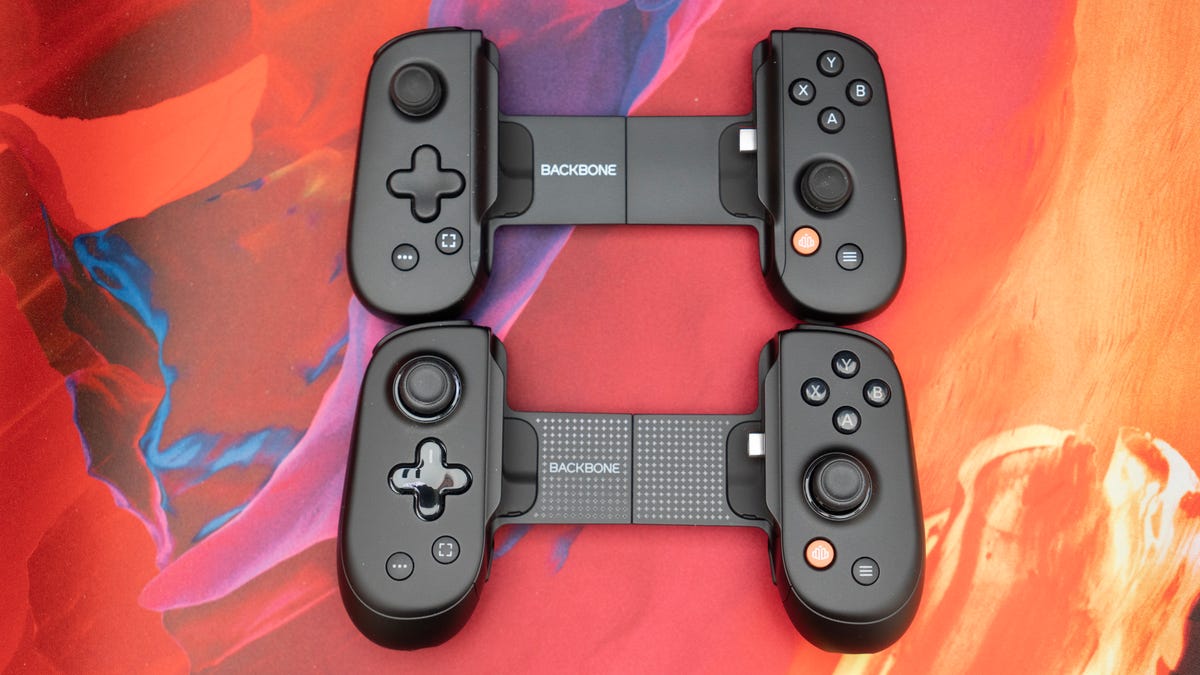
If you’ve explored the world of mobile gaming on a phone or tablet within the last few years, you’ve likely heard of the Backbone controller.
Backbone wasn’t the first company to make a controller specifically for phones, but it’s certainly the most well-known today. In 2020, the Backbone One burst onto the scene with its iOS controller and quickly rose to prominence for offering gamers a whole new way to play. At the time, most mobile controllers were simply clips that attached your phone to a console controller.
The Backbone One places the grips and controls around the phone, much more akin to what made the Nintendo Switch so popular when it was released in 2017. The most innovative part was that, instead of using Bluetooth to connect to your phone, the Backbone One connected directly via a Lightning connector. This eliminated the input lag problem with Bluetooth and made gaming on your phone a much more immersive experience.
Since then, the company has launched an updated USB-C version, a PlayStation Edition, an Xbox Edition and, most recently, the Backbone Pro controller.
If you’re considering picking up a mobile controller, Backbone is a great place to start. Here are some important things to consider to make sure you get the right one for you.
Backbone One: Keep it simple
Backbone essentially has two controllers: the Backbone One and the Backbone Pro.
Since Apple transitioned from its Lightning connector to USB-C for the iPhone a couple of years ago, there are no longer two separate controllers for iPhone and Android. The same Backbone controller will work for both iPhone (15 and newer) and Android. If you’re using an iPhone 14 or an older model, however, you can still purchase the Lightning version.
For the $100 Backbone One, the differences between the standard One, the PlayStation Edition and the Xbox Edition are almost entirely aesthetic.
The PlayStation Edition comes in white and features the same glyph symbols as the PlayStation controllers, instead of the more traditional ABXY face buttons. The PlayStation Edition is also the only one officially supported for PS Remote Play on Android. (That doesn’t mean you can’t use the other versions with PS Remote Play; Backbone has an «official» version because Sony requires it for licensing reasons.) While it’s still possible to use PS Remote Play with a different Backbone controller, the experience may not be as seamless as you would need, likely requiring some sort of emulation.
The Xbox Edition comes in a translucent green color that’s come to be associated with Xbox and replaces Backbone’s screen capture button with an Xbox button. In addition to triggering screen captures, the Xbox button either opens a collection of Xbox games while in the Backbone app or triggers the Xbox secondary button press while in Xbox games or apps.
Unless you use PS Remote Play or Xbox Cloud Gaming primarily on your phone, there’s really no need to pick up either of those versions (even if the white controller does look really clean).
The Backbone One is great for providing more gaming control than just a touchscreen, but when you still want something compact and easy to carry around, especially if you opt for the carrying case to accompany it.
Backbone Pro: Level up
For more serious mobile gamers or those who prefer a more traditional feel, or just want a better grip, the Backbone Pro controller is much more your speed.
It builds on the original Backbone One in every way. The grips are bigger and more ergonomic. The joysticks are full-size, much more like what you’re used to from standard console and PC controllers, and there are two additional buttons on the back that can be remapped to anything you want. It also features Bluetooth connectivity, allowing for multiple ways to play.
Plus, the Hall Effect triggers add durability, and they are textured for better grip. The Backbone Pro also supports creating multiple profiles to customize and remap the buttons for all your favorite games.
One of the best features of the Backbone One is that it can also serve as a controller for a PC or tablet, simply by connecting it with a cable. The Backbone Pro takes this a step further by allowing you to seamlessly switch between devices wirelessly via Bluetooth. It works surprisingly well and is a fantastic option for those who enjoy gaming on multiple devices and screens.
Honestly, the only big downside of the Backbone Pro is the price. At $170, it’s $20 more than the Razer Kishi V3 Pro, which is arguably a better controller. However, Backbone controllers offer a significant advantage in software and native game compatibility, particularly on Android, so the extra money might be worth it for you. Then again, you might also consider the Elo Vagabond. Its apps aren’t as polished, but its design and features are top-notch and it’s more affordable at $100.
Which one should I buy?
Ultimately, the answer to which mobile controller you should buy comes down to your personal preferences, play style and budget.
I have smaller hands, so the Backbone Pro actually ended up being less comfortable for me than the Backbone One. However, the additional features and more ergonomically designed grips (which are better suited for people with average-size hands) make it one of the best mobile controllers on the market. If you can stomach the price, then it’s a great choice.
The Backbone One is a fine option if you want a more compact controller that still gives you a lot of ways to elevate your gaming. It’s also the only one with color variations other than black and is significantly cheaper. It retails for $100 but is often on sale for much less, and you can easily find a used one in good shape for a decent price.
Either way, you can’t really go wrong with Backbone’s controllers. However, they are not the only options. My preference is for the Razer Kishi V3 Pro, particularly paired with an iPhone. Razer also has the regular Kishi V3 controller, which is similarly priced to the Backbone One but with better hardware. There’s no denying that Backbone still has the edge when it comes to software and native compatibility, though, so it’s an easy recommendation for most people.
Technologies
If You Were ‘Tricked’ Into an Amazon Prime Subscription, You Should Have Been Paid by Today
Amazon is paying $1.5 billion to people who mistakenly subscribed to Prime, and the first round of payments are due today.
Amazon Prime provides a lot of valuable benefits to its members, but the company’s registration practices for its premium subscription from 2019 to 2025 led to many customers accidentally subscribing to a service they didn’t want.
Amazon is now paying the price for that deception — the US Federal Trade Commission levied a massive $2.5 billion settlement on the company for its subscription tactics.
The majority of the settlement — $1.5 billion — has been earmarked to refund eligible subscribers, with the rest serving as a civil penalty. Amazon is also now legally required to provide a clear, obvious option to decline Prime, making it as easy to leave the service as it is to join.
Amazon isn’t admitting to shady behavior. «Amazon and our executives have always followed the law, and this settlement allows us to move forward and focus on innovating for customers,» Mark Blafkin, Amazon senior manager, said in a statement. «We work incredibly hard to make it clear and simple for customers to both sign up or cancel their Prime membership, and to offer substantial value for our many millions of loyal Prime members around the world.»
The online retail giant started sending out payments to eligible people in November and was supposed to conclude its initial automatic payments today, Dec. 24. Read on to learn more about Amazon’s settlement and what to do if you think you’re eligible for compensation but didn’t receive a payment.
Why did the FTC fine Amazon?
The FTC filed suit against Amazon, accusing the company of using «dark patterns» to nudge people into Prime subscriptions and then making it too hard to cancel. The FTC maintained Amazon was in violation of Section 5 of the FTC Act and the Restore Online Shoppers’ Confidence Act.
«Specifically, Amazon used manipulative, coercive or deceptive user-interface designs known as ‘dark patterns’ to trick consumers into enrolling in automatically renewing Prime subscriptions,» the FTC complaint stated.
Who’s eligible for Amazon’s payout?
Amazon’s legal settlement is limited to customers who enrolled in Amazon Prime between June 23, 2019, and June 23, 2025. It’s also restricted to customers who subscribed to Prime using a «challenged enrollment flow» or who enrolled in Prime through any method but were unsuccessful in canceling their memberships.
The FTC called out specific enrollment pages, including Prime Video enrollment, the Universal Prime Decision page, the Shipping Option Select page and the Single Page Checkout. To qualify for a payout, claimants must also not have used more than 10 Amazon Prime benefits in any 12-month period.
Customers who signed up via those challenged processes and did not use more than three Prime benefits within one year will be paid automatically by Amazon within 90 days. Other eligible Amazon customers will need to file a claim, and Amazon is required to send notices to those people within 30 days of making its automatic payments.
If you are eligible for the automatic payment, you should have received an email from Amazon by today explaining how to claim the money. You can be paid via PayPal or Venmo. If you prefer a paper check, don’t accept the digital payment. The FTC says Amazon will mail you a check that you must cash within 60 days.
How big will the Amazon payments be?
Payouts to eligible Amazon claimants will be limited to a maximum of $51. That amount could be reduced depending on the number of Amazon Prime benefits you used while subscribed to the service. Those benefits include free two-day shipping, watching shows or movies on Prime Video or Whole Foods grocery discounts.
Customers who qualify for the payments should have received them from Nov. 12 to Dec. 24, 2025.If you are eligible for compensation from Amazon but didn’t receive a payout, you’ll need to file a claim after Amazon starts the claim process. The FTC says it will update its Amazon settlement site once that process has begun.
Customers who did not use a challenged sign-up process but instead were unable to cancel their Prime memberships will also need to file claims for payment.
Technologies
Today’s NYT Connections: Sports Edition Hints and Answers for Dec. 25, #458
Here are hints and the answers for the NYT Connections: Sports Edition puzzle for Dec. 25, No. 458.
Looking for the most recent regular Connections answers? Click here for today’s Connections hints, as well as our daily answers and hints for The New York Times Mini Crossword, Wordle and Strands puzzles.
Today’s Connections: Sports Edition has a real mix of categories, including one that’s all about a certain famous athlete. If you’re struggling with today’s puzzle but still want to solve it, read on for hints and the answers.
Connections: Sports Edition is published by The Athletic, the subscription-based sports journalism site owned by The Times. It doesn’t appear in the NYT Games app, but it does in The Athletic’s app. Or you can play it for free online.
Read more: NYT Connections: Sports Edition Puzzle Comes Out of Beta
Hints for today’s Connections: Sports Edition groups
Here are four hints for the groupings in today’s Connections: Sports Edition puzzle, ranked from the easiest yellow group to the tough (and sometimes bizarre) purple group.
Yellow group hint: Swing away!
Green group hint: What’s that on your bat?
Blue group hint: Catch the football.
Purple group hint: Lake Placid or Lillehammer.
Answers for today’s Connections: Sports Edition groups
Yellow group: Baseball bat materials.
Green group: Associated with George Brett.
Blue group: NFL rookie WRs.
Purple group: Olympic ____.
Read more: Wordle Cheat Sheet: Here Are the Most Popular Letters Used in English Words
What are today’s Connections: Sports Edition answers?
The yellow words in today’s Connections
The theme is baseball bat materials. The four answers are aluminum, ash, birch and maple.
The green words in today’s Connections
The theme is associated with George Brett. The four answers are 5, pine tar, Royals and third base.
The blue words in today’s Connections
The theme is NFL rookie WRs. The four answers are Burden, Egbuka, Golden and McMillan.
The purple words in today’s Connections
The theme is Olympic ____. The four answers are Games, rings, torch and village.
Don’t miss any of our unbiased tech content and lab-based reviews. Add CNET as a preferred Google source.
Technologies
Christmas Eve Gaming Crushed as Steam Goes Offline
Services related to the popular game hub seem to slowly be returning as of Wednesday afternoon.
Your Christmas Eve gaming session might not go as planned. Online gaming hub Steam went down on Wednesday. As of about 1:30 pm PT, the Steam store page was once again accessible, so services seemed to be coming back online.
The Steam outage appeared to begin mid-afternoon ET, according to Downdetector, which monitors site outages. (Disclosure: Downdetector is owned by the same parent company as CNET, Ziff Davis.)
A representative for Steam did not immediately respond to a request for comment.
As of Wednesday noon PT, Steam’s official X and Bluesky accounts hadn’t posted anything about the outage.
Gamers certainly noticed. «Steam down, Steam down!!!» wrote one Bluesky user.
Others commented on the bad timing just as gamers were enjoying time off or receiving gaming gifts. «‘You got a gift on Steam!’ oh cool ‘Steam is down’ oh cool,» wrote another Bluesky user.
-
 Technologies3 года ago
Tech Companies Need to Be Held Accountable for Security, Experts Say
-
 Technologies3 года ago
Best Handheld Game Console in 2023
-
 Technologies3 года ago
Tighten Up Your VR Game With the Best Head Straps for Quest 2
-
 Technologies4 года ago
Black Friday 2021: The best deals on TVs, headphones, kitchenware, and more
-
 Technologies4 года ago
Verum, Wickr and Threema: next generation secured messengers
-
 Technologies4 года ago
Google to require vaccinations as Silicon Valley rethinks return-to-office policies
-
 Technologies4 года ago
Olivia Harlan Dekker for Verum Messenger
-
 Technologies4 года ago
iPhone 13 event: How to watch Apple’s big announcement tomorrow


