

Technologies
Anyone Can Download the iOS 17 Developer Beta on the iPhone for Free. Here’s How
For the first time, Apple is allowing iPhone users to download the developer beta version of iOS for free.

Advertiser Disclosure
You can get your hands on iOS 17 right now — for free.
iOS 17 was first announced at WWDC on Monday. Shortly after the keynote, Apple released the first developer beta version of iOS 17. Typically, you have to pay $99 to officially download and install any Apple developer beta software, but this year Apple is letting anyone with a compatible iPhone get a crack at iOS 17 — as long as they join the Apple Developer Program.
Don’t miss: Apple Unveils iOS 17 for the iPhone at WWDC 2023
iOS 17 places an emphasis on communication, with several new features to the Phone, FaceTime and Messages applications, including personalized contact posters, video messages, a more intelligent autocorrect, improved AirDrop options and the Journal app.
More from WWDC 2023


Before you go on and install iOS 17, you should know that developer beta versions like this aren’t intended for general use, especially because they may have unfinished features and issues that can make the iPhone difficult to use. These early beta releases are, instead, for developers, to help them keep their apps up to date and get early access to the upcoming features.
In short, you probably shouldn’t install the developer beta on your primary iPhone. If you really want to get iOS 17 right now, try to find a spare iPhone that is new enough (iPhone XS or later) to work with the latest software.
Check out: iOS 17 Is Coming This Year. Will It Work on Your iPhone?
For those who still want to dive in, we’ll show you how to install the iOS 17 developer version on your iPhone, as well as what to do in case you want to revert to iOS 16.
If you want to learn more about what was announced at WWDC, here’s what you need to know about Vision Pro, Apple’s new augmented reality headset, the new 15-inch MacBook Air and MacOS Sonoma.

16:43
What to know before you download the iOS 17 developer beta
Because the iOS 17 developer beta is an early prerelease version, the software could have bugs and other issues.
Again, if you’re thinking about downloading iOS 17, do it on a backup or secondary phone, if available. The iOS 17 developer beta’s issues could cripple your iPhone and make it difficult to use, disabling phone calls or text messages or making it extremely laggy. However, if you only have your main phone or tablet available, make sure to back up your iPhone on iOS 16.5 (the latest version of iOS 16) before updating to iOS 17. That way you have the option to return to iOS 16 if there are too many issues on the new OS.
Also, you must have an iPhone XS or later to run iOS 17. iOS 17 is not supported on the iPhone 8, iPhone 8 Plus and the iPhone X, all of which supported the iOS 16 developer beta last year.
And most importantly, to download the iOS 17 developer beta, you must be enrolled in the Apple Developer Program. The full membership is $99 a year, but as mentioned above, Apple is now offering a free membership option, with limited tools and resources, that allows pretty much anyone to download and install the iOS 17 developer beta for free.
You can also wait to join the Apple Beta Software program next month, which will provide a more stable iOS 17 upgrade than the developer version.

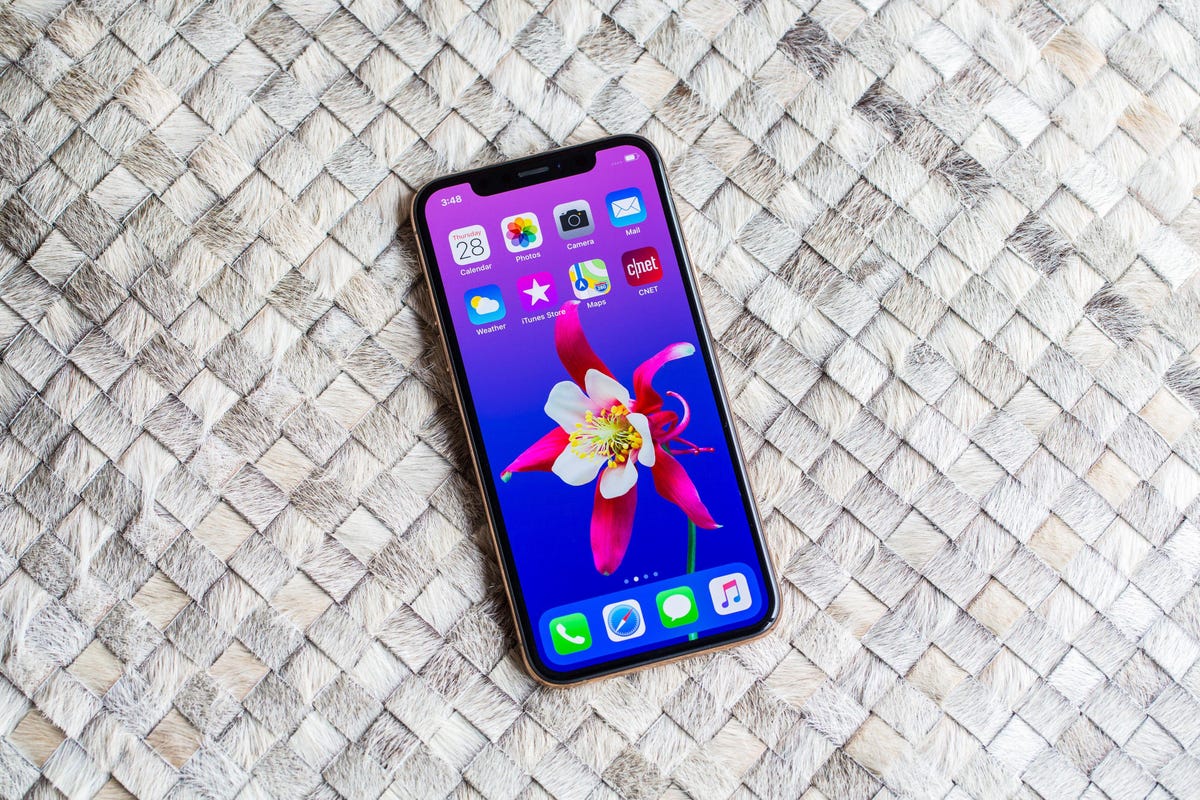
You can download iOS 17 on the iPhone XS and later.
How to enroll in the Apple Developer Program (free)
If you’re only interested in testing out the iOS 17 developer beta for fun, then you don’t need to pay for an Apple Developer Program membership. You can easily use your existing Apple ID to sign up for the developer program and download developer software onto your iPhone.
1. Go to Apple’s Developer website, tap the three-dash menu in the top-right and hit Account.
2. Sign in with your existing Apple ID.
3. Read through the Apple Developer Agreement, check the boxes at the bottom and then hit Submit.
You now have a free Apple Developer Program account. You can skip the next step to download and install the iOS 17 developer beta on your iPhone.

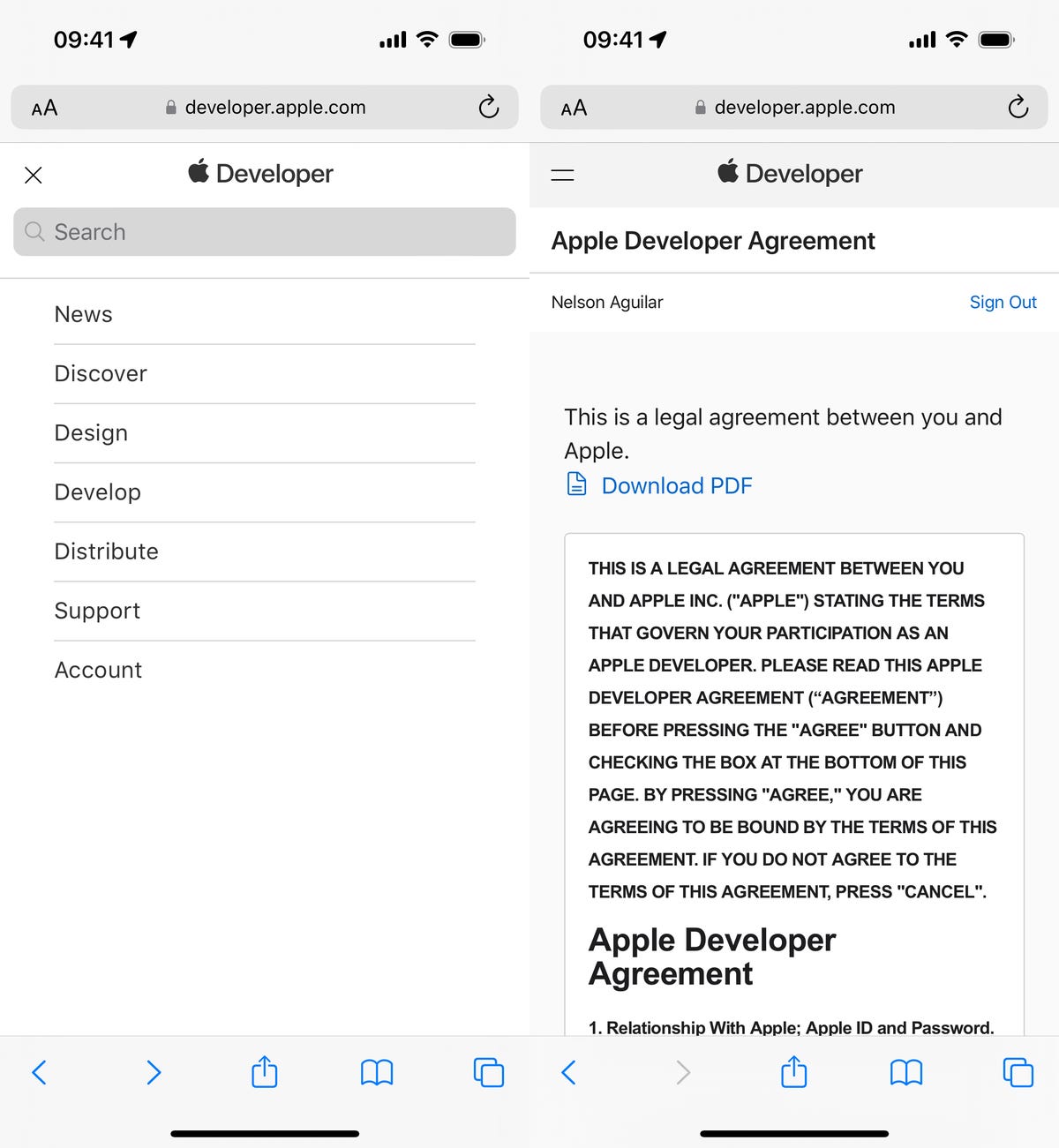
You can then scroll to Software Downloads to check out everything you can install, including the iOS 17 developer beta.
How to enroll in the Apple Developer Program (paid)
If you’re a developer, and want full access to development tools and the ability to distribute apps on the App Store, then you’ll want to pay for the Apple Developer Program. On your iPhone, here’s how you can enroll:
1. Download the Apple Developer app from the App Store, launch the app, go to Account and tap Enroll Now.
2. Sign in with your Apple ID credentials, read through the various benefits and instructions, enter your personal information and scan your ID to verify your identity.
3. Once this information is submitted, you must choose your entity (individual for most people) and agree to the program license agreement.
4. Finally, pay the Apple Developer membership fee (with Apple Pay), which is $99 (about £80 or AU$140) a year.
After you successfully make the payment, you’ll be redirected to your Account page in the Apple Developer app. Here you can verify that you’re now enrolled, and you can also check out the date of your membership’s expiration next year.

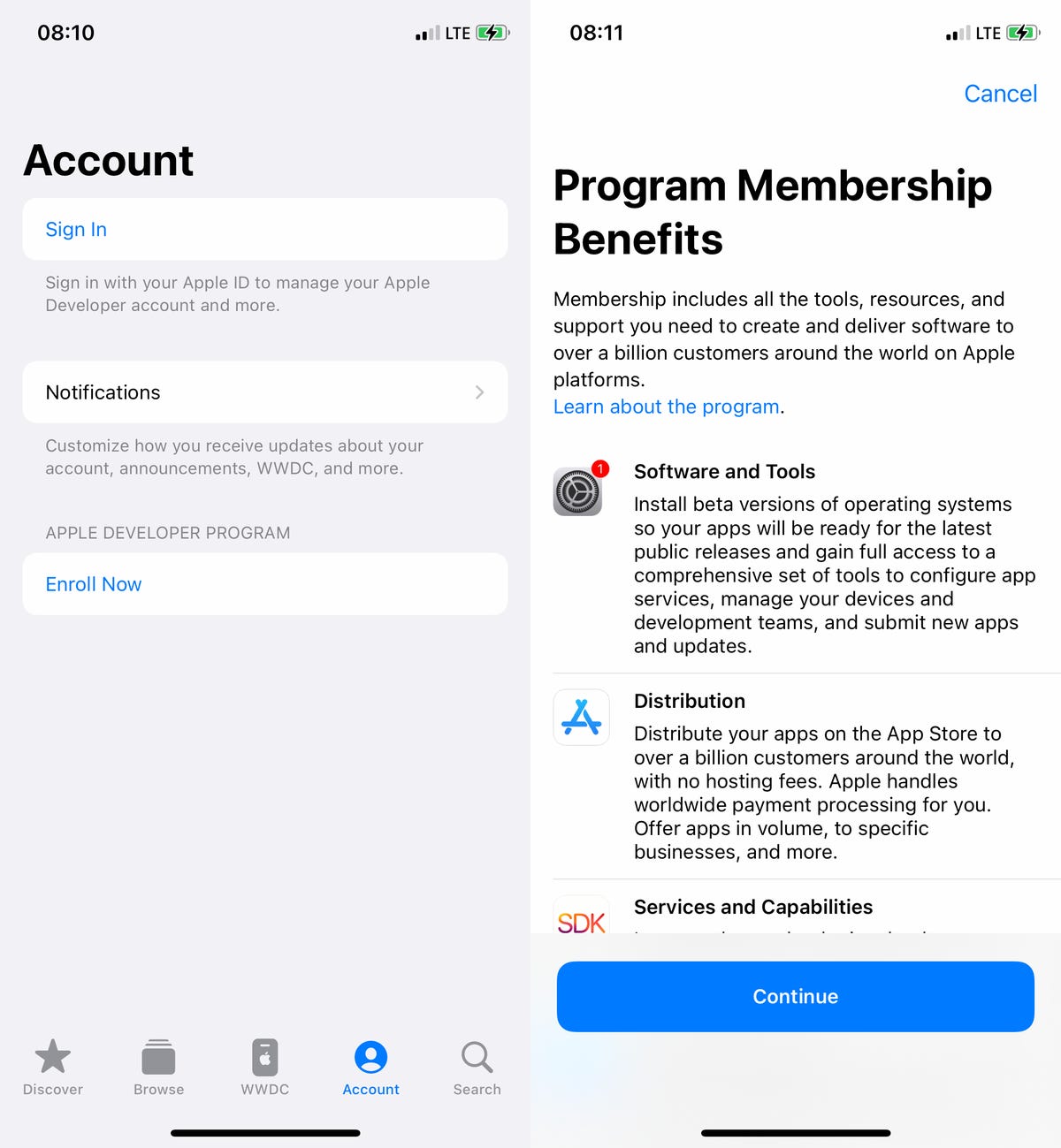
The Apple Developer app is free to download from the App Store.
You can install iOS 17 with an over-the-air update on your iPhone
The easiest way to download the iOS 17 developer beta is with an over-the-air update — the way you would update to any other new software release on your device. Once you’re a member of the Apple Developer Program, free or paid, you’ll automatically have the option to install iOS 17 from your settings. Here’s how:
1. On your iPhone or iPad, go to the Settings > General > Software Update.
2. Next, go into Beta Updates and tap iOS 17 Developer Beta.
3. Go back and tap Download and Install under the new iOS 17 Developer Beta option that appears.
You’ll need to then enter your passcode, agree to the terms and conditions and wait for the update to be installed. The process can take over 20 minutes, depending on your internet connection. Once your phone reboots, you should have access to the iOS 17 developer beta.
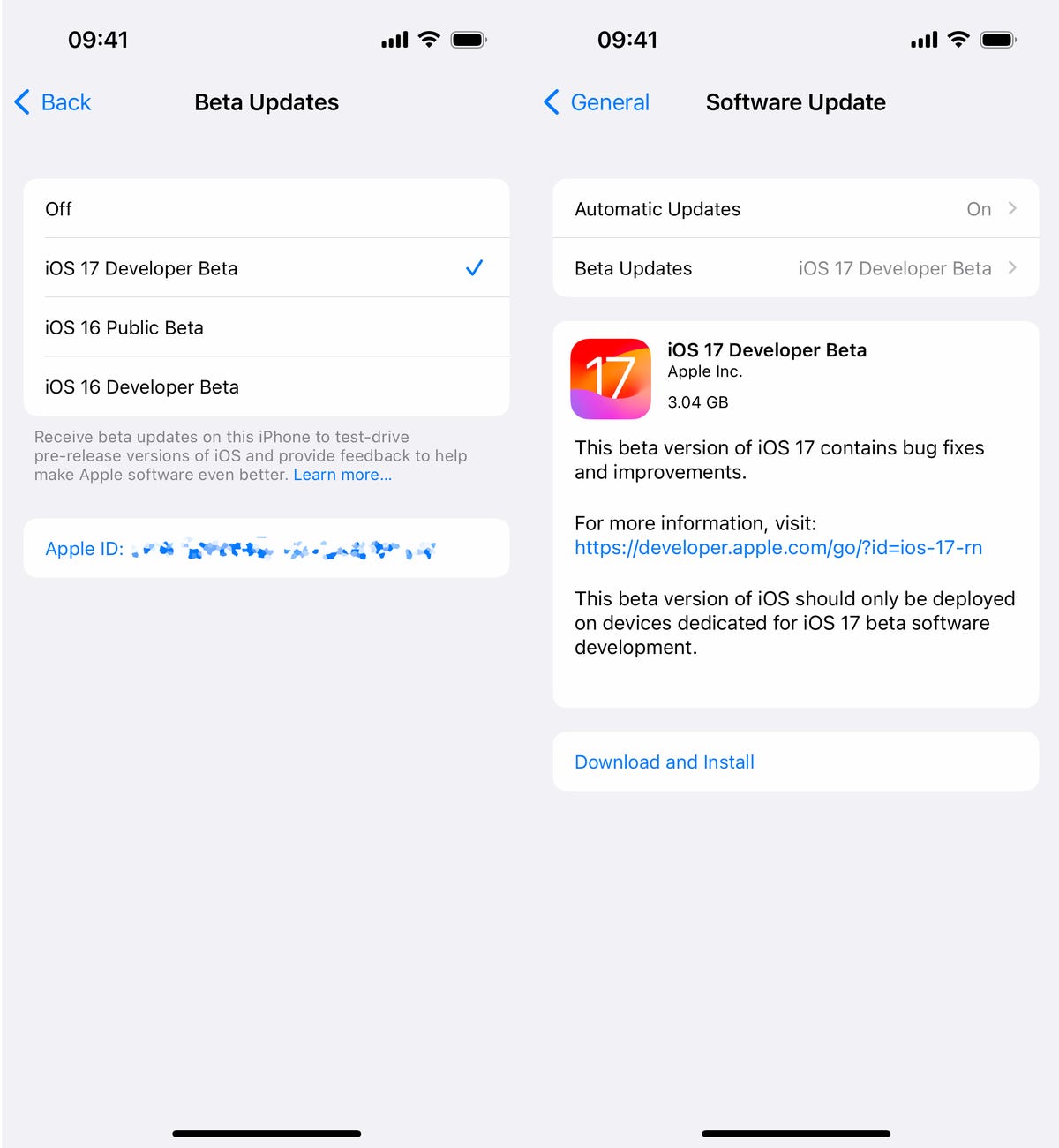
All subsequent iOS 17 developer beta updates will appear as over-the-air updates here on your iPhone.
Or download the iOS 17 developer beta using your Mac
Over-the-air updates require a certain amount of storage, and if you don’t have that available, your computer is really the only way to update to iOS 17 beta without manually clearing out space.
1. On your Mac, go to the Apple Developer Program download page, find iOS 17 beta, click Download Restore Images and download the iOS beta software restore image for your specific device.
2. Connect your device to your computer and enter your device passcode or hit Trust This Computer if prompted.
3. Next, open Finder, click your device in the sidebar under Locations.
4. Hold down the Option key, click Check for Update and choose the iOS 17 beta software restore image you just downloaded from the Apple Developer page.
The iOS 17 beta software will install on your device. Wait for a few minutes and when your phone reboots, you should have access.

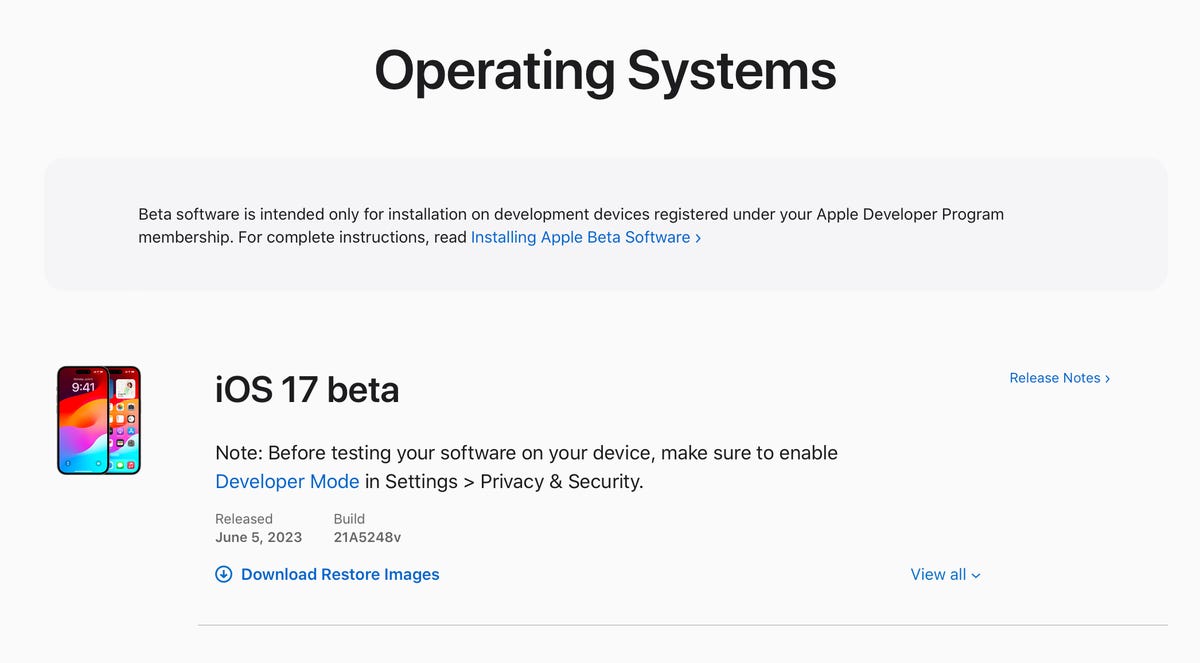
If you don’t have space on your iPhone, download and install the iOS 17 developer beta from your Mac.
While you’re here, check out the best iPhone model you can get in 2023. And if you’re looking for a new computer, check out these laptops you might be interested in.
Technologies
Today’s NYT Strands Hints, Answers and Help for Oct. 23 #599
Here are hints and answers for the NYT Strands puzzle for Oct. 23, No. 599.
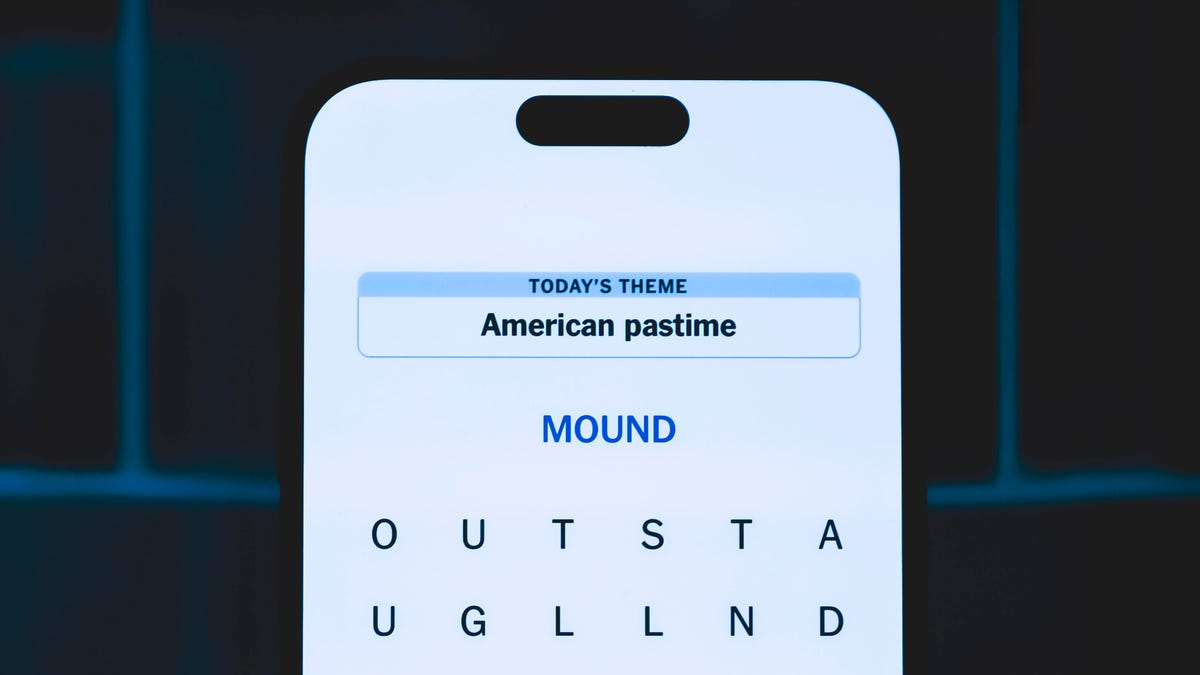
Looking for the most recent Strands answer? Click here for our daily Strands hints, as well as our daily answers and hints for The New York Times Mini Crossword, Wordle, Connections and Connections: Sports Edition puzzles.
Today’s NYT Strands puzzle might be Halloween-themed, as the answers are all rather dangerous. Some of them are a bit tough to unscramble, so if you need hints and answers, read on.
I go into depth about the rules for Strands in this story.
If you’re looking for today’s Wordle, Connections and Mini Crossword answers, you can visit CNET’s NYT puzzle hints page.
Read more: NYT Connections Turns 1: These Are the 5 Toughest Puzzles So Far
Hint for today’s Strands puzzle
Today’s Strands theme is: Please don’t eat me!
If that doesn’t help you, here’s a clue: Remember Mr. Yuk?
Clue words to unlock in-game hints
Your goal is to find hidden words that fit the puzzle’s theme. If you’re stuck, find any words you can. Every time you find three words of four letters or more, Strands will reveal one of the theme words. These are the words I used to get those hints but any words of four or more letters that you find will work:
- POND, NOON, NODE, BALE, SOCK, LOVE, LOCK, MOCK, LEER, REEL, GLOVE, DAIS, LEAN, LEAD, REEL
Answers for today’s Strands puzzle
These are the answers that tie into the theme. The goal of the puzzle is to find them all, including the spangram, a theme word that reaches from one side of the puzzle to the other. When you have all of them (I originally thought there were always eight but learned that the number can vary), every letter on the board will be used. Here are the nonspangram answers:
- AZALEA, HEMLOCK, FOXGLOVE, OLEANDER, BELLADONNA
Today’s Strands spangram
Today’s Strands spangram is POISONOUS. To find it, look for the P that is the first letter on the far left of the top row, and wind down and across.
Technologies
Today’s NYT Connections: Sports Edition Hints and Answers for Oct. 23, #395
Here are hints and the answers for the NYT Connections: Sports Edition puzzle for Oct. 23, No. 395.
Looking for the most recent regular Connections answers? Click here for today’s Connections hints, as well as our daily answers and hints for The New York Times Mini Crossword, Wordle and Strands puzzles.
Today’s Connections: Sports Edition has one of those crazy purple categories, where you wonder if anyone saw the connection, or if people just put that grouping together because only those four words were left. If you’re struggling but still want to solve it, read on for hints and the answers.
Connections: Sports Edition is published by The Athletic, the subscription-based sports journalism site owned by The Times. It doesn’t show up in the NYT Games app but appears in The Athletic’s own app. Or you can play it for free online.
Read more: NYT Connections: Sports Edition Puzzle Comes Out of Beta
Hints for today’s Connections: Sports Edition groups
Here are four hints for the groupings in today’s Connections: Sports Edition puzzle, ranked from the easiest yellow group to the tough (and sometimes bizarre) purple group.
Yellow group hint: Fan noise.
Green group hint: Strategies for hoops.
Blue group hint: Minor league.
Purple group hint: Look for a connection to hoops.
Answers for today’s Connections: Sports Edition groups
Yellow group: Sounds from the crowd.
Green group: Basketball offenses.
Blue group: Triple-A baseball teams.
Purple group: Ends with a basketball stat.
Read more: Wordle Cheat Sheet: Here Are the Most Popular Letters Used in English Words
What are today’s Connections: Sports Edition answers?
The yellow words in today’s Connections
The theme is sounds from the crowd. The four answers are boo, cheer, clap and whistle.
The green words in today’s Connections
The theme is basketball offenses. The four answers are motion, pick and roll, Princeton and triangle.
The blue words in today’s Connections
The theme is triple-A baseball teams. The four answers are Aces, Jumbo Shrimp, Sounds and Storm Chasers.
The purple words in today’s Connections
The theme is ends with a basketball stat. The four answers are afoul, bassist, counterpoint and sunblock.
Technologies
Amazon’s Delivery Drivers Will Soon Wear AI Smart Glasses to Work
The goal is to streamline the delivery process while keeping drivers safe.

Amazon announced on Wednesday that it is developing new AI-powered smart glasses to simplify the delivery experience for its drivers. CNET smart glasses expert Scott Stein mentioned this wearable rollout last month, and now the plan is in its final testing stages.
The goal is to simplify package delivery by reducing the need for drivers to look at their phones, the label on the package they’re delivering and their surroundings to find the correct address.
Don’t miss any of our unbiased tech content and lab-based reviews. Add CNET as a preferred Google source.
A heads-up display will activate as soon as the driver parks, pointing out potential hazards and tasks that must be completed. From there, drivers can locate and scan packages, follow turn-by-turn directions and snap a photograph to prove delivery completion without needing to take out their phone.
The company is testing the glasses in select North American markets.
Watch: See our Instagram post with a video showing the glasses
A representative for Amazon didn’t immediately respond to a request for comment.
To fight battery drain, the glasses pair with a controller attached to the employee’s delivery vest, allowing them to replace depleted batteries and access operational controls. The glasses will support an employee’s eyeglass prescription. An emergency button will be within reach to ensure the driver’s safety.
Amazon is already planning future versions of the glasses, which will feature «real-time defect detection,» notifying the driver if a package was delivered to the incorrect address. They plan to add features to the glasses to detect if pets are in the yard and adjust to low light.
-
 Technologies3 года ago
Tech Companies Need to Be Held Accountable for Security, Experts Say
-
 Technologies3 года ago
Best Handheld Game Console in 2023
-
 Technologies3 года ago
Tighten Up Your VR Game With the Best Head Straps for Quest 2
-
 Technologies4 года ago
Verum, Wickr and Threema: next generation secured messengers
-
 Technologies4 года ago
Black Friday 2021: The best deals on TVs, headphones, kitchenware, and more
-
 Technologies4 года ago
Google to require vaccinations as Silicon Valley rethinks return-to-office policies
-
 Technologies4 года ago
Olivia Harlan Dekker for Verum Messenger
-
 Technologies4 года ago
iPhone 13 event: How to watch Apple’s big announcement tomorrow


