

Technologies
Before You Download iOS 17 on Your iPhone, You Need to Do This
If you’re thinking about installing iOS 17, follow this checklist first.

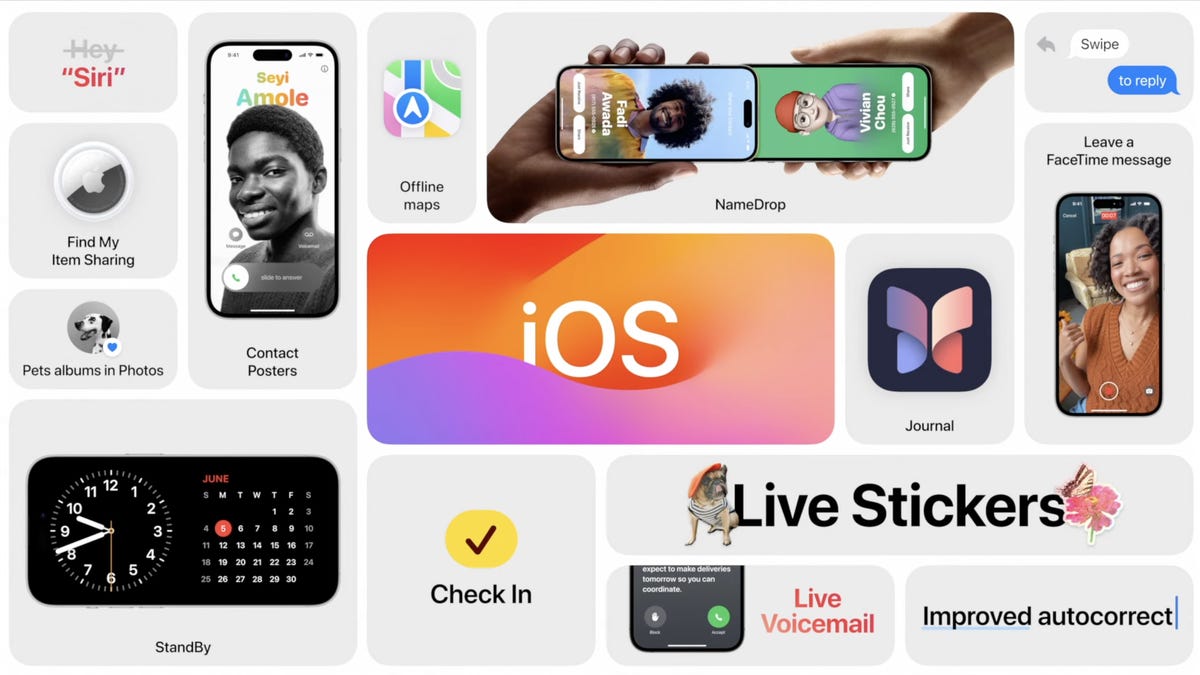
Apple on Monday announced iOS 17 at WWDC, its yearly developer conference. The latest mobile software update will bring several new features to the iPhone, including live stickers in Messages, an improved autocorrect that finally lets you curse in peace and an easier way to share you contact information.
Don’t miss: You Can Download the iOS 17 Developer Beta on Your iPhone Right Now
And as long as you pay for the Apple Developer Program ($99 a year), you can download iOS 17 on your iPhone right now if you wanted to, but before you even think about doing that, there are a few things to know. Here’s everything you should do before installing iOS 17 on your device.
If want to learn more, check out everything announced at WWDC 2023, as well as what you need to know about Reality Pro, Apple’s long-awaited mixed reality headset, and all the new features that are available on iOS 17.

06:31
First, is your device even compatible with iOS 17?
As long as you own an iPhone XS or later, you should be able to download the iOS 17 developer beta. Below is a full list of every iPhone compatible with Apple’s new software update. And if your current phone isn’t on the list, here are some more recent iPhone models to consider purchasing.
- iPhone XS
- iPhone XS Max
- iPhone XR
- iPhone 11
- iPhone 11 Pro
- iPhone 11 Pro Max
- iPhone 12
- iPhone 12 Mini
- iPhone 12 Pro
- iPhone 12 Pro Max
- iPhone 13
- iPhone 13 Mini
- iPhone 13 Pro
- iPhone 13 Pro Max
- iPhone SE (second generation and later)
- iPhone 14
- iPhone 14 Plus
- iPhone 14 Pro
- iPhone 14 Pro Max
The iPhone 15 series, which is expected to be Apple’s next phone release, should be announced later this year and come with iOS 17 already installed.
More from WWDC 2023
Next, make sure your iPhone is up to date
Before you update to iOS 17, make sure you’re updated to the latest iOS 16 version so that you don’t encounter any issues if you decide to revert. Also, it’s just good to always be updated to the newest mobile software version in case there are major bugs or other issues in older iOS versions.
To update your iPhone to the latest version iOS 16, go to Settings > General > Software Update and check for any available updates.
Now, back up your iPhone before updating to iOS 17
This is important: The iOS 17 developer beta is experimental software intended for developers, which means it will have many bugs and issues that could potentially cripple your iPhone. Your phone may unexpectedly restart or get really hot — with developer betas, you never know what to expect, so it’s best to prepare beforehand so that if you face major issues you can return to iOS 16.
The best way to do that is to back up your iPhone while it’s still running iOS 16. The reason is that if you update to iOS 17 but then decide to go back to iOS 16, you have an up-to-date backup to revert to, so that you keep your most recent photos, text messages, app data and more.
Now, there are two ways too back up your iPhone: via iCloud and your computer.
Back up your iPhone with iCloud
Your iPhone should automatically back up by default once a day, as long as your device is connected to both a power source and Wi-Fi and locked.
To check if this feature is enabled, go to Settings > [your name] > iCloud Backup and make sure that Back Up This iPhone is enabled. Also, if you have a compatible 5G iPhone, including the iPhone 12, iPhone 13 and iPhone 14 models, you can enable Back Up Over Cellular to have your iPhone back up over your cellular network when you’re not connected to W-Fi.
You can also just manually back up your iPhone with iCloud. In the same iCloud Backup page, simply tap Back Up Now. Underneath that, you’ll see the last time a successful backup was created. Under All Device Backups, you can check out more information about your backups, including backup size, and customize what is backed up.

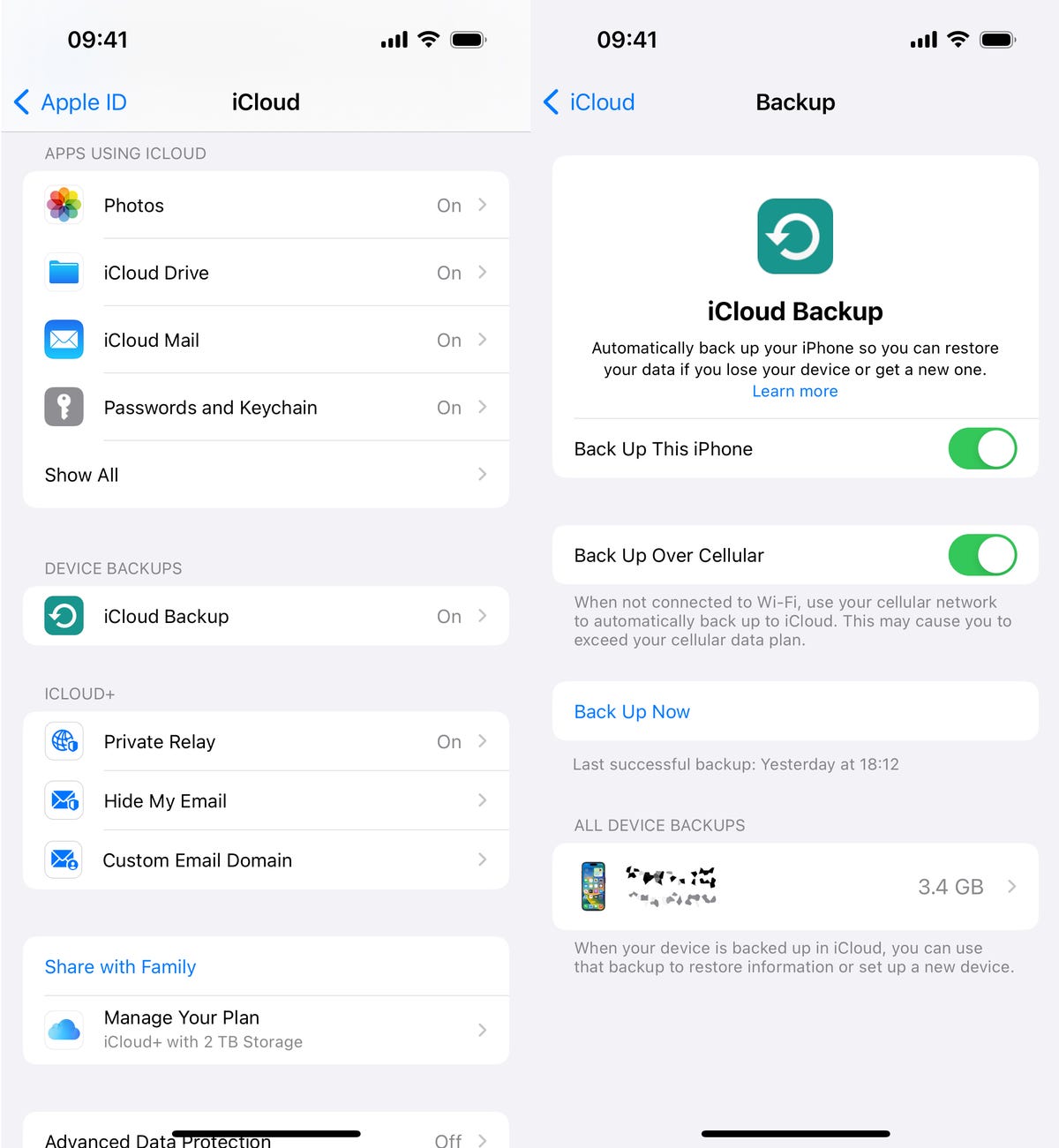
If your iPhone doesn’t automatically back up, you can do it manually in your settings.
Back up your iPhone with Mac or Windows
If you don’t have storage on your iPhone or iCloud, you always have the option to back up your device via your computer.
On Mac, connect your iPhone to your computer via lightning cable, open Finder and select your iPhone. Next, check the circle next to Back up all of the data on your iPhone to this Mac and then hit Back Up Now.

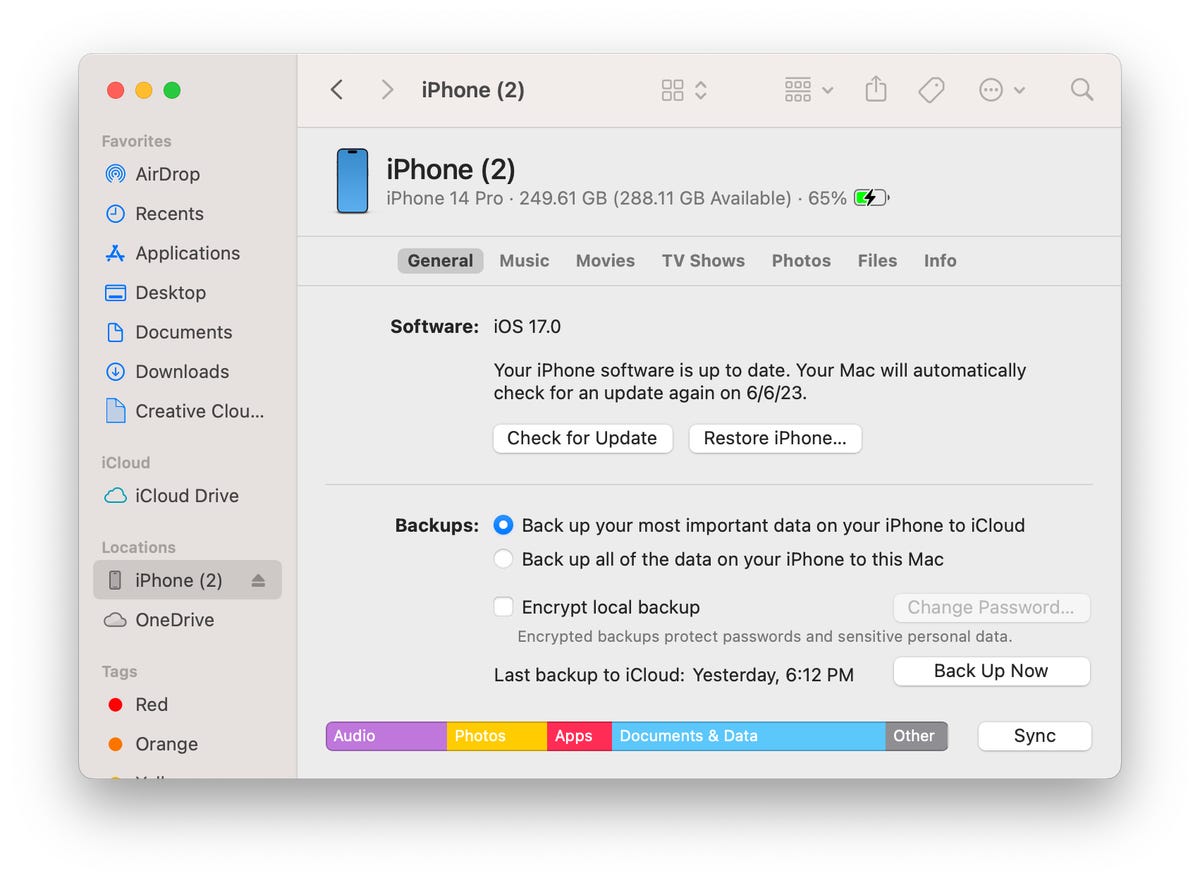
You can back up your iPhone on your Mac if you don’t have phone storage.
The process with Windows is pretty similarly. Again, connect your iPhone to your computer via cable, but this time open the iTunes app and click the iPhone button on the top-left of the window. In the Summary page, click Back Up Now to back up your iPhone to your Windows PC.
For more on Apple, here are the best iPhone deals right now and our ongoing review of the iPhone 14.
Technologies
Today’s NYT Strands Hints, Answers and Help for Oct. 23 #599
Here are hints and answers for the NYT Strands puzzle for Oct. 23, No. 599.
Looking for the most recent Strands answer? Click here for our daily Strands hints, as well as our daily answers and hints for The New York Times Mini Crossword, Wordle, Connections and Connections: Sports Edition puzzles.
Today’s NYT Strands puzzle might be Halloween-themed, as the answers are all rather dangerous. Some of them are a bit tough to unscramble, so if you need hints and answers, read on.
I go into depth about the rules for Strands in this story.
If you’re looking for today’s Wordle, Connections and Mini Crossword answers, you can visit CNET’s NYT puzzle hints page.
Read more: NYT Connections Turns 1: These Are the 5 Toughest Puzzles So Far
Hint for today’s Strands puzzle
Today’s Strands theme is: Please don’t eat me!
If that doesn’t help you, here’s a clue: Remember Mr. Yuk?
Clue words to unlock in-game hints
Your goal is to find hidden words that fit the puzzle’s theme. If you’re stuck, find any words you can. Every time you find three words of four letters or more, Strands will reveal one of the theme words. These are the words I used to get those hints but any words of four or more letters that you find will work:
- POND, NOON, NODE, BALE, SOCK, LOVE, LOCK, MOCK, LEER, REEL, GLOVE, DAIS, LEAN, LEAD, REEL
Answers for today’s Strands puzzle
These are the answers that tie into the theme. The goal of the puzzle is to find them all, including the spangram, a theme word that reaches from one side of the puzzle to the other. When you have all of them (I originally thought there were always eight but learned that the number can vary), every letter on the board will be used. Here are the nonspangram answers:
- AZALEA, HEMLOCK, FOXGLOVE, OLEANDER, BELLADONNA
Today’s Strands spangram
Today’s Strands spangram is POISONOUS. To find it, look for the P that is the first letter on the far left of the top row, and wind down and across.
Technologies
Today’s NYT Connections: Sports Edition Hints and Answers for Oct. 23, #395
Here are hints and the answers for the NYT Connections: Sports Edition puzzle for Oct. 23, No. 395.
Looking for the most recent regular Connections answers? Click here for today’s Connections hints, as well as our daily answers and hints for The New York Times Mini Crossword, Wordle and Strands puzzles.
Today’s Connections: Sports Edition has one of those crazy purple categories, where you wonder if anyone saw the connection, or if people just put that grouping together because only those four words were left. If you’re struggling but still want to solve it, read on for hints and the answers.
Connections: Sports Edition is published by The Athletic, the subscription-based sports journalism site owned by The Times. It doesn’t show up in the NYT Games app but appears in The Athletic’s own app. Or you can play it for free online.
Read more: NYT Connections: Sports Edition Puzzle Comes Out of Beta
Hints for today’s Connections: Sports Edition groups
Here are four hints for the groupings in today’s Connections: Sports Edition puzzle, ranked from the easiest yellow group to the tough (and sometimes bizarre) purple group.
Yellow group hint: Fan noise.
Green group hint: Strategies for hoops.
Blue group hint: Minor league.
Purple group hint: Look for a connection to hoops.
Answers for today’s Connections: Sports Edition groups
Yellow group: Sounds from the crowd.
Green group: Basketball offenses.
Blue group: Triple-A baseball teams.
Purple group: Ends with a basketball stat.
Read more: Wordle Cheat Sheet: Here Are the Most Popular Letters Used in English Words
What are today’s Connections: Sports Edition answers?
The yellow words in today’s Connections
The theme is sounds from the crowd. The four answers are boo, cheer, clap and whistle.
The green words in today’s Connections
The theme is basketball offenses. The four answers are motion, pick and roll, Princeton and triangle.
The blue words in today’s Connections
The theme is triple-A baseball teams. The four answers are Aces, Jumbo Shrimp, Sounds and Storm Chasers.
The purple words in today’s Connections
The theme is ends with a basketball stat. The four answers are afoul, bassist, counterpoint and sunblock.
Technologies
Amazon’s Delivery Drivers Will Soon Wear AI Smart Glasses to Work
The goal is to streamline the delivery process while keeping drivers safe.

Amazon announced on Wednesday that it is developing new AI-powered smart glasses to simplify the delivery experience for its drivers. CNET smart glasses expert Scott Stein mentioned this wearable rollout last month, and now the plan is in its final testing stages.
The goal is to simplify package delivery by reducing the need for drivers to look at their phones, the label on the package they’re delivering and their surroundings to find the correct address.
Don’t miss any of our unbiased tech content and lab-based reviews. Add CNET as a preferred Google source.
A heads-up display will activate as soon as the driver parks, pointing out potential hazards and tasks that must be completed. From there, drivers can locate and scan packages, follow turn-by-turn directions and snap a photograph to prove delivery completion without needing to take out their phone.
The company is testing the glasses in select North American markets.
Watch: See our Instagram post with a video showing the glasses
A representative for Amazon didn’t immediately respond to a request for comment.
To fight battery drain, the glasses pair with a controller attached to the employee’s delivery vest, allowing them to replace depleted batteries and access operational controls. The glasses will support an employee’s eyeglass prescription. An emergency button will be within reach to ensure the driver’s safety.
Amazon is already planning future versions of the glasses, which will feature «real-time defect detection,» notifying the driver if a package was delivered to the incorrect address. They plan to add features to the glasses to detect if pets are in the yard and adjust to low light.
-
 Technologies3 года ago
Tech Companies Need to Be Held Accountable for Security, Experts Say
-
 Technologies3 года ago
Best Handheld Game Console in 2023
-
 Technologies3 года ago
Tighten Up Your VR Game With the Best Head Straps for Quest 2
-
 Technologies4 года ago
Verum, Wickr and Threema: next generation secured messengers
-
 Technologies4 года ago
Black Friday 2021: The best deals on TVs, headphones, kitchenware, and more
-
 Technologies4 года ago
Google to require vaccinations as Silicon Valley rethinks return-to-office policies
-
 Technologies4 года ago
Olivia Harlan Dekker for Verum Messenger
-
 Technologies4 года ago
iPhone 13 event: How to watch Apple’s big announcement tomorrow


