

Technologies
Apple’s iOS 17 Debut at WWDC Sees Major Updates to Journal, FaceTime and More
The new iPhone software brings a number of fixes and additions.

Apple has announced iOS 17, its next major update for the iPhone. The reveal came Monday during Apple’s Worldwide Developers Conference. The new iPhone software builds upon the last several versions of iOS which is important since it won’t likely disrupt the status quo on your iPhone. iOS 17 brings updates to FaceTime, Messages and the phone app to make your iPhone feel more intuitive and personal.
Last year’s software update, iOS 16 introduced the ability to edit or «unsend» messages you send via iMessage, Apple Pay Later, a major overhaul to the lock screen, revamped notifications and Live Activities. These additions didn’t all come out at once and were actually scattered over the course of smaller iOS software updates throughout the year.
We can expect the same for iOS 17, which will likely release just before the rumored iPhone 15 goes on sale.
More from WWDC 2023
Contact Posters

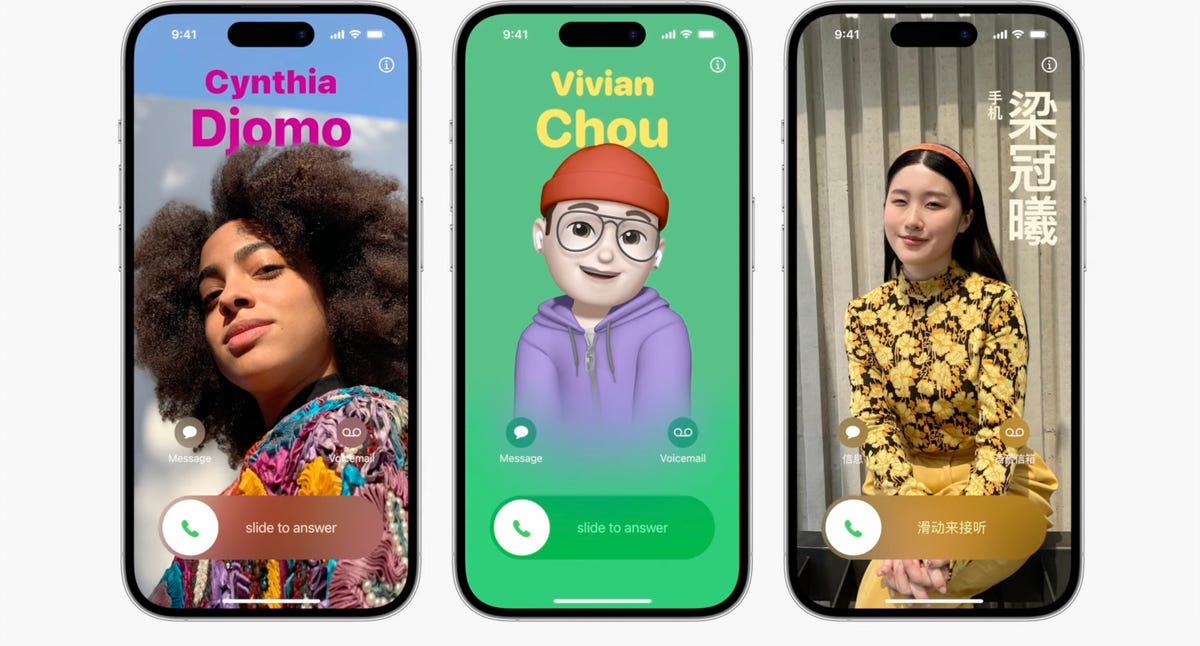
Contact Posters aim to make your contact cards more compelling.
Last year we got customizable lock screens in iOS 16. This year, iOS 17 has a similar change for your iPhone’s contact cards, to make them look more eye-catching. Contact Posters are beautiful treatments for contact photos and emoji paired with slick-looking fonts that show up when you get calls and for other services on your phone where you communicate and share.
You can customize your Contact Poster similar to how you personalize your lock screen. Pick a photo, font and color and that’s it.
AirDrop gets easier to use
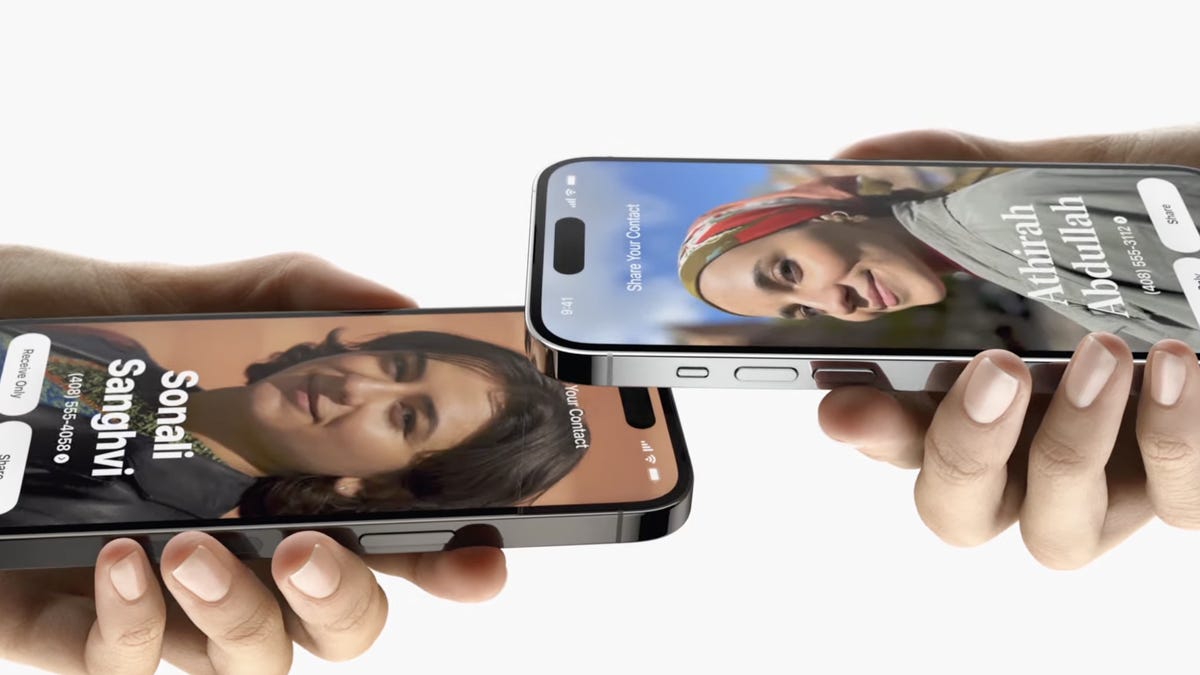
iOS 17 brings an overhaul to AirDrop. You just need to bring your iPhone close to someone else’s to share a Contact Poster, photos, videos or kick off a shared activity using Share Play. Of course, being Apple, there’s a word for sharing your Contact Poster with someone new: NameDrop. What’s nice, is that you can choose what contact info is shared. NameDrop works between iPhones or with an Apple Watch, too. It reminds me of «bumping» a contact in the early days of the iPhone.
Standby turns your iPhone into an Amazon Echo Show

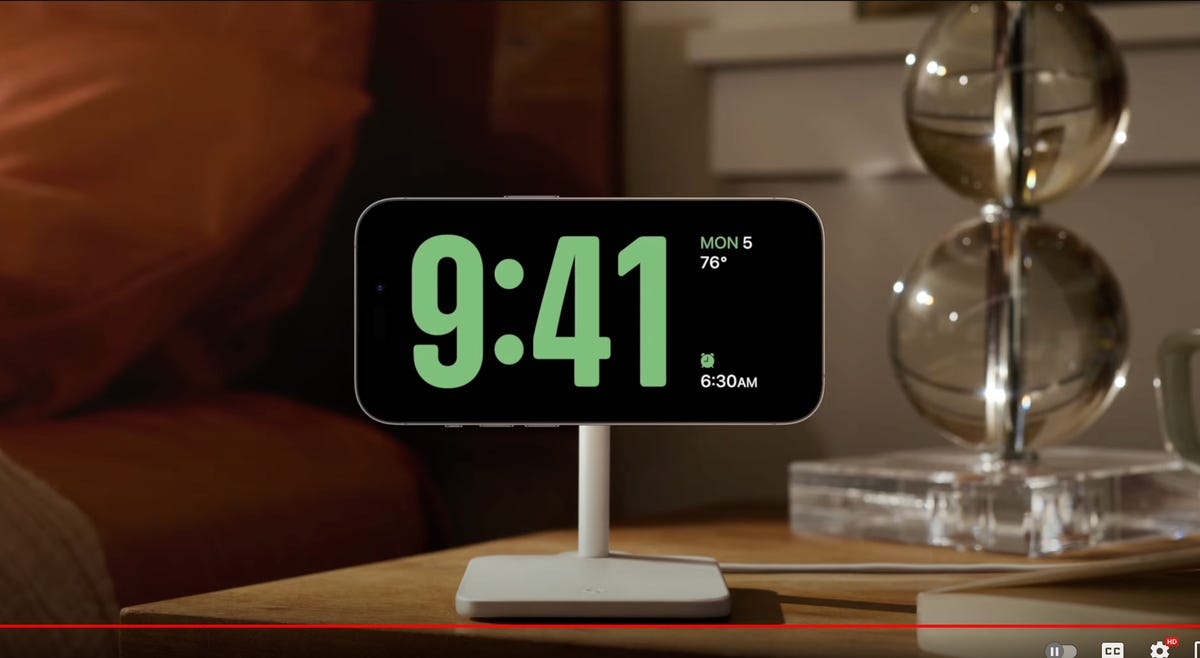
iOS 17 adds an attractive screen that shows photos, widgets and info when your iPhone is charging.
One of the biggest additions in iOS 17 is for when your iPhone isn’t in your hand. When your iPhone is on its side while MagSafe charging, you get a new full screen experience with glanceable information. The feature is called Standby and mimics what many smart home devices can do, such as the Amazon Echo Show.
The new screen shows the time, photos, widgets and Live Activities; nearly all of which can be personalized. It’s a bit of a cross between the iPhone 14 Pro’s always-on display and nightstand mode on the Apple Watch.
When you swipe to the side on the Standby screen, you can look at your favorite photos or moments. iOS 17 will also automatically shuffle images to find the one that take the best advantage of the screen.
Standby can also show glanceable widgets. For example, you can see the weather, your Apple Home smart controls or your favorite third-party widget. With support for live activities, you can also see the score of sporting events or the status of a food delivery.
One of the more curious features is that Standby can remember your preferred view «setup» for each place you charge via MagSafe.
The new Journal app

The icon for the new Journal app in iOS 17.
iOS 17 brings a new Apple app called Journal that creates personalized suggestions to inspire writing. These suggestions are curated from information on your iPhone, like photos, location, music and workouts.
Journal gives you the option to select a moment, like «morning visit, Ocean Beach,» and start writing. You can also schedule notifications to remind you to write and get new prompts. You can flag important moments so that you can reflect on them later.
Live Voicemail

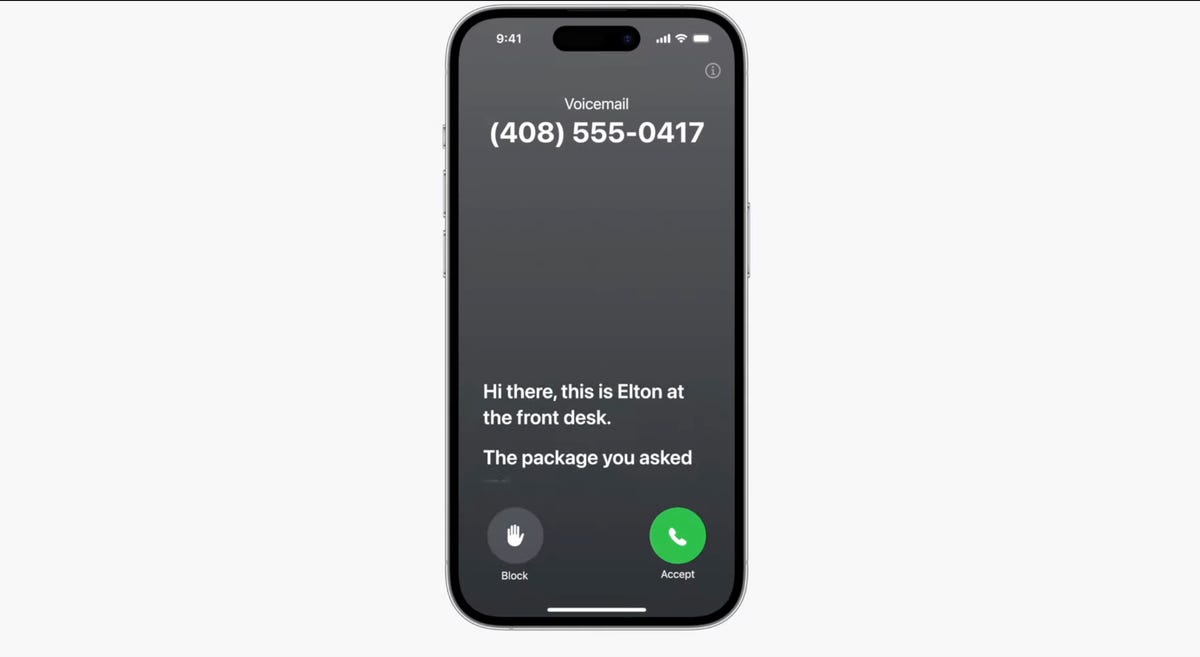
Live Voicemail lets you preview a transcription in real time as a voicemail is being recorded.
Another new talent iOS 17 has involves your voicemail. When someone calls you and leaves a message, you’ll see a live transcription in real time as they speak. The new service is called Live Voicemail and it kind of feels like the days of answering machines, when my dad would screen a call. For Live Voicemail, you’ll see the voicemail right on your screen so you can decide whether to step out and take the call. The feature is powered by your iPhone’s neural engine in order to preserve your privacy. Live Voicemail seems identical to Call Screen on Google Pixel phones which isn’t a bad thing.
FaceTime messages
iOS 17 will let you record a video message in FaceTime. It’s a heavily requested feature that will ensure you can document and share important moments, even if someone misses your call.
Messages Check In
iOS 17 comes with a new location sharing tool called Check In.
Apple is expanding and simplifying its location sharing via Messages. The new feature, called Check In, is for letting a loved one know you made it to your destination safely. Whether you’re walking home after dark or going for an early morning run, you can start a Check In with a family member or friend and as soon as you arrive home, it will automatically let your friend know. But if something unexpected happens, it can recognize that you’re not near your destination and check in with you. If you don’t respond, Check In can automatically share your current location, the route you took, your iPhone’s battery level and cell service status; all of which is end-to-end encrypted.
Messages get a handful of fixes and additions

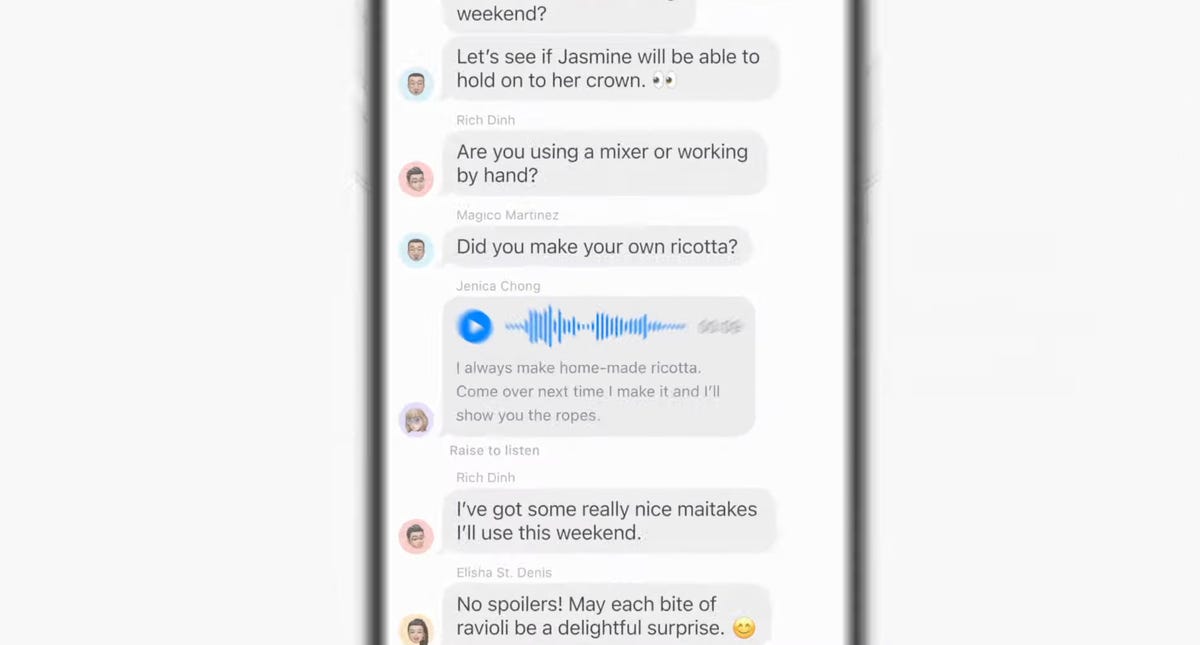
The Messages app will get transcriptions for audio messages in iOS 17.
The tried-and-true Messages app gets a handful of updates, including a visual overhaul of your iMessage apps which will no longer live above your keyboard and instead be accessible via a plus sign on the bottom left.
Searching through your Messages becomes a lot easier on iOS 17 with the addition of filters. When you start a search in the Messages app, you will be able to add terms to narrow the results.
Another welcome addition is transcription for audio messages. If you’re someone who has friends or family members who send you audio messages, you’ll be able to read a transcription of the recording right in the Messages app.
There’s also a new «catch up arrow» in Messages. It sits in the top right of your conversation and lets you jump to the first message you haven’t read. This could be a killer feature for managing group chats. Apple also made inline replies faster. In iOS 17, you’ll be able to just swipe to reply on any message bubble.
Apple fixes ‘ducking’ autocorrect
Autocorrect will become more intelligent and can fix more grammatical mistakes. Reverting words back to what you typed is easier. And apparently, autocorrect will learn and let you use curse words. Duck, yeah!

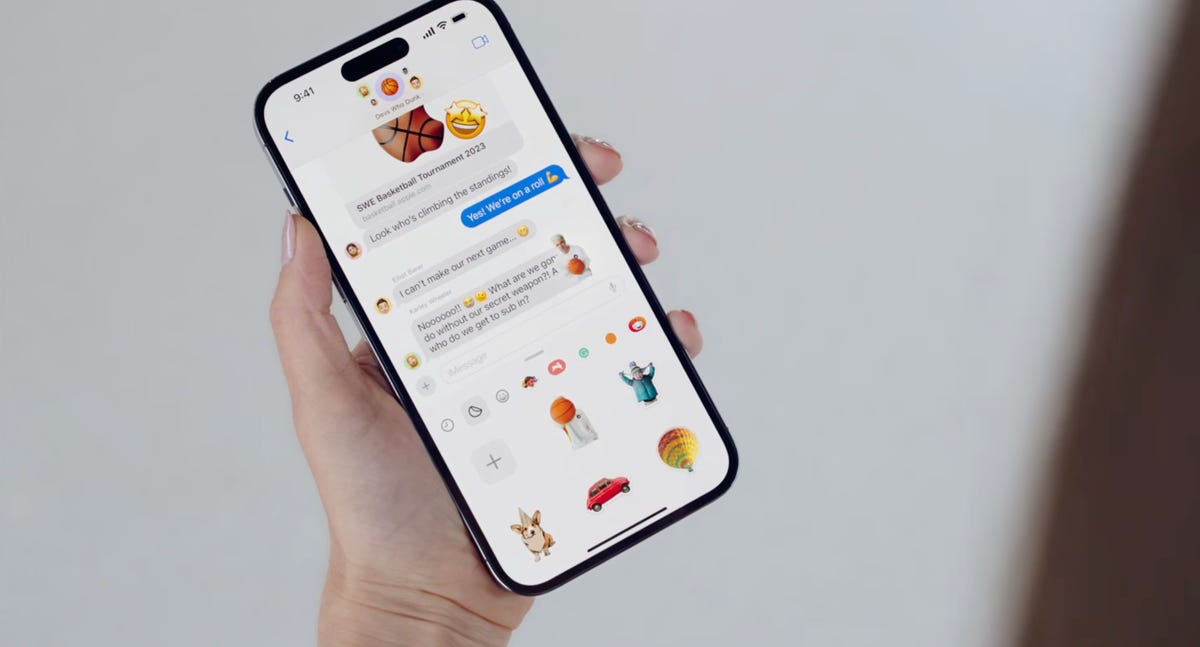
Messages adds a bunch of Sticker features.
iMessage stickers get a new drawer to bring all the stickers you’ve used into one place. And now emoji are stickers. You can peel and stick an emoji sticker to a message bubble, rotate and resize it. Last year in iOS 16, Apple introduced the ability to lift a subject from the background of a photo as part of Visual Lookup. With iOS 17, you can turn a photo’s subject into a sticker in Messages.
The Stickers drawer also has a Live Stickers tab that lets you create a Sticker animation (aka a gif) from a Live Photo. Stickers can be accessed system wide in things like Tapback, Markup and third-party apps; basically anywhere you can access emoji.
But Wait, There’s More iOS 17 Features
As is typical with WWDC, there are a lot more additions and improvements to iOS 17 than Apple showed during the keynote. Some notable highlights include:
-
Triggering Siri by just saying Siri instead of Hey Siri
-
Download offline maps in the Maps app
-
New profiles for Safari and your passwords
-
Auto retrieval of one time verification codes from the Mail app
-
Interactive widgets (which was featured in-depth during the iPadOS portion)
iOS 17 will be out in full this fall and work on the iPhone XS, XR and newer, including the 2020 iPhone SE.

16:43
Technologies
Tesla Has a New Range of Affordable Electric Cars: How Much They Cost
The new, stripped-back versions of the Model Y and Model 3 have a more affordable starting price.

Technologies
Today’s NYT Strands Hints, Answers and Help for Oct. 22 #598
Here are hints and answers for the NYT Strands puzzle for Oct. 22, No. 598.
Looking for the most recent Strands answer? Click here for our daily Strands hints, as well as our daily answers and hints for The New York Times Mini Crossword, Wordle, Connections and Connections: Sports Edition puzzles.
Today’s NYT Strands puzzle is a fun one — I definitely have at least two of these in my house. Some of the answers are a bit tough to unscramble, so if you need hints and answers, read on.
I go into depth about the rules for Strands in this story.
If you’re looking for today’s Wordle, Connections and Mini Crossword answers, you can visit CNET’s NYT puzzle hints page.
Read more: NYT Connections Turns 1: These Are the 5 Toughest Puzzles So Far
Hint for today’s Strands puzzle
Today’s Strands theme is: Catch all.
If that doesn’t help you, here’s a clue: A mess of items.
Clue words to unlock in-game hints
Your goal is to find hidden words that fit the puzzle’s theme. If you’re stuck, find any words you can. Every time you find three words of four letters or more, Strands will reveal one of the theme words. These are the words I used to get those hints but any words of four or more letters that you find will work:
- BATE, LICE, SLUM, CAPE, HOLE, CARE, BARE, THEN, SLAM, SAMBA, BACK
Answers for today’s Strands puzzle
These are the answers that tie into the theme. The goal of the puzzle is to find them all, including the spangram, a theme word that reaches from one side of the puzzle to the other. When you have all of them (I originally thought there were always eight but learned that the number can vary), every letter on the board will be used. Here are the nonspangram answers:
- TAPE, COIN, PENCIL, BATTERY, SHOELACE, THUMBTACK
Today’s Strands spangram
Today’s Strands spangram is JUNKDRAWER. To find it, look for the J that’s five letters down on the far-left row, and wind down, over and then up.
Quick tips for Strands
#1: To get more clue words, see if you can tweak the words you’ve already found, by adding an «S» or other variants. And if you find a word like WILL, see if other letters are close enough to help you make SILL, or BILL.
#2: Once you get one theme word, look at the puzzle to see if you can spot other related words.
#3: If you’ve been given the letters for a theme word, but can’t figure it out, guess three more clue words, and the puzzle will light up each letter in order, revealing the word.
Technologies
Today’s Wordle Hints, Answer and Help for Oct. 22, #1586
Here are hints and the answer for today’s Wordle for Oct. 22, No. 1,586.
Looking for the most recent Wordle answer? Click here for today’s Wordle hints, as well as our daily answers and hints for The New York Times Mini Crossword, Connections, Connections: Sports Edition and Strands puzzles.
Today’s Wordle puzzle features some letters I don’t often guess, but it’s not terribly difficult. If you need a new starter word, check out our list of which letters show up the most in English words. If you need hints and the answer, read on.
Today’s Wordle hints
Before we show you today’s Wordle answer, we’ll give you some hints. If you don’t want a spoiler, look away now.
Wordle hint No. 1: Repeats
Today’s Wordle answer has one repeated letter.
Wordle hint No. 2: Vowels
Today’s Wordle answer has one vowel.
Wordle hint No. 3: First letter
Today’s Wordle answer begins with S.
Wordle hint No. 4: Last letter
Today’s Wordle answer ends with T.
Wordle hint No. 5: Meaning
Today’s Wordle answer can refer to an action displaying spectacular skill and daring.
TODAY’S WORDLE ANSWER
Today’s Wordle answer is STUNT.
Yesterday’s Wordle answer
Yesterday’s Wordle answer, Oct. 21, No. 1,585 was DETOX.
Recent Wordle answers
Oct. 17, No. 1,581: GROSS
Oct. 18, No. 1,582: HAVEN
Oct. 19, No. 1,583: IDEAL
Oct. 20, No. 1,584: LIMBO
Quick tips for Wordle
#1: Check our list ranking the popularity of all the letters in the alphabet and choose your starter words accordingly. (TRAIN, STERN and AUDIO are good.)
#2: Don’t forget that letters can be used more than once.
#3: Many words are similar. You don’t want to use up multiple guesses that don’t advance your cause. So if the puzzle is STA_E, don’t guess STARE, STATE and STALE. Guess something that uses that R, T and L, like TWIRL.
-
 Technologies3 года ago
Tech Companies Need to Be Held Accountable for Security, Experts Say
-
 Technologies3 года ago
Best Handheld Game Console in 2023
-
 Technologies3 года ago
Tighten Up Your VR Game With the Best Head Straps for Quest 2
-
 Technologies4 года ago
Verum, Wickr and Threema: next generation secured messengers
-
 Technologies4 года ago
Black Friday 2021: The best deals on TVs, headphones, kitchenware, and more
-
 Technologies4 года ago
Google to require vaccinations as Silicon Valley rethinks return-to-office policies
-
 Technologies4 года ago
Olivia Harlan Dekker for Verum Messenger
-
 Technologies4 года ago
iPhone 13 event: How to watch Apple’s big announcement tomorrow


