

Technologies
Hands-On With Sony’s DualSense Edge Controller for PlayStation 5
The expensive and pro-style DualSense Edge game controller gives players more customization and performance options.

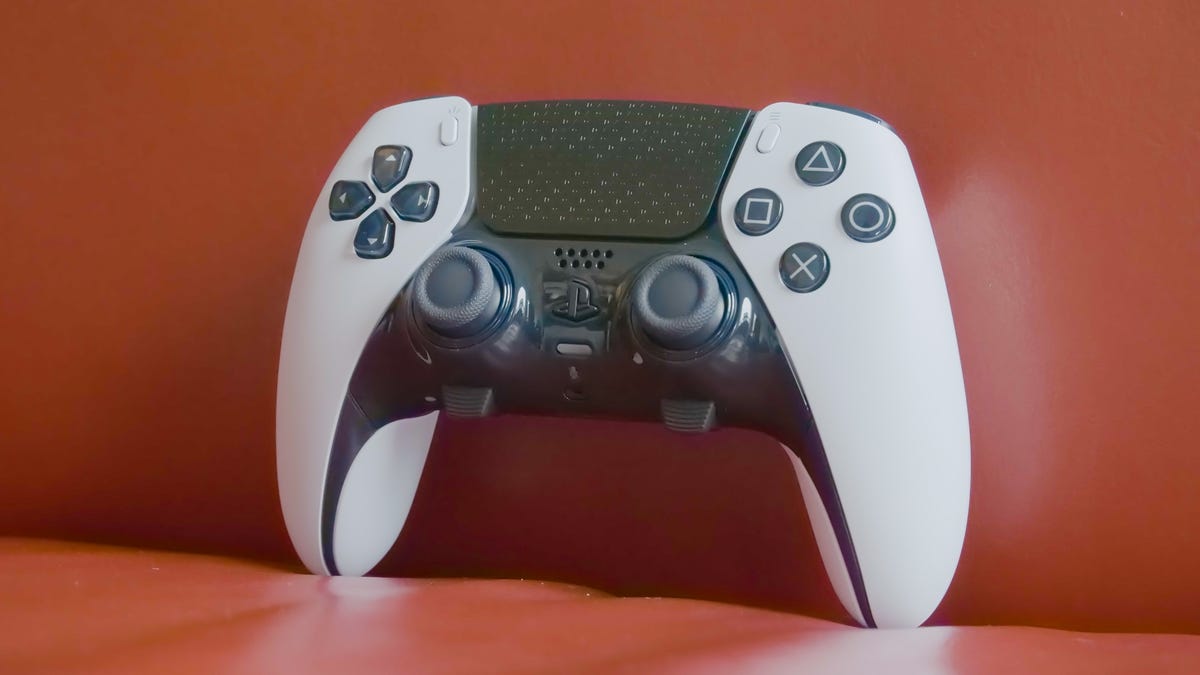
The DualSense Edge controller is the latest accessory for Sony’s PlayStation 5, and it offers a high degree of customization at an equally high price. The PS5’s default controller, the DualSense, got its name from its ultraspecific vibration functionality. The Edge is a pro-style controller that improves on that by allowing players more options to fine-tune their inputs and, as Sony explains, «craft [their] own unique gaming experience tailored to [their] playstyle.» However, this enhanced customization doesn’t come cheap.
While a typical PS5 controller will cost you around $70, the new DualSense Edge, which comes with some accessories, is $200. Alongside the controller itself, the box includes a carrying case with a pass-through window to allow for charging, a USB-C cable and a connector housing to secure it to the controller, plus two separate options for back paddles and two options for analog stick replacements.
The DualSense and DualSense Edge controller look very similar to one another at first glance. The controllers even weigh just about the same, with the DualSense coming in at around 281 grams while the Edge is slightly more at approximately 325 grams.
The Edge features a textured grip on the handles that helps the controller stay in your hands. It also has grooves on the trigger buttons, which is nice because you can more easily keep your fingers in the proper position. Textures and grooves aside, when the back buttons are removed, the controllers feel almost identical to use. The original DualSense has a notoriously short battery life, around 7 to 10 hours. From my brief testing, I’m disappointed to report that the Edge comes in at an even lower 5 to 7 hours. The included USB-C is pretty long so, fortunately, I could still play games while the controller charged.
More buttons, more options
Pro controllers give players more options for how the buttons and triggers register inputs. When connecting the controller to the PS5 for the first time, a welcome screen shows the different customization options from both a hardware and software perspective. On the hardware side, players can attach either half-dome (rounded and short) or lever (skinny and long) back paddles to the device. These paddles sit close to where the player’s middle or ring fingers rest and can be mapped to any other input on the DualSense Edge. First-person shooter fans often use these to keep their right thumb on the right analog stick so they can aim while still being able to jump or duck (an input often put on the X or O face buttons). While both paddles are comfortable to use, I prefer the half-dome option since it sits a bit further away and can’t be as easily pressed by mistake.
These back paddles are also a great accessibility feature. Players with low range of motion for any of the primary controller fingers (the thumbs or pointer fingers) can swap one of those inputs to the back of the controller where they might have an easier time pressing a button.
The next biggest hardware tweak is in the trigger buttons on top of the controller. Next to each trigger is a mechanical switch that adjusts how much the L2/R2 buttons can be pressed before registering a full push. Players can choose between three ranges of motion. Fans of twitch-based games often prefer shorter distances so they can press quicker and more often. For example, being able to shoot a gun more rapidly will give Call of Duty players an advantage. Microsoft’s Xbox Elite controller has similar options for its triggers and paddles.
Customizing the software
Customization options are set via the PS5 accessories settings screen, and the intensity and deadzone customization options are the most exciting. These menus can adjust how fast the input curves are for any of the controller’s analog inputs. For example, if you want to physically use the full range of the trigger buttons but want the controller to register that input more quickly, you can fine-tune that on a surprisingly granular level. This goes for the analog sticks’ movement, as well. In addition, you can adjust the deadzone (the center part of the stick where the controller registers no input) to be wider.
All of these software options can be saved into a user profile. The DualSense Edge features two Fn (function) buttons, located below the analog sticks. Holding either of them down and pressing any of the face buttons will let you toggle between four assigned profiles. It seems like a missed opportunity that both of these buttons do the same thing when held down and don’t have the ability to map different commands to each one. That said, being able to swap between profiles midgame was quite useful, especially when jumping between different games. For example, Fortnite and Overwatch have different crouch buttons, so using the same profile wouldn’t be helpful.
The DualSense Edge fills a hole that was missing from PlayStation’s portfolio. The controller feels good and offers new and more personal ways for any player to connect with a game, but its high price means it only makes sense for the truly dedicated.
This review is in progress, and we’ll update with additional impressions and a video later this week.
Technologies
Today’s Wordle Hints, Answer and Help for Jan. 13, #1669
Here are hints and the answer for today’s Wordle for Jan. 13, No. 1,669.
Looking for the most recent Wordle answer? Click here for today’s Wordle hints, as well as our daily answers and hints for The New York Times Mini Crossword, Connections, Connections: Sports Edition and Strands puzzles.
Today’s Wordle puzzle is a little tricky, and it might make you hungry. If you need a new starter word, check out our list of which letters show up the most in English words. If you need hints and the answer, read on.
Read more: New Study Reveals Wordle’s Top 10 Toughest Words of 2025
Today’s Wordle hints
Before we show you today’s Wordle answer, we’ll give you some hints. If you don’t want a spoiler, look away now.
Wordle hint No. 1: Repeats
Today’s Wordle answer has no repeated letters.
Wordle hint No. 2: Vowels
Today’s Wordle answer has two vowels.
Wordle hint No. 3: First letter
Today’s Wordle answer begins with G.
Wordle hint No. 4: Last letter
Today’s Wordle answer ends with O.
Wordle hint No. 5: Meaning
Today’s Wordle answer can refer to a spicy Cajun stew popular in New Orleans.
TODAY’S WORDLE ANSWER
Today’s Wordle answer is GUMBO.
Yesterday’s Wordle answer
Yesterday’s Wordle answer, Jan. 12, No. 1,668 was TRIAL.
Recent Wordle answers
Jan. 8, No. 1,664: BLAST
Jan. 9, No. 1,665: EIGHT
Jan. 10, No. 1,666: MANIC
Jan. 11, No. 1,667: QUARK
Don’t miss any of our unbiased tech content and lab-based reviews. Add CNET as a preferred Google source.
What’s the best Wordle starting word?
Don’t be afraid to use our tip sheet ranking all the letters in the alphabet by frequency of uses. In short, you want starter words that lean heavy on E, A and R, and don’t contain Z, J and Q.
Some solid starter words to try:
ADIEU
TRAIN
CLOSE
STARE
NOISE
Technologies
Today’s NYT Strands Hints, Answers and Help for Jan. 13 #681
Here are hints and answers for the NYT Strands puzzle for Jan. 13, No. 681.
Looking for the most recent Strands answer? Click here for our daily Strands hints, as well as our daily answers and hints for The New York Times Mini Crossword, Wordle, Connections and Connections: Sports Edition puzzles.
It took me a while to figure out the theme for today’s NYT Strands puzzle, but once I did, I thought it was a fun one. Some of the answers are difficult to unscramble, so if you need hints and answers, read on.
I go into depth about the rules for Strands in this story.
If you’re looking for today’s Wordle, Connections and Mini Crossword answers, you can visit CNET’s NYT puzzle hints page.
Read more: NYT Connections Turns 1: These Are the 5 Toughest Puzzles So Far
Hint for today’s Strands puzzle
Today’s Strands theme is: You need to chill
If that doesn’t help you, here’s a clue: Brrrr!
Clue words to unlock in-game hints
Your goal is to find hidden words that fit the puzzle’s theme. If you’re stuck, find any words you can. Every time you find three words of four letters or more, Strands will reveal one of the theme words. These are the words I used to get those hints but any words of four or more letters that you find will work:
- GONE, ABLE, TABLE, FOOD, TEEN, LEAF, GOOF, GOOD, SAFE
Answers for today’s Strands puzzle
These are the answers that tie into the theme. The goal of the puzzle is to find them all, including the spangram, a theme word that reaches from one side of the puzzle to the other. When you have all of them (I originally thought there were always eight but learned that the number can vary), every letter on the board will be used. Here are the nonspangram answers:
- PIZZA, SHERBET, POPSICLES, WAFFLES, VEGETABLES
Today’s Strands spangram
Today’s Strands spangram is FROZENFOOD. To find it, start with the F that is five letters down on the far-right row, and wind backward.
Don’t miss any of our unbiased tech content and lab-based reviews. Add CNET as a preferred Google source.
Toughest Strands puzzles
Here are some of the Strands topics I’ve found to be the toughest.
#1: Dated slang. Maybe you didn’t even use this lingo when it was cool. Toughest word: PHAT.
#2: Thar she blows! I guess marine biologists might ace this one. Toughest word: BALEEN or RIGHT.
#3: Off the hook. Again, it helps to know a lot about sea creatures. Sorry, Charlie. Toughest word: BIGEYE or SKIPJACK.
Technologies
Anker’s Brand New Soundcore Aerofit Pro 2 Earbuds Are Barely a Week Old and They’re Already $30 Off
The AeroFit line has been one of our go-tos, and the brand-new Pro model is already easier to recommend thanks to a solid deal.

If you’re looking for earbuds that can keep up with your workouts, commutes and everything in between, the Anker AeroFit Pro 2 earbuds are worth a look. This brand-new model just launched last week, combining comfort, open-ear listening and active noise cancellation into one versatile package.
We expect big things from this new model — after all, the AeroFit 2 are one of our favorite earbuds, so this new model is bound to impress. Despite being so new, the AeroFit 2 Pro are already discounted to $150, down $30 from the launch price of $180. You’ll need to use promo code WSTDA3875US when you shop at Anker, giving you a head start on a top-tier open-ear experience.
What’s unique about the AeroFit Pro 2 is that the buds can switch between two forms with a simple adjustment of the ear hooks. That means you get both an open-ear design for breathable comfort and active noise cancellation for focused listening. Those same skin-friendly liquid silicone ear hooks ensure a secure fit that should stay comfortable all day.
Hey, did you know? CNET Deals texts are free, easy and save you money.
Sound promises to be equally impressive. The earbuds offer studio-grade 11.8mm composite drivers, LDAC technology and dynamic head tracking deliver immersive, theatre-like audio. Four mics with AI call-boosting make your voice come through crystal-clear, even in noisy environments.
If you want to compare models, take a look at our roundup of the best open earbuds for 2026, and the best headphone deals for more savings.
HEADPHONE DEALS OF THE WEEK
-
$248 (save $152)
-
$170 (save $181)
-
$398 (save $62)
-
$200 (save $250)
Why this deal matters
You have the chance to get a brand-new model from a proven line of favorites at a solid discount. With versatile forms, premium sound and top-notch microphones, the AeroFits Pro 2 is a flexible, high-quality option for any listener.
-
 Technologies3 года ago
Tech Companies Need to Be Held Accountable for Security, Experts Say
-
 Technologies3 года ago
Best Handheld Game Console in 2023
-
 Technologies3 года ago
Tighten Up Your VR Game With the Best Head Straps for Quest 2
-
 Technologies4 года ago
Black Friday 2021: The best deals on TVs, headphones, kitchenware, and more
-
 Technologies4 года ago
Google to require vaccinations as Silicon Valley rethinks return-to-office policies
-
 Technologies4 года ago
Verum, Wickr and Threema: next generation secured messengers
-
 Technologies4 года ago
Olivia Harlan Dekker for Verum Messenger
-
 Technologies4 года ago
iPhone 13 event: How to watch Apple’s big announcement tomorrow


