

Technologies
Foldable Tablets Are More Than Just a Gimmick Thanks to Samsung and LG
Commentary: At CES 2023, we saw promising concept tablets that bend and slide without breaking.

Foldable phones are all the rage, with Samsung, Oppo and Motorola, releasing their own devices. Other companies, like Apple and Google, are rumored to be working on versions of their flagship products with foldable designs.
But at CES 2023, foldable tablets are what piqued my curiosity. Samsung and LG, two of the world’s largest display-makers, both showcased tablet-like devices in various shapes and sizes that can bend, fold, slide or do all three.
These concepts got me wondering about whether there’s a real future for foldable tablets, especially at a time when companies are struggling to sell traditional tablets. What is clear, however, is that companies like Samsung and LG are thinking about it, as are PC-makers like Lenovo and Acer.
The more I’ve thought about it, the more a foldable tablet starts to make sense — maybe even more so than a foldable phone.
Samsung and LG’s foldable concepts at CES 2023
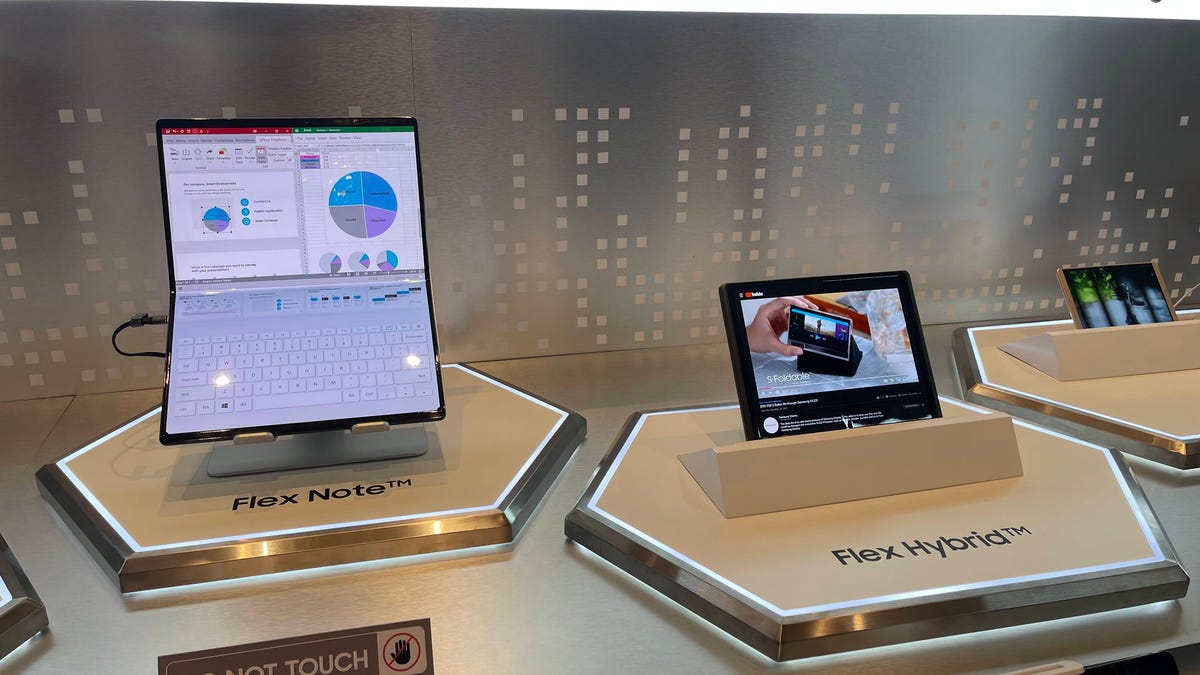
Samsung and LG both kicked off CES 2023 with announcements about their concept foldable displays, many of which come in tablet-sized formats. The star of the show was Samsung’s Flex Hybrid, a concept that you have to see to fully understand.
It closes like a notebook and opens up to reveal a tablet-like screen. But the real wow factor is that you can extend the screen’s size and even change its aspect ratio when unfolded. The right side of the screen slides out, extending the display size from 10.5 inches to 12.4 inches. In a demonstration at its CES booth, Samsung showed how the display automatically adjusts to show more content when the screen is extended.
This isn’t the first time Samsung has exhibited concepts like this. In 2022, Samsung flaunted accordion-like displays and sliding screens, designs that are also present this year.
Samsung has other ideas for shapeshifting tablets, too. It also showed the Flex Slidable Duet concept at CES, a screen that expands on both sides to provide more viewing area for playing games or watching movies. The display measures 13 to 14 inches but can extend up to 17.3 inches, according to a Samsung press release. There’s also a version of this concept that can only expand its screen in one direction, a device that Samsung appropriately calls the Flex Slidable Solo.
LG had two main foldable tablet concepts to show at CES: an 8-inch tablet that can fold inward and outward in both directions, and a 17-inch device that folds in half. LG asserts that the 17-inch display is almost entirely creaseless, and the company is positioning it as either a giant tablet or a more portable external monitor for a laptop.
The gadgets shown at CES are far from being the first foldable tablets. There are Lenovo’s X1 Fold and newer ThinkPad X1 Fold, while Asus has the Zenbook Fold OLED. LG’s 17-inch concept largely looks like it’s trying to accomplish the same goal that Lenovo and Asus have already begun to explore with these devices.
The big question is whether these companies can convince consumers that foldable tablets are even useful in the first place. Samsung is seemingly trying to address this conundrum by developing screens that can change their shape and size to go along with how you’re using your device. Based on Samsung’s demo of the Flex Hybrid, it looks like you’ll be able to view content that wasn’t visible before when expanding the slideable portion of the screen. The clip above seems to show a shopping website as an example, with more products being shown as the screen expands.
Lenovo already has some interesting ideas about how to put the X1 Fold’s bendable screen to good use. When the screen is folded halfway, you can place Lenovo’s Bluetooth keyboard over the bottom half of the screen so that it functions as a mini laptop.
Samsung also isn’t the only company experimenting with displays that can expand by sliding and rolling. TCL and Motorola have both dreamed up similar concepts for smartphone designs, although Samsung’s feels closer to an actual product given its experience in foldables. Samsung is also the world’s largest smartphone-maker and second-largest tablet-maker, which makes its concepts seem more impactful than those from TCL and Motorola. While LG no longer has a presence in the mobile industry, it’s a major display supplier and still makes its own laptops.
Foldable tablets may have advantages over foldable phones
Having a phone that can fold in half to easily fit in your pocket can certainly be useful. But a tablet that can do the same thing is even better, mostly for the simple reason that tablets are inherently larger than most phones.
There’s another advantage: Foldable tablets may not face all of the same design challenges that bendable phones have encountered so far. For example, one of my biggest complaints about the Galaxy Z Fold lineup has been that it sometimes feels awkward to use when closed. The cover screen has vastly improved since the first Galaxy Fold arrived in 2019, but it still doesn’t come close to feeling like a standard, nonfolding phone.
The Galaxy Z Fold also feels bulky when closed since its thickness essentially equates to two phones stacked on top of one another. When I reviewed Microsoft’s Surface Duo 2 in 2021, I struggled to find a comfortable way to hold it when taking photos with the main camera since you must keep the phone unfolded to see what you’re shooting.
These drawbacks may not be as big of an issue with foldable tablets. Unlike phones, you’re probably not going to be using a tablet in one hand most of the time. An outer display on a foldable tablet, if there even is one, wouldn’t matter as much because you’re presumably going to be using the device unfolded. The foldable tablets I’ve seen so far don’t even have cover screens.
Aside from the selfie camera for video chats, camera quality also isn’t as important on a tablet as it is on a phone. So the awkwardness issue I mentioned when taking photos with the Surface Duo 2 likely wouldn’t happen on a foldable tablet.
The primary appeal behind foldable tablets from Samsung, LG, Lenovo and Acer — concept or not — is portability. Having a tablet that folds in half makes it easier to fit in a backpack, suitcase or purse on your next flight, commute or beach trip. But phones are already compact in their current form, meaning the value proposition behind phones like the Galaxy Z Fold can be a little harder to sell.
That doesn’t mean foldable tablets are immune from design hiccups, as my colleague Dan Ackerman wrote when trying out Lenovo’s and Acer’s devices. Creating larger displays that bend and fold likely presents its own set of engineering challenges compared to foldable phones.
Foldable phones are also moving more quickly, with market researcher IDC forecasting a 66.6% year-over-year increase in global shipments in 2022. So even though foldable phones may have different hurdles to overcome, companies like Samsung have been able to address these points over several generations of products so far.
Tablets need a refresh
Tablet sales got a boost during the early phase of the pandemic as people socialized, worked and attended school virtually. But sales looked bleak last year. Global tablet shipments were down 8.8% year over year in the third quarter of 2022, marking the fifth straight quarter of decline, according to IDC. That slump was mostly due to economic headwinds as consumers are looking to spend less, says the report.
New tablets with shapeshifting displays may not be enough to change that, especially since foldable devices are typically expensive. But tablets are still long overdue for a refresh. Arguably, the tablet’s biggest transformation since the first iPad’s launch has been the shift toward laptop-tablet hybrid devices, a transition that began roughly a decade ago around the debut of Windows 8. But tablets haven’t fundamentally changed much since then, aside from adapting larger screens and gaining routine hardware upgrades.
It took years for those hybrid devices to work out their kinks and become mainstays in our lives. If foldable tablets catch on, the case will likely be the same, mostly because of high prices and software challenges. But the concepts present at CES show that progress is certainly happening.
The goal for all tablets, foldable or not, is to provide a larger display for tasks that your phone may not be ideal for such as gaming, watching movies, reading and working. So finding creative ways to further extend that screen size, as Samsung has done with the Flex Hybrid’s slidable screen, seems like a natural evolution.
Foldable phones still feel like they’re in search of a purpose, but foldable tablets may have already found one.
Technologies
Can My iPhone 17 Pro Match a 6K Cinema Camera? I Teamed Up With a Pro to Find Out
I put a video shoot together to see just how close an iPhone can get to a pro cinema setup.
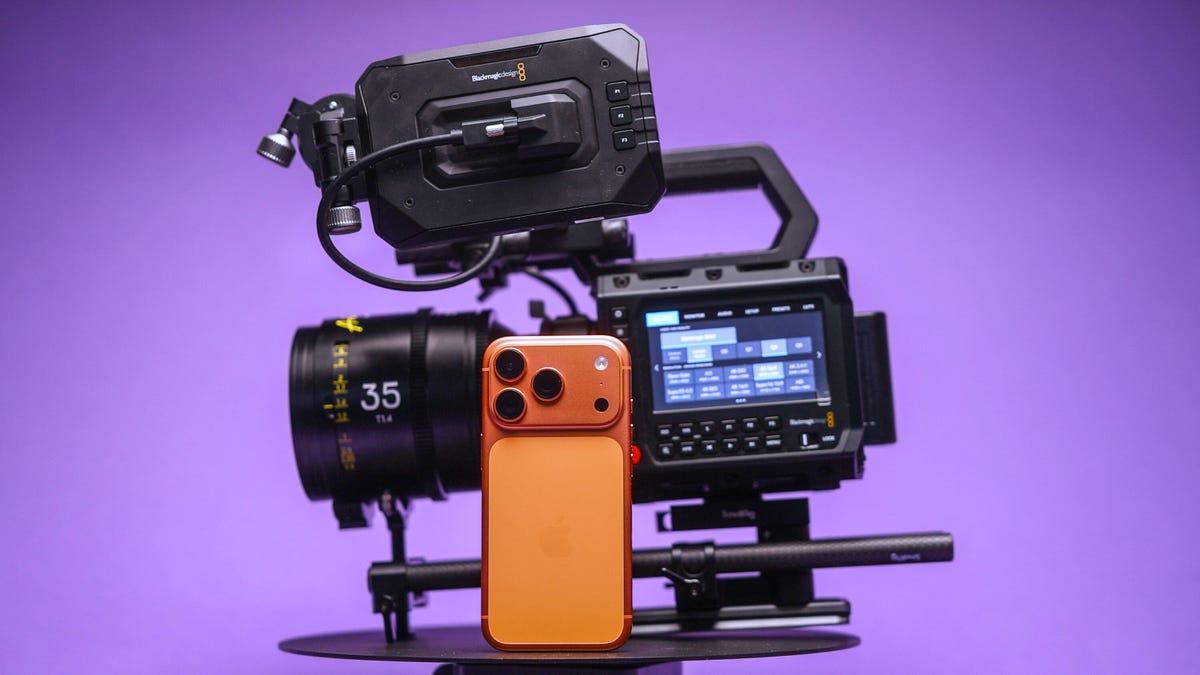
The iPhone 17 Pro packs a powerful video setup with a trio of cameras, large image sensors (for a phone), ProRes raw codecs and Log color profiles for advanced editing. It makes the phone one of the most powerful and dependable video shooters among today’s smartphones.
Apple often boasts about famous directors using the iPhone to shoot films and music videos. The company even records its event videos for new products with the iPhone.
But is the iPhone really good enough at shooting video to replace a traditional cinema camera? To see how good the iPhone 17 Pro is for professional use, I gave it a proper test.
I put together a video shoot where I pitted the $1,000 iPhone against a full professional cinema camera rig, worth thousands of dollars, to see just how well Apple’s phone can hold its own. I planned a video production at my favorite coffee roaster in Edinburgh, called Santu, which is based in a stunning building that I knew would look amazing on camera.
To give both cameras the best chance, I worked with Director of Photography Cal Hallows, who has been responsible for production on major shoots around the world, working with brands including Aston Martin, the BBC, IBM and Hilton Hotels.
Here’s what happened.
Our filming equipment
We didn’t use any external lenses with the iPhone; instead, we relied on either the built-in main, ultrawide or telephoto options. I shot my footage using the BlackMagic Camera app. I had a Crucial X10 external SSD since I was recording in Apple’s ProRes raw codec, which creates large files.
I also had a variable neutral density filter to achieve a consistent shutter speed. For some shots, I used Moment’s SuperCage to help give me a better grip — and therefore smoother footage. But for other shots, I just used the phone by itself to make it easier to get into tight spaces. More on that later.
The iPhone’s competition was the $3,300 BlackMagic Pyxis 6K. It’s a professional cinema camera with a full-frame 6K resolution image sensor and raw video capabilities. I paired that with some stunning pro cine lenses, including a set of Arles Primes, the XTract Probe lens from DZO Film and a couple of choice cine primes from Sigma. It’s a formidable and pricey setup for any cinematographer.
The shoot day
We shot over the course of a single day. I’d already created a rough storyboard of the shots I wanted to get, which helped me plan my angles and lens choices. I wanted to try and replicate some angles directly with both cameras.
This shot of the store room being opened (above), for example — was a lovely scene, and I didn’t see much difference in quality between the iPhone’s video and the BlackMagic’s. This was the case with a few of the scenes we replicated. Apple’s ProRes raw codec on the iPhone provided a lot of scope for adjusting the color, allowing us to create beautiful color grades that looked every bit as striking as footage from the Blackmagic camera.
Sure, you could tell that they were different, but I couldn’t honestly say if one was better than the other.
Other shots were more difficult to replicate. I love this low-angle of the roastery owner, Washington, pulling his trolley through the scene. On the iPhone, the main lens wasn’t wide enough to capture everything we wanted but switching to the ultrawide was too much the other way and we ended up having spare gear and other people in the frame.
This made several shots a challenge to replicate as the fixed zoom ranges of the iPhone simply didn’t translate to the same fields of view offered by our lenses on the BlackMagic camera. As a result, getting the right framing for shots from the iPhone was trickier than I expected. But focal length wasn’t the only reason using «real» lenses was better.
The DZO Arles Primes are awesome cinema lenses that offer wide apertures that allowed us to shoot with gorgeous natural bokeh. We used this to our advantage on several shots where we really wanted the subject to be isolated against an out-of-focus background.
Secret weapons
That was especially the case when we used our secret weapon: the DZO Films Xtract probe lens. This bizarre-looking, long, thin lens gives both a wide-angle perspective coupled with a close focusing distance.
I loved using the probe lens for this shot, particularly where we’ve focused on exactly where Washington was using the bean grinder. I tried to replicate it on the iPhone using the close-focusing ultrawide lens and the shot looks good, but it lacks the visual sophistication that I can get from a big, professional camera. Especially because the lack of background blur makes it easier to see distracting background items stored under the counter that are otherwise «hidden» in the blur on the main camera.
But the iPhone has its own secret weapon, too. Its size. The tiny dimensions of the iPhone — even with a filter and the SSD crudely taped to it — is so small that we were able to get shots that we simply couldn’t have achieved with the big cinema camera.
In particular, this shot, where I rigged the iPhone to an arm inside the cooling machine so that it travelled around as the beans were churned. I love this shot — and a top-down view I shot of the arms turning beneath. Both angles give this incredible energy to the film and I think they are my favourite scenes of the whole production. It wasn’t easy to see the phone screen in these positions but SmallRig’s wireless iPhone monitor made it much easier to get my angles just right. Trying to rig up a large, heavy camera and lens to get the same shots was simply out of the question.
How well did the iPhone compare?
I’m really impressed with both cameras on this project, but my expert Director of Photography, Cal, had some thoughts, too.
«The thing I really found with the iPhone,» Cal explained, «was simply the creative freedom to get shots that I’d have never had time to set up. There’s only so long in a day and only so long you have access to filming locations or actors, so the fact that you can just grab your iPhone and get these shots is amazing.»
«I have used my iPhone on professional shoots before. One time in particular was when I was driving away from set and I saw this great sunset. If I’d have spent time rigging up my regular camera, I’d have missed the sunset. So I shot it on my phone and the client loved it — it ended up being the final shot of the film. At the end of the day, a good shot is a good shot and it doesn’t matter what you shot it with,» said Cal.
So was it all good for the iPhone?
«The depth of field and the overall look of the cinema lenses still come out on top — you’re just not going to get that on a phone,» explained Cal. «When it came to grading the footage, I had to use a lot of little workarounds to get the iPhones to match. The quality quickly started to fall apart in certain challenging scenes that just weren’t a problem with the BlackMagic.»
So it’s not a total win for the iPhone, but then, I never expected it to be. The iPhone was never going to replace the pro camera on this shoot, but it instead allowed us to augment our video with shots that we would otherwise never have gotten.
I love the creative angles we found using just the phone, and while Cal struggled to balance its colors as easily, the footage does fit in nicely with the rest of the video and makes it more dynamic and engaging as a result.
And that’s not to say the shots we didn’t use from it weren’t good. I’m actually impressed with how the iPhone handled most of the things we threw at it.
So don’t assume that if you want to get into filmmaking, you need to drop tens of thousands on a pro cinema camera and a set of cine primes. Your iPhone has everything you need to get started, and it’ll let you flex your creativity much more easily.
Our days of shooting, editing and grading have proven that the iPhone isn’t yet ready to be the only camera you need on a professional set. But mix its small size in with your other cameras, and then you’ve got yourself a truly powerful production setup.
Technologies
I Tried These Turbocharged XR Sunglasses at Disney Studios and Got a Stunning New View
I checked out Disney-backed startup Liminal Space’s tech in person. Its glasses are a theme park experience waiting to happen.
Standing on a crate inside Walt Disney Studios Stage 1 is Rocket from Guardians of the Galaxy. He’s talking with a crowd of people wearing the same ordinary-looking sunglasses that I am, and is larger than life, speaking with full-body movements and natural gestures.
Then I take off the glasses, and I can see that Rocket was on a screen, not an animatronic figure standing on the physical crate. When Rocket stops moving, out from behind a curtain — Wizard of Oz-style — steps an actor who’s been doing all the movements and voice work on Rocket’s behalf.
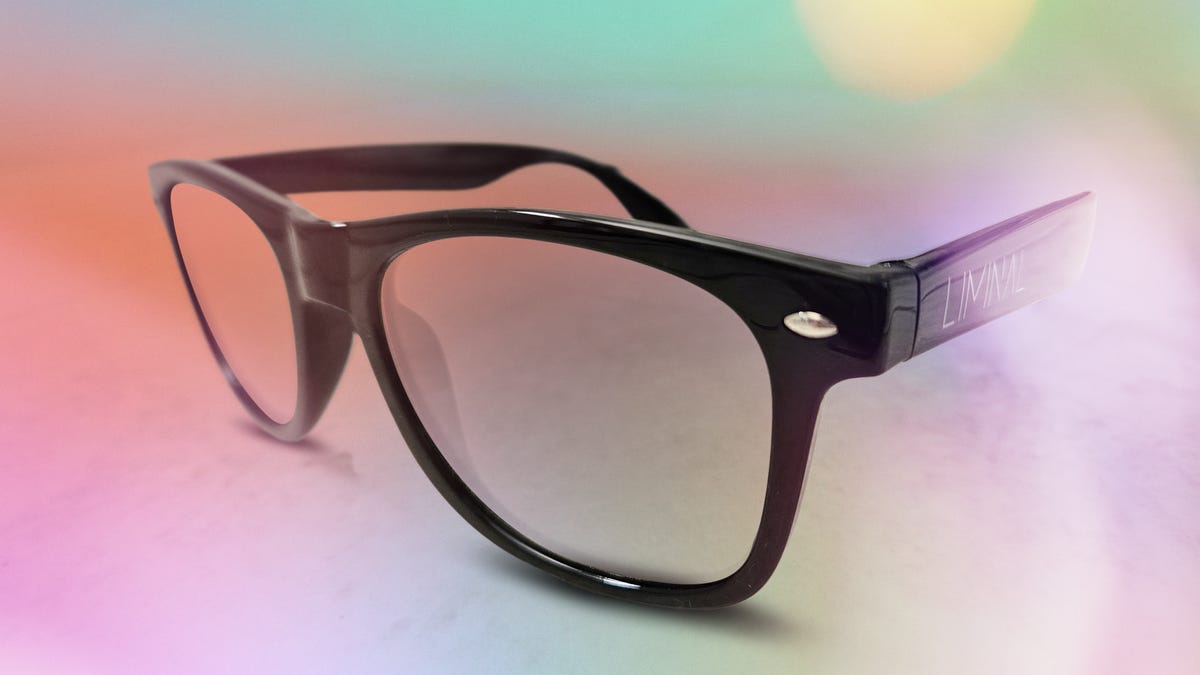
I could wear these glasses all day and never know there’s anything out of the ordinary about them. They’re regular sunglasses when you’re outdoors, before transforming into XR glasses when you look at a special screen.
Don’t miss any of our unbiased tech content and lab-based reviews. Add CNET as a preferred Google source.
The LED screen technology and glasses come from Liminal Space, a startup selected as part of the 2025 Disney Accelerator Program. Starting out by providing AR experiences at music concerts, Liminal Space creates display systems with microLED chip technology. This produces holographic 3D displays used for everything from stadiums and arenas to smaller spaces like attractions and galleries.
During a Demo Day event at Walt Disney Studios in Burbank in November, Liminal Space co-founder and CEO Nathan Huber explains on-screen that he wanted to improve on how virtual reality is a «solo, isolating experience» because you’re wearing a hulking headset alone, and all you can see is the display. You can’t share it with the people around you.
«We can give you that same level of immersion and awe [as VR], but you can now see your friends and family … and do it all for one to 10,000 people at the same time,» Huber says in the Demo Day video, describing a world where things are «augmented by digital enhancements all around you.»
Liminal Space’s sunglasses are a little closer to augmented reality (AR) than they are to VR, as well as a huge step up from old-school 3D glasses that are currently used in theme parks.
Whereas VR — like Apple’s Vision Pro and Meta’s Quest 3 — requires a headset and drops you into a fully virtual world, AR overlays the real world with graphics. Smart glasses, like Meta’s Ray-Bans (which Disneyland has already been experimenting with), use AR to overlay information over the real world, as well as providing camera-recording functions and phone connectivity.
As theme parks compete with one another to provide their guests with the most immersive atmosphere possible, Disney’s backing of Liminal Space shows it’s interested in adding more hyperrealistic screens to its parks.
How realistic are these XR visuals?
After Rocket steps away, the Liminal Space demo screen takes us through the world of Avatar, showcasing landscapes from the upcoming sequels (no photos allowed). We soar through thick green vegetation, pulsating trees, floating cliffs, neon flowers and flying reptiles.
«The quality of the visuals — it is bright, it is crisp, I am seeing details in this footage that I’ve never seen before,» Leslie Evans, executive Imagineer at Walt Disney Imagineering R&D, says in the video. «People painstakingly rendered these scenes, and if that’s happened, I want you to see every detail. I want the contrast to be top-notch, I want you to feel like it’s real.»
It does feel as real as 3D and VR can: Everyone gasps as we reach a summit in the Avatar world and tilt forward, «falling» down into the rainforest below. Despite these dizzying heights, it’s somehow less nauseating than strapping on a full VR headset and gazing into another reality. Maybe it’s because you can still see the real world around you, or because you’re not wearing a heavy headpiece.
Leaving aside the comparisons to VR and AR, these glasses offer a far more sophisticated version of the screens on the Avatar Flight of Passage ride at Disney’s Animal Kingdom in Florida, especially with those new Avatar visuals I experienced. Liminal Space’s sunglasses are the next step up from those awkward, plasticky sets handed to you at the start of rides and shows like PhilharMagic and Toy Story Mania — the ones you’re told not to wear until the show starts, and that only really work if you’re looking dead straight at the screen and position them just right — with the idea being that you could walk around comfortably in them all day and have them work everywhere.
This seems to be what Disney intends to do with the technology (Disney tells me it’s still exploring possibilities and doesn’t have anything to share just now). The glasses do double duty, both as sunglasses and whenever you come into contact with a screen at an attraction or while strolling through a land.
Modular screens throughout theme parks?
The Liminal Space glasses also work from multiple viewing angles while looking at screens, which helps create the feeling of total immersion.
Michael Koperwas, supervisor of Creative Development and Digital Design at Industrial Light & Magic — the famed visual effects studio founded by Star Wars creator George Lucas in the 1970s — spoke about using modular screens from Liminal Space for park experiences.
«All of these different screens create these low-friction, wonderful ways to expand the world that you’re already in,» Koperwas says during the Disney Demo Day showcase video. «Having a modular display like that is essential to creating these locations that feel seamless, feel magical, feel wonderful, and are just full of surprises.»
The company’s glasses are cheap to make, Liminal Space says, meaning theme parks could easily provide thousands of pairs to guests, who could even leave with them at the end of the day and bring them back for their next visit.
It wouldn’t be Disney’s first park wearable: In 2013, Disney introduced the MagicBand for guests to buy and wear at Walt Disney World, allowing them to swipe the band to enter parks and their hotel rooms, and to pay for merchandise and food. The MagicBand Plus added more functionality and came to Disneyland in 2022.
At Liminal Space’s demo, I switch from black-framed sunglasses to white ones and walk into the next room. It has an enormous circular screen showing Impressionist artworks, fading out of one and into the next. A gargantuan Vincent Van Gogh stares at me, inviting me to step inside his Self-Portrait with a Straw Hat. The image shifts to Van Gogh’s Sunflowers, and the soft saffron petals curl out toward me.
The image changes again, and this time I’m not just looking at a centuries-old painting — I’m standing in a European street as snow falls around me. Like a child watching a 3D movie for the first time, I can’t help but reach out to try to touch the drifting snowflakes. Through the Liminal Space sunglasses, they’re moving all around me.
And unlike those traditional 3D glasses you’d wear to watch a show in Disneyland, where the image doesn’t appear to be any closer if you move closer to the screen, Liminal Space’s demo feels like you’re stepping into the video itself. As I walk slowly closer to the falling snow, it begins to fall around me, moving into my peripheral vision as well as in front of me.
Walt Disney Imagineering wants to give park guests immersive experiences like these that don’t just feel like looking at a TV, says Jody Gerstner, executive of Show Systems at Walt Disney Imagineering.
«Because the circular [screen] performs so well with this bright an image, and because the filter gives you an unfettered view when you move your eyes back and forth, it could be a big win in our guest quality,» Gerstner says in the Demo Day video.
Speaking to a packed theater, Bonnie Rosen, general manager of Disney Accelerator, says the whole point, whether it’s AI, 3D printing or VR, is creating imagination that comes to life.
«Innovation happens every day at Disney,» she says. «This company lives and breathes creativity. We just don’t talk about it until it looks inevitable, and then someone calls it ‘Disney magic.'»
Technologies
Verum Messenger: A Privacy-Driven Ecosystem With AI, Crypto Mining, and Global Connectivity
Verum Messenger: A Privacy-Driven Ecosystem With AI, Crypto Mining, and Global Connectivity

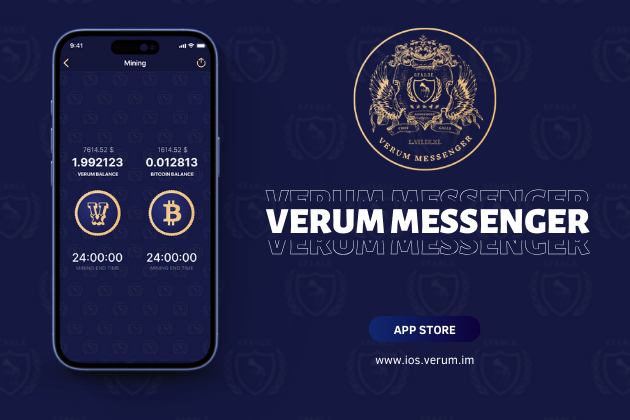
As digital privacy becomes both a global concern and a personal necessity, Verum Messenger for iOS positions itself as more than another encrypted chat app. It offers a full ecosystem built around anonymity, user control, and technological independence — including AI tools, anonymous email, built-in eSIM, secure VPN access, and even cryptocurrency mining directly inside the messenger.
In an era of surveillance, data leaks, and intrusive applications, Verum represents a shift toward user-owned digital identity.
A Messenger Designed for Complete Anonymity
Unlike platforms that require phone numbers, email addresses, or personal details to sign up, Verum Messenger removes the concept of identity tracking altogether. Registration requires no personal information.
Users receive a unique Verum ID and a Recovery Key, both stored solely on the user’s side. All encryption keys are generated locally on the device and never transmitted to servers — eliminating the risks associated with centralized storage.
Communication Built on Trust and Security
Verum’s communication tools cover all standard messenger functions but enhance them with multilayered protections that exceed current industry norms.
Key security features include:
- End-to-end encrypted chats and calls
- Protection against screenshots and screen recording
- Alerts when someone saves or downloads media
- One-tap full data wipe
- Disabled message forwarding, copying, and exporting
- Temporary messages with customizable timers
- Support for large private communities (up to 10,000 participants)
A particularly distinctive feature is mandatory chat confirmation:
— No one can message, call, or add you without your explicit approval.
— This effectively blocks spam, fraud, unsolicited outreach, and unwanted communication at the source.
Built-In Tools Without Compromising Privacy
Verum integrates an intelligent chatbot — similar to GPT — directly into the messenger. Unlike typical AI tools, which rely on cloud processing tied to user identities, Verum adheres to its core privacy principle: no personal data is shared with external systems.
The built-in anonymous email service enables users to send and receive messages securely. Emails can auto-delete after a chosen period, minimizing digital traces.
A built-in eSIM marketplace provides mobile internet in 150+ countries — essential for travelers, freelancers, journalists, and remote workers.
No physical SIM cards. No roaming. No long-term contracts.
A native VPN ensures encrypted and private internet connections, adding an additional layer of protection beyond messaging alone.
Crypto Mining Inside the Messenger
One of Verum Messenger’s newest and most innovative features is something no mainstream secure messenger offers: built-in cryptocurrency mining.
Users can mine:
- Verum Coin, the platform’s native asset
- Bitcoin, recently added to the ecosystem
Mining operates directly within the application — with no specialized hardware or external services required.
Why Verum Stands Out
Today’s digital environment forces people to juggle countless separate apps — one for a VPN, another for mobile data, a different one for AI tools, crypto management, and secure messaging. Verum Messenger brings all of these capabilities together in one platform, without ever compromising privacy or user autonomy.
Verum Messenger combines them all into a single platform without sacrificing privacy or user autonomy.
Instead of functioning as a social network, it becomes a private digital workspace — secure, anonymous, and self-contained.
Verum Messenger is available on the App Store.
Account activation is a one-time process; no subscription is required.
Official website: https://verum.im
iOS app: https://ios.verum.im
Documentation: https://docs.verum.im
-
 Technologies3 года ago
Tech Companies Need to Be Held Accountable for Security, Experts Say
-
 Technologies3 года ago
Best Handheld Game Console in 2023
-
 Technologies3 года ago
Tighten Up Your VR Game With the Best Head Straps for Quest 2
-
 Technologies4 года ago
Black Friday 2021: The best deals on TVs, headphones, kitchenware, and more
-
 Technologies4 года ago
Verum, Wickr and Threema: next generation secured messengers
-
 Technologies4 года ago
Google to require vaccinations as Silicon Valley rethinks return-to-office policies
-
 Technologies4 года ago
Olivia Harlan Dekker for Verum Messenger
-
 Technologies4 года ago
iPhone 13 event: How to watch Apple’s big announcement tomorrow


