

Technologies
How to Upload Your Driver’s License to Your iPhone
Residents of select states can show TSA a digital version of their license stored in their Apple Wallet.

If you’re traveling over the holidays, there’s a lot to keep track of as you race through the airport: Your tickets, your boarding pass, your luggage, your loved ones — and, of course, your ID.
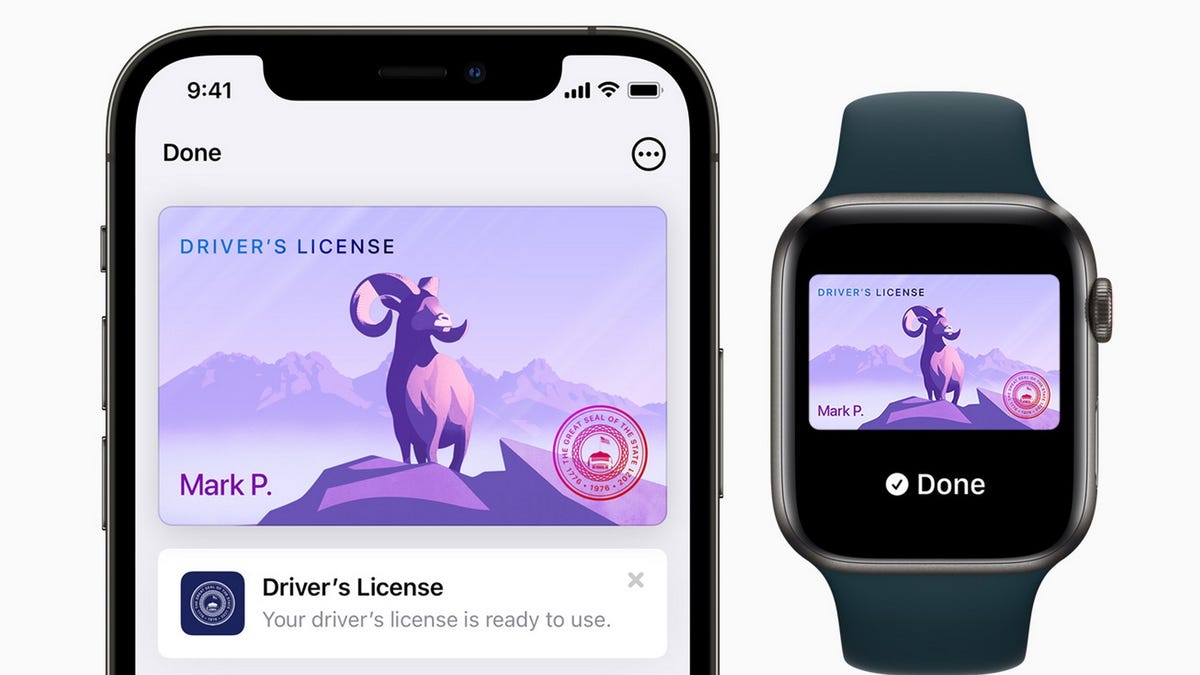
Almost all airlines let you use a digital version of your boarding pass to board, but now some states are allowing residents to keep their driver’s license or other recognized identification in their Apple Wallet, letting them just flash their iPhones — or Apple Watch — rather than root through their pocketbooks for their ID.
Apple announced the initiative in 2021, building the technology into iOS 15 for iPhone.
«The addition of driver’s licenses and state IDs to Apple Wallet is an important step in our vision of replacing the physical wallet with a secure and easy-to-use mobile wallet,» Jennifer Bailey, vice president of Apple Pay and Apple Wallet, said in a statement at the time.
It’s not quite a universal game-changer yet: While 12 states have committed to allowing digital IDs, only three have officially started accepting them.
And while the airport you depart from might accept a driver’s license on your Apple Watch, you might not be extended the same courtesy on the return trip.
But the Transportation Security Administration (TSA) is already supporting the technology at select airport security checkpoints at participating airports.
«Digital identity has the ability to strengthen airport security and enhance the passenger experience by reducing touchpoints, providing greater privacy, and verifying IDs more accurately,» the agency said in a statement. So it’s really a question of when, not if the option will become standard nationwide.
Here’s what you need to know about putting your driver’s license in your Apple Wallet, including how to do it and which states recognize digital IDs.
Read On: Homeland Security Postpones Deadline for Real ID at Airports
How do I add my driver’s license to my Apple Wallet?
Adding a driver’s license or other state ID is similar to how you add new credit cards to your Apple Wallet.
First, tap the «+» button at the top of the screen in Wallet. (If you have an Apple Watch paired to your iPhone, it will ask you about adding your license there, as well.)
You’ll then scan your physical driver’s license with your iPhone’s camera and take a selfie, «which will be securely provided to the issuing state for verification,» according to Apple.
You’ll also be asked to complete a series of facial and head movements «as an additional security step.»
Once your ID has been verified by the state that issued it, it will be added to your Wallet.
To add your license or ID to Apple Wallet, it will need to be issued from a participating state. In addition, you’ll need:
- An iPhone 8 or later, or an Apple Watch Series 4 or later, with the latest version of iOS or WatchOS
- Face ID or Touch ID turned on
- An Apple ID with two-factor authentication turned on
- Your device region set to the US
Also, only passengers with TSA PreCheck on their boarding pass are eligible to flash digital licenses, according to the TSA website, though the agency said it plans to add the option for other passengers in the future.
Only one license or ID can be added to an iPhone and paired Apple Watch at a time.
Which states accept a digital driver’s license on an iPhone?
Apple initially announced in 2021 that eight states were participating in the program, then bumped the number to 12 this year. But those are states committed to accepting Apple Wallet IDs, not that currently do.
Only Arizona, Colorado and Maryland currently support the digital identification feature — and only at select security checkpoints at these airports:
- Phoenix Sky Harbor Airport
- Baltimore/Washington International Thurgood Marshall Airport
- Ronald Reagan Washington National Airport
Connecticut, Georgia, Hawaii, Iowa, Kentucky, Mississippi, Ohio, Oklahoma and Utah have all committed to supporting the initiative, as has Puerto Rico, though specific timetables have not been announced.
Other states are expected to join this roster soon: Last year Bailey said Apple was «already in discussions with many more states.»
In November, the South Carolina Department of Motor Vehicles said it was «exploring» the digital ID option.
«There is a proviso that created a study committee on the idea and they are still undergoing research,» spokeswoman Maranda Williams told The State, a Columbia, South Carolina, news outlet.
Separate from Apple’s efforts, some states allow residents to upload their driver’s licenses to their phones through state-operated apps, like Louisiana’s LA Wallet. But these are for driving and age verification purposes and are not accepted by TSA yet.
How do I use a license stored in my Apple Wallet at TSA?
To present your digital ID, tap your iPhone or Apple Watch on the identity reader at the security checkpoint.
You’ll then be prompted to authenticate your identification with Face ID or Touch ID.
If it’s successful, a checkmark should appear on the screen.
According to Apple, «you don’t need to unlock, show or hand over your device [to a TSA agent].»
Is this technology secure?
According to Apple, it is. A statement on the Apple Support website says the program uses the same privacy and security features already in the iPhone and Apple Watch to prevent tampering and theft.
«Your driver’s license or state ID data is encrypted,» it said. «Neither the state issuing authority nor Apple can see when and where you use your license or ID, and biometric authentication using Face ID and Touch ID helps make sure that only you can view and use your license or ID.»
If my state accepts digital IDs, do I still need my physical license at the airport?
Yes. The program is still in its infancy, and there’s no guarantee the TSA agent you encounter will be able to accept a driver’s license on your Apple Wallet.
«All passengers must continue to have readily available their physical driver’s license,» TSA said on its website. «The TSA officer may require this physical ID in addition to the digital ID.»
Where else can I use my digital ID?
With the rollout of iOS 16 in June, apps that require age or identity verification should now be able to accept ID cards stored in your Apple Wallet app, Apple said.
Uber Eats and car-share service Turo were cited as two apps that could potentially offer this functionality, according to MacRumors, but neither has officially done so.
Apple also said retailers, restaurants and other venues will make use of the feature in the future.
I have an Android phone. Can I upload my ID to Google Wallet?
In a December 2022 system update, Google announced it was beta testing allowing Android phone users to upload their driver’s licenses to Google Wallet «for convenient, private and secure presentation.»
While the company said the feature would be available in «selected US state(s),» it didn’t indicate which ones or when.
Read On: Smartphones Traded Wow Factor for Peace of Mind in 2022
Technologies
Today’s Wordle Hints, Answer and Help for Oct. 22, #1586
Here are hints and the answer for today’s Wordle for Oct. 22, No. 1,586.
Looking for the most recent Wordle answer? Click here for today’s Wordle hints, as well as our daily answers and hints for The New York Times Mini Crossword, Connections, Connections: Sports Edition and Strands puzzles.
Today’s Wordle puzzle features some letters I don’t often guess, but it’s not terribly difficult. If you need a new starter word, check out our list of which letters show up the most in English words. If you need hints and the answer, read on.
Today’s Wordle hints
Before we show you today’s Wordle answer, we’ll give you some hints. If you don’t want a spoiler, look away now.
Wordle hint No. 1: Repeats
Today’s Wordle answer has one repeated letter.
Wordle hint No. 2: Vowels
Today’s Wordle answer has one vowel.
Wordle hint No. 3: First letter
Today’s Wordle answer begins with S.
Wordle hint No. 4: Last letter
Today’s Wordle answer ends with T.
Wordle hint No. 5: Meaning
Today’s Wordle answer can refer to an action displaying spectacular skill and daring.
TODAY’S WORDLE ANSWER
Today’s Wordle answer is STUNT.
Yesterday’s Wordle answer
Yesterday’s Wordle answer, Oct. 21, No. 1,585 was DETOX.
Recent Wordle answers
Oct. 17, No. 1,581: GROSS
Oct. 18, No. 1,582: HAVEN
Oct. 19, No. 1,583: IDEAL
Oct. 20, No. 1,584: LIMBO
Quick tips for Wordle
#1: Check our list ranking the popularity of all the letters in the alphabet and choose your starter words accordingly. (TRAIN, STERN and AUDIO are good.)
#2: Don’t forget that letters can be used more than once.
#3: Many words are similar. You don’t want to use up multiple guesses that don’t advance your cause. So if the puzzle is STA_E, don’t guess STARE, STATE and STALE. Guess something that uses that R, T and L, like TWIRL.
Technologies
Verum Mail: Temporary Email for Those Who Value Privacy in the Digital Age
Verum Mail: Temporary Email for Those Who Value Privacy in the Digital Age

In a world where every click can leave a digital trace, more and more users are looking for ways to protect their personal information. Online registrations, file downloads, trial services — all of these typically require providing an email address. And then the familiar scenario begins: endless newsletters, spam, ads, and data leaks.
The new app Verum Mail offers a simple and elegant solution to this problem — anonymous, temporary email without registration or digital footprints.
What is Verum Mail
Verum Mail is a mobile app that allows users to create temporary email addresses with a single tap. Messages arrive instantly, appear in a clean, user-friendly interface, and are automatically deleted after 60 minutes.
No registration, no logins, no account linking — everything is anonymous and secure.
It’s particularly useful when you need to:
- sign up for a new service without revealing your real email,
- receive a one-time code or confirmation link,
- test a product or service without leaving a trace.
Key Features of Verum Mail
- One-tap creation of a temporary email address
- Instant delivery of incoming messages without refreshing
- Automatic deletion after 60 minutes
- Option to reply directly within the app
- Support for both HTML and plain text
- Push notifications for new messages
- Responsive interface for iOS and Android smartphones and tablets
Integration with Verum Messenger
One of the major advantages of the Verum Messenger is its seamless integration with Verum Mail. Users can now create temporary email addresses and receive messages directly inside the messenger.
This is especially convenient for anyone frequently signing up for services or who prefers not to share their primary email.
Fewer app switches mean more control over privacy.
Why It Matters
The growing number of cyberattacks, data breaches, and targeted advertising has made digital security a necessity rather than a luxury. Temporary email addresses are a simple but powerful tool for reducing risk and maintaining control over personal information.
Verum Mail is not just about hiding your real email. It’s about adopting a more mindful and secure approach to your online life.
Technologies
Today’s NYT Mini Crossword Answers for Wednesday, Oct. 22
Here are the answers for The New York Times Mini Crossword for Oct. 22.
Looking for the most recent Mini Crossword answer? Click here for today’s Mini Crossword hints, as well as our daily answers and hints for The New York Times Wordle, Strands, Connections and Connections: Sports Edition puzzles.
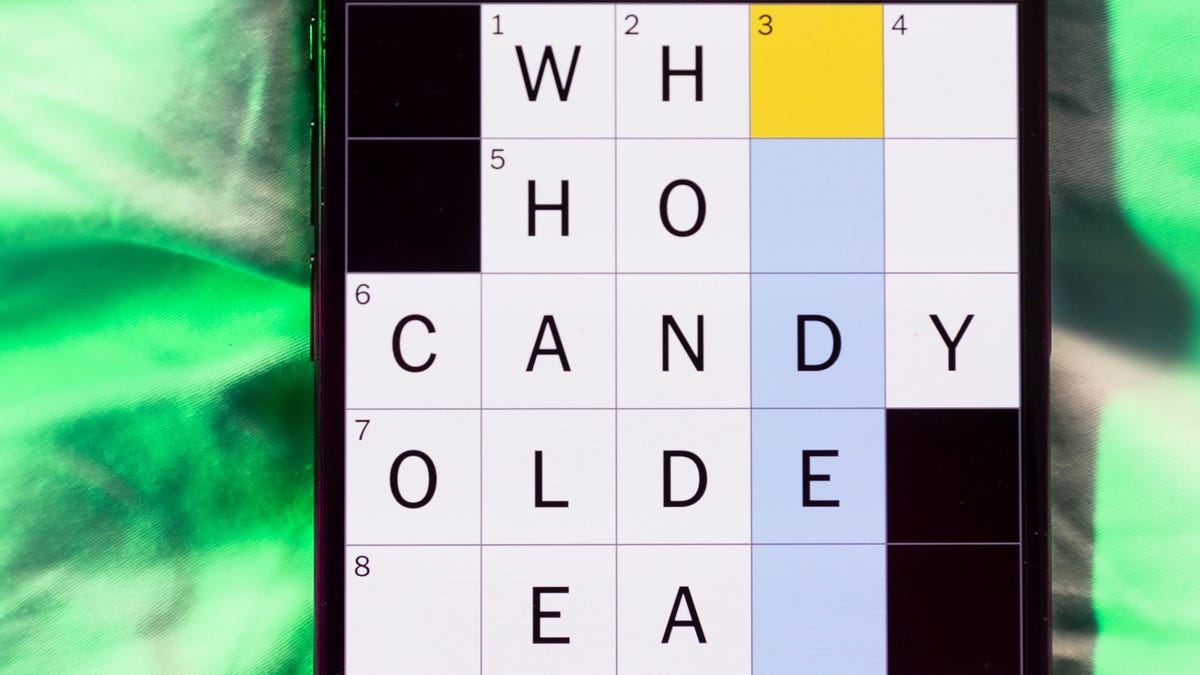
Need some help with today’s Mini Crossword? It’s one of those with absolutely no empty spaces, just a grid of letters, which means if you correctly answer all the Across answers, you’ve solved the Down answers, too. Need help? Read on. And if you could use some hints and guidance for daily solving, check out our Mini Crossword tips.
If you’re looking for today’s Wordle, Connections, Connections: Sports Edition and Strands answers, you can visit CNET’s NYT puzzle hints page.
Read more: Tips and Tricks for Solving The New York Times Mini Crossword
Let’s get to those Mini Crossword clues and answers.
Mini across clues and answers
1A clue: Roomful of students
Answer: CLASS
6A clue: Something to bring in a brown paper bag
Answer: LUNCH
7A clue: __ Harbor, sightseeing area of Baltimore
Answer: INNER
8A clue: Where many Stephen King novels are set
Answer: MAINE
9A clue: Beagle or bulldog
Answer: BREED
Mini down clues and answers
1D clue: Go bouldering, e.g.
Answer: CLIMB
2D clue: ___ New Year
Answer: LUNAR
3D clue: Redhead of musical/movie fame
Answer: ANNIE
4D clue: Something an actor might steal
Answer: SCENE
5D clue: Tear to pieces
Answer: SHRED
-
 Technologies3 года ago
Tech Companies Need to Be Held Accountable for Security, Experts Say
-
 Technologies3 года ago
Best Handheld Game Console in 2023
-
 Technologies3 года ago
Tighten Up Your VR Game With the Best Head Straps for Quest 2
-
 Technologies4 года ago
Verum, Wickr and Threema: next generation secured messengers
-
 Technologies4 года ago
Black Friday 2021: The best deals on TVs, headphones, kitchenware, and more
-
 Technologies4 года ago
Google to require vaccinations as Silicon Valley rethinks return-to-office policies
-
 Technologies4 года ago
Olivia Harlan Dekker for Verum Messenger
-
 Technologies4 года ago
iPhone 13 event: How to watch Apple’s big announcement tomorrow


